

Re-Signing App Binaries Made Easy with Appcircle
In the world of mobile app development, signing app binaries is one of those tasks you don’t think about until you absolutely have to—and then it becomes critical. Whether you’re updating an app, transferring ownership, or fixing an expired certificate, re-signing binaries ensures that your app remains trusted, secure, and ready for distribution.
With Appcircle’s re-signing feature, re-signing iOS and Android binaries has never been easier. Let’s break down why re-signing is so important, when you might need to do it, and how Appcircle streamlines the entire process.
Binary Signing 101: A Quick Refresher
Every mobile app needs to be signed before it can run on a device or be distributed through app stores. This process involves a digital signature that:
- Verifies the app’s authenticity and ensures it hasn’t been tampered with.
- Links the app to the developer or publisher.
- Allows operating systems like iOS and Android to authorize the app for installation.
To sign a binary, you’ll need:
- A certificate, which contains information about the developer or organization.
- A private key, which creates the signature.
When users install your app, their devices check the signature against the certificate. If everything matches, the app is good to go. If not, the app can’t be installed—simple as that.
Why Re-Signing App Binaries is Necessary
Sometimes, your app’s existing signature isn’t enough. Here are a few common scenarios where re-signing becomes essential:
1. Transferring App Ownership
If your app changes hands—whether due to a company acquisition or a developer handoff—it needs to be re-signed with the new owner’s credentials to ensure it aligns with their developer account.
2. Updating Expired or Revoked Certificates
Certificates and provisioning profiles don’t last forever. If a certificate expires or is revoked, the app must be re-signed with a new certificate to maintain functionality.
3. Rebranding or Bundle Identifier Changes
When rebranding an app or creating a localized version for a specific market, changes to the app’s name or bundle identifier require a re-signing process.
4. Beta Testing and Internal Distribution
Distributing builds to QA teams, stakeholders, or beta testers requires specific provisioning profiles and certificates. Re-signing ensures these builds are installable on targeted devices.
How Appcircle Simplifies Re-Signing
Traditionally, re-signing app binaries could be a tedious and error-prone task. But with Appcircle, it’s as easy as a few clicks. Here’s how it works:
Re-Signing iOS Binaries
- Select the Binary
Upload IPA or xcarchive files or choose from your existing binaries in Appcircle’s Test Distribution module.
- Fill in Re-Signing Details
Update the bundle identifier, version number, and any other required details.
- Click “Resign Binary”
Appcircle automatically generates a new signed binary with updated information.
- Distribute Effortlessly
Once signed, the binary is ready for distribution through Appcircle’s Test Distribution module.
Re-Signing Android Binaries
- Select the Binary
Upload APK or AAB files or choose from your existing binaries.
- Choose the Keystore
Select the appropriate keystore for signing the binary.
- Click “Sign Binary”
Appcircle handles the rest, creating a newly signed binary that’s ready for installation or further distribution.
Binary Details and Resign History
Appcircle doesn’t stop at just re-signing binaries. It also provides powerful tools for managing your binaries, including:
- Binary Details: Displays version numbers, build numbers, and signing certificate information.
- Resign History: Tracks every signing process, complete with detailed logs for transparency and troubleshooting.
Benefits of Re-Signing with Appcircle
Appcircle makes re-signing not only possible but also painless. Here’s why developers and app publishers love it:
- Integrated into Test Distribution: Re-signing is built directly into Appcircle’s Test Distribution module, streamlining workflows and eliminating the need for separate tools.
- User-Friendly Interface: Whether you’re a seasoned pro or a newcomer, Appcircle’s intuitive platform makes re-signing binaries quick and straightforward.
- Seamless Binary Management: Features like resign history and centralized credential management ensure your workflows stay organized.
- Cross-Platform Support: Re-sign binaries for both iOS and Android with a consistent, unified process.
- Enhanced Security: Appcircle securely stores your certificates and keystores, ensuring compliance with industry standards.
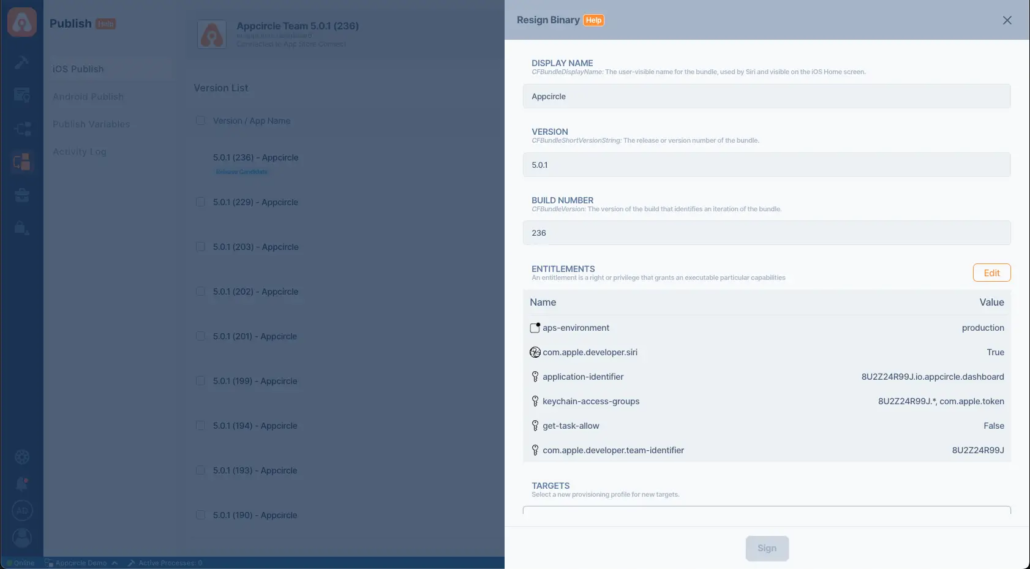
Prepare Binaries for Publishing with Resigning
Appcircle offers a more detailed resigning capability within its Publish module. But what are the advantages of resigning binaries before publishing?
Efficient Management for Large Teams: When working with large teams and multiple applications, you can easily organize different apps under one unified platform.
Seamless Internal and External Testing: Use the resign feature to prepare binaries for final testing before release, ensuring they are ready and functional.
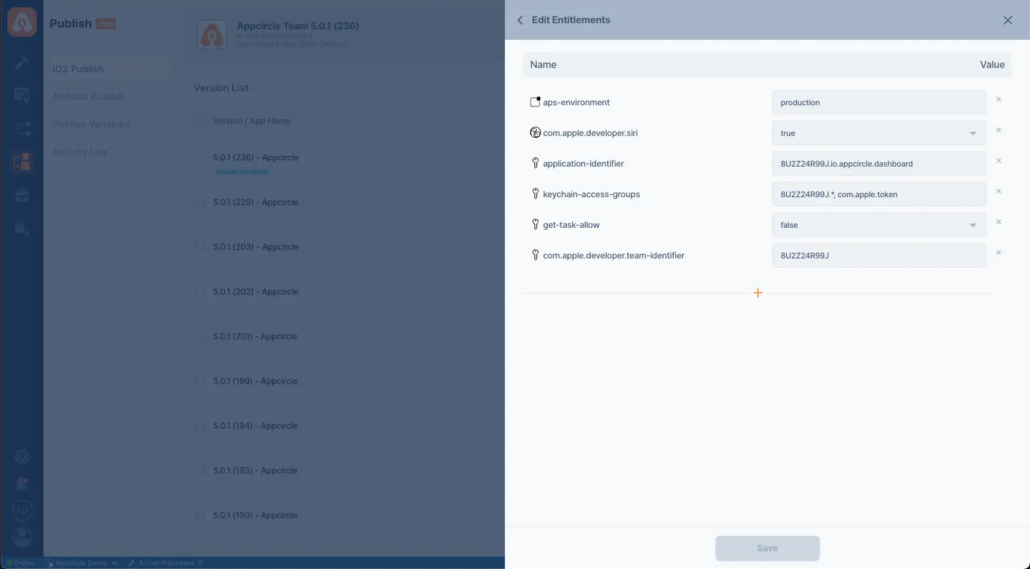
Entitlement Adjustments: Modify binary entitlements to remove invalid entitlements or add new ones, ensuring compatibility and compliance.
Why Re-Signing Matters in the Bigger Picture
Re-signing binaries is more than just a technical requirement—it’s a cornerstone of mobile app security and functionality. Without a valid signature, apps can’t be trusted, installed, or distributed. By streamlining this process, Appcircle helps developers:
- Deliver apps faster, with fewer headaches.
- Maintain user trust by ensuring app authenticity.
- Keep up with ever-changing requirements from app stores and operating systems.
Conclusion: Re-Signing Made Easy with Appcircle
Re-signing binaries used to be a dreaded task, but with Appcircle, it’s now a breeze. Whether you’re transferring ownership, updating an expired certificate, or preparing a build for beta testing, Appcircle’s re-signing tools ensure your app stays secure, functional, and ready for distribution.
Ready to simplify your mobile app development process? Try Appcircle for free and see how easy re-signing can be. Get Started Today!

