
Mobile CI/CD for the AI Age: Meet Appcircle MCP
The Way We Ship Is Changing
The AI age is not coming. It is already here, and it is already reshaping the way software teams work. Developers are offloading coding-heavy tasks to AI coding assistants, writing features in hours that used to take days. Engineering managers are using AI agents to surface blockers, generate reports, and make sense of release cycles without digging through dashboards. DevOps teams are automating pipeline decisions that once required deep manual intervention. Even executives are asking AI tools for product insights.
Every layer of the software organization is being touched by AI, and the teams that adapt fastest are already pulling ahead.
So here is the question nobody in mobile development should ignore: if everything around mobile CI/CD is becoming AI-native, why should your mobile delivery pipeline stay stuck in the dashboard era?
It should not. And now it does not have to.
Your mobile CI/CD pipeline just joined the conversation. Meet the Appcircle MCP Server.
What Is an MCP Server?
If you are new to MCP, here is everything you need to know.
Model Context Protocol (MCP) is an open standard that defines how AI agents connect to external tools and services. Introduced by Anthropic, MCP was created to solve a simple but important problem: AI agents are powerful, but without a standard way to interact with real systems, they are limited to what they already know. MCP gives them a structured, secure, and consistent way to reach out, ask questions, and take actions inside the tools your team already uses.
Think of MCP like a USB-C port for AI applications. Just as USB-C provides a standardized way to connect your devices without worrying about compatibility, Model Context Protocol provides a standardized way to connect AI applications to external systems, without building custom integrations every time. One standard. Endless possibilities.
An MCP server is the component that makes this possible on the tool side. It exposes a defined set of capabilities, data access points, and actions, so that any MCP-compatible AI agent, like Claude, Cursor, or Copilot, can discover and use them immediately. No custom integration. No extra code. Just a standard protocol connecting intelligent agents to real workflows.
Meet the Appcircle MCP Server
The Appcircle MCP Server is the direct connection between your AI agent and everything happening inside your Appcircle account. Think of it as giving your AI agent a full view of your mobile CI/CD pipeline, instead of switching between browser tabs, dashboards, and documentation, you simply ask.
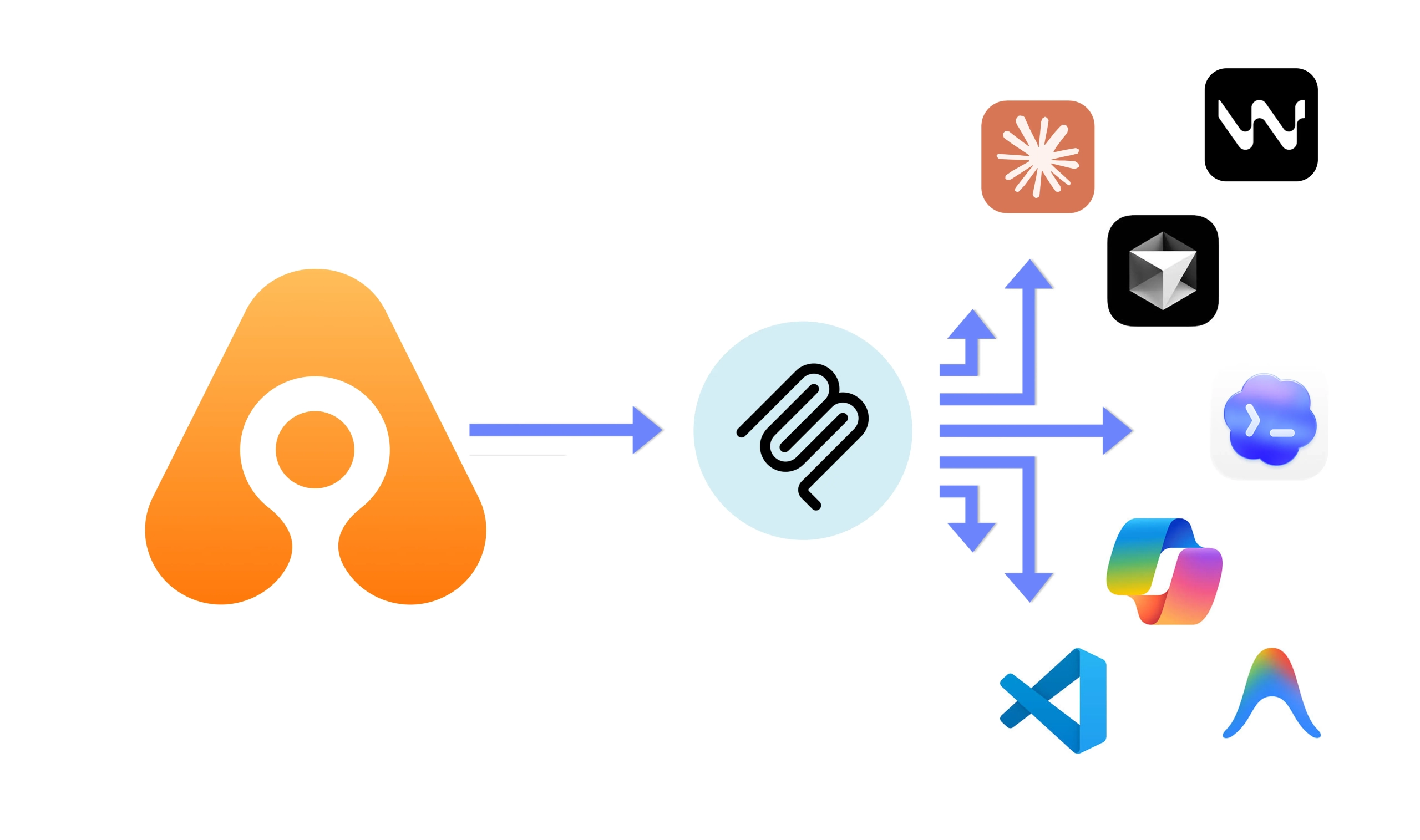
With the Appcircle MCP Server connected to your AI agent of choice, you can have a real conversation with your mobile delivery pipeline:
- Check the status of your build profiles and configurations
- Browse your distribution profiles and list previously distributed test versions
- Query your signing certificates and provisioning profiles and their expiration dates
- Pull reports filtered by platform, date, or any criteria you need
- Inspect your publish profiles for iOS and Android and track where each release stands
- Explore your Enterprise App Store profiles and app versions
All of this, without ever leaving your development environment. The result is a faster and more focused way to work. Just you, your AI agent, and your entire Appcircle account, ready to answer.
A Day in the Life with Appcircle MCP
Every scenario below represents a moment in a typical mobile engineering or release day. Normally you would open three tabs, dig through build logs, and manually piece together what went wrong or what needs attention. With Appcircle AI, that same process becomes a conversation.
AREA | USE CASE | THE QUESTION YOU ASK | WHAT YOU GET BACK |
DEBUGGING | One pipeline passes, the other fails. Why? | Pull both profiles’ configurations and workflow steps and compare them side by side. | A structured diff of signing identities, environment variables, and workflow steps, highlighting exactly what differs between the two. |
GOVERNANCE | Are any profiles skipping critical steps? | Scan all workflows across all profiles and flag any missing unit tests, linting, or signing steps. | A list of profiles whose workflows are missing expected steps, so nothing silently drops off the CI checklist. |
REPORTING | Which profiles have the worst failure rates this month? | Pull build history for a date range and rank profiles by failure rate, duration, and most common failure points. | A ranked breakdown ready for sprint retrospectives, with no manual log parsing required. |
DEBUGGING | Builds were green Monday, red Wednesday. What changed? | Pull commits for the branch and cross-reference timestamps with build history to correlate the first failure with a specific commit. | The likely culprit commit with its message, author, and associated build outcome, without manually matching hashes to logs. |
CI RELIABILITY | Are any commits slipping through without triggering a build? | Compare commit history against build history for a branch and surface commits that never triggered a pipeline run. | A list of commits with no corresponding build, closing a visibility gap that is otherwise invisible in the UI. |
RISK PREVENTION | Are any certs or provisioning profiles about to expire? | Cross-reference provisioning profiles, certificates, and the signing report to surface anything expiring soon or already mismatched. | A prioritised list of at-risk signing identities before they cause a production build failure. |
INCIDENT ANALYSIS | Signing failures spiked last sprint. Is it one app or systemic? | Pull all failed signing builds for a window and group them by app, profile, and OS. | A clear answer on whether the problem is isolated to one certificate or spread across the org. |
HYGIENE | Do any bundle IDs have conflicting provisioning profiles? | List all provisioning profiles, group by bundle ID, and flag any that have more than one registered. | A list of bundle IDs with overlapping profiles, a common hidden cause of intermittent signing failures. |
QA OPS | Which builds have been sitting undistributed for over two weeks? | Pull all distribution profiles and their app version lists, then filter for versions not sent to any testers within a time window. | A list of forgotten builds so nothing slips past QA unnoticed. |
REPORTING | Is Android getting less QA attention than iOS? | Compare distribution send activity across both platforms for a given period, including profiles with zero activity. | Concrete platform-by-platform data for a conversation that otherwise relies on gut feel. |
COMPLIANCE | Which internal apps have not been updated in 60 days? | Pull all enterprise store profiles and check each one’s latest app version date against a threshold. | A flagged list of stale internal apps before field teams start complaining about outdated tools. |
UNBLOCKING | Which App Store submissions are frozen right now? | Pull all publish profiles filtered by Waiting or AwaitingResponse status in one query. | An instant view of every stalled submission, with no clicking through each profile individually. |
RELEASE OPS | Are we publishing to both stores, or only one? | Compare iOS and Android publish profiles side by side and flag any apps succeeding on one platform but failing or absent on the other. | Asymmetric releases caught before users notice, with a per-app summary of publish status on each platform. |


The Tools Under the Hood
The Appcircle MCP Server exposes a set of tools that give your AI assistant read access to the data it needs to reason across your entire mobile CI/CD pipeline. You do not interact with these tools directly. They run in the background when you ask a question, pulling exactly what is relevant and nothing more.
At a high level, the tools cover six areas of your pipeline:
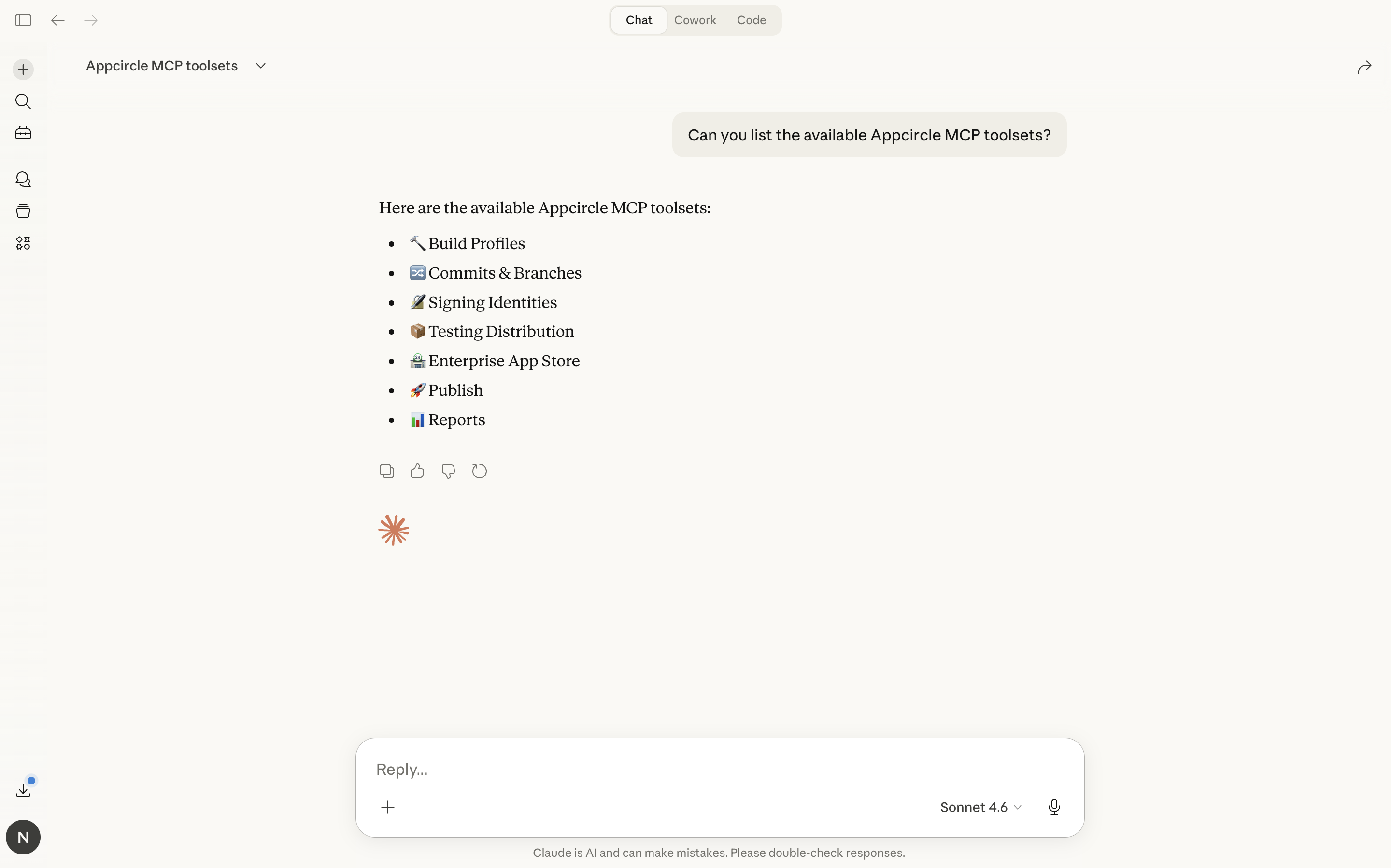
Build profiles, workflows, and commits: access to your build profiles, their configurations, and the individual workflow definitions attached to each one, plus commit-level data for tracing changes back to specific builds.
Signing identities: provisioning profiles, certificates, and keystore metadata across iOS and Android.
Testing distribution: distribution profiles and app versions for tracking what has been shared with testers.
Enterprise App Store: enterprise store profiles and the app versions published within them.
Publish to Stores: publish profiles for both platforms, including current submission statuses and version history.
History and reports: build history, signing reports, distribution and publish activity reports, all filterable by date range, platform, and profile. This gives your AI agent the ability to reason across time, not just the current snapshot.
What AI-Powered Mobile CI/CD Looks Like in Practice
These are real conversations with a real Appcircle account. No dashboards, no manual report generation, just plain questions and instant answers.
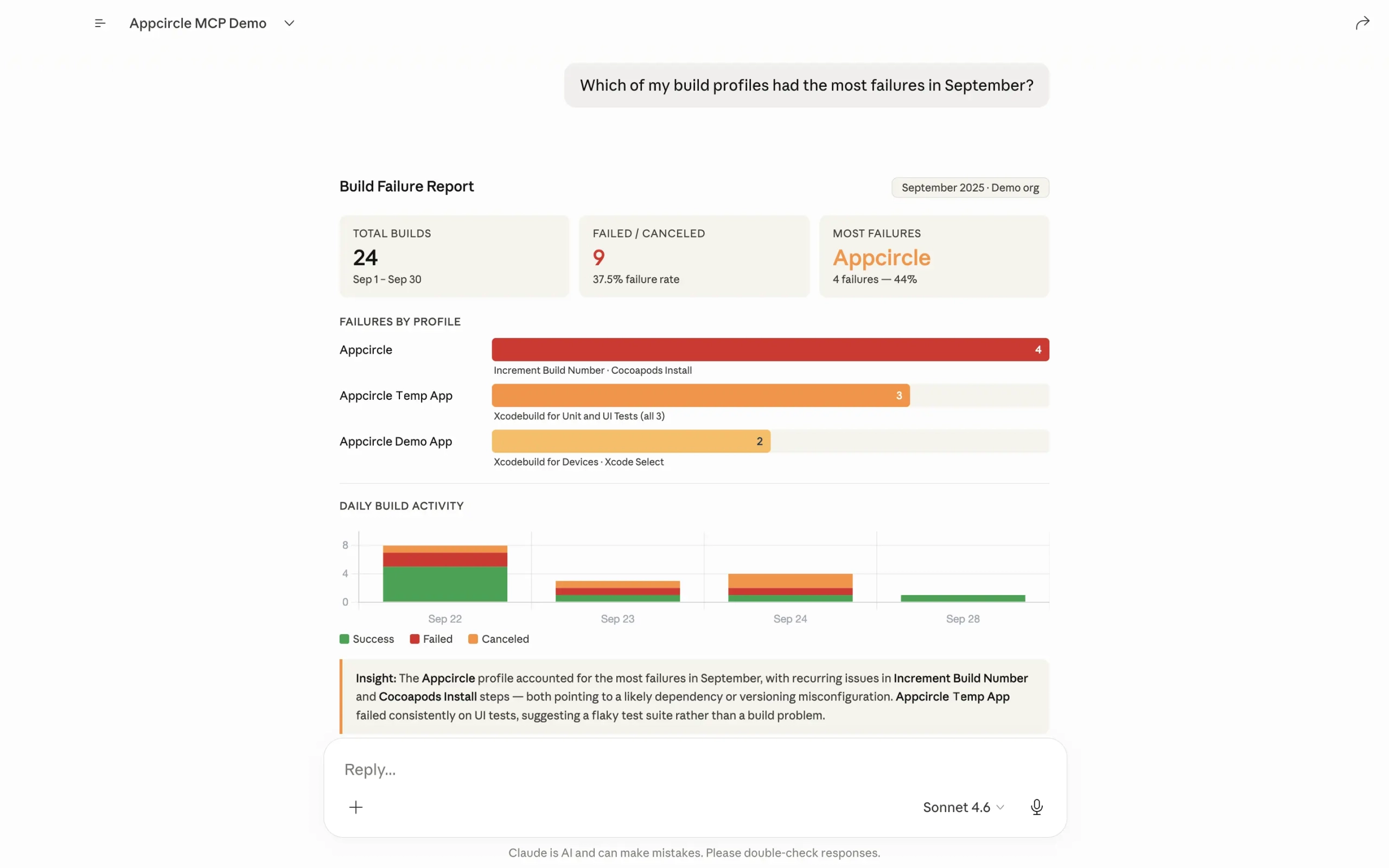
Build Failure Report
Ask which profiles are failing most and get a ranked breakdown with failure rates, affected steps, and daily build activity. One question, no log digging required.
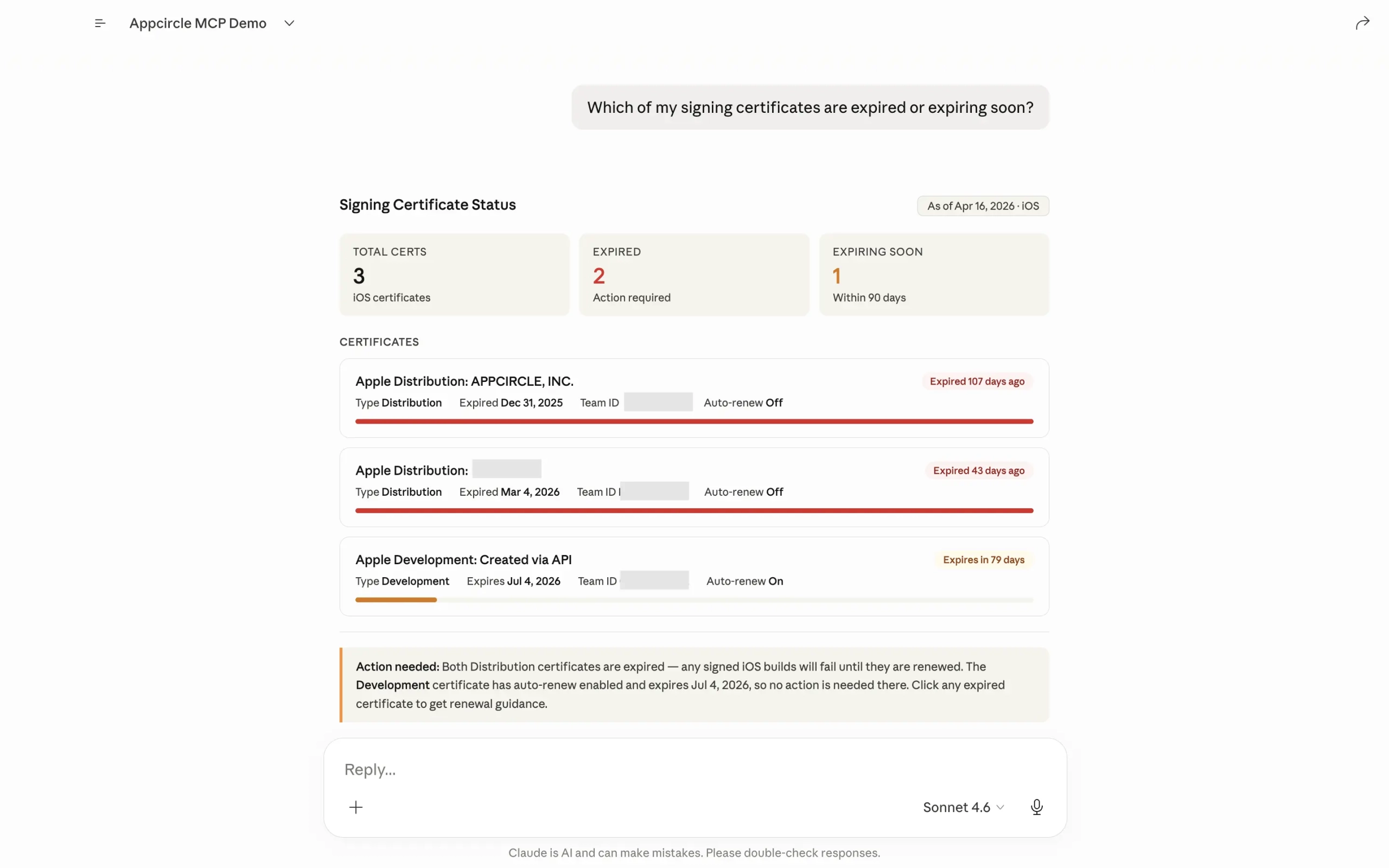
Certificate Audit
Expired certificates can silently break your iOS builds. One question surfaces every certificate’s status, what has already expired, what is expiring soon, and what needs action.
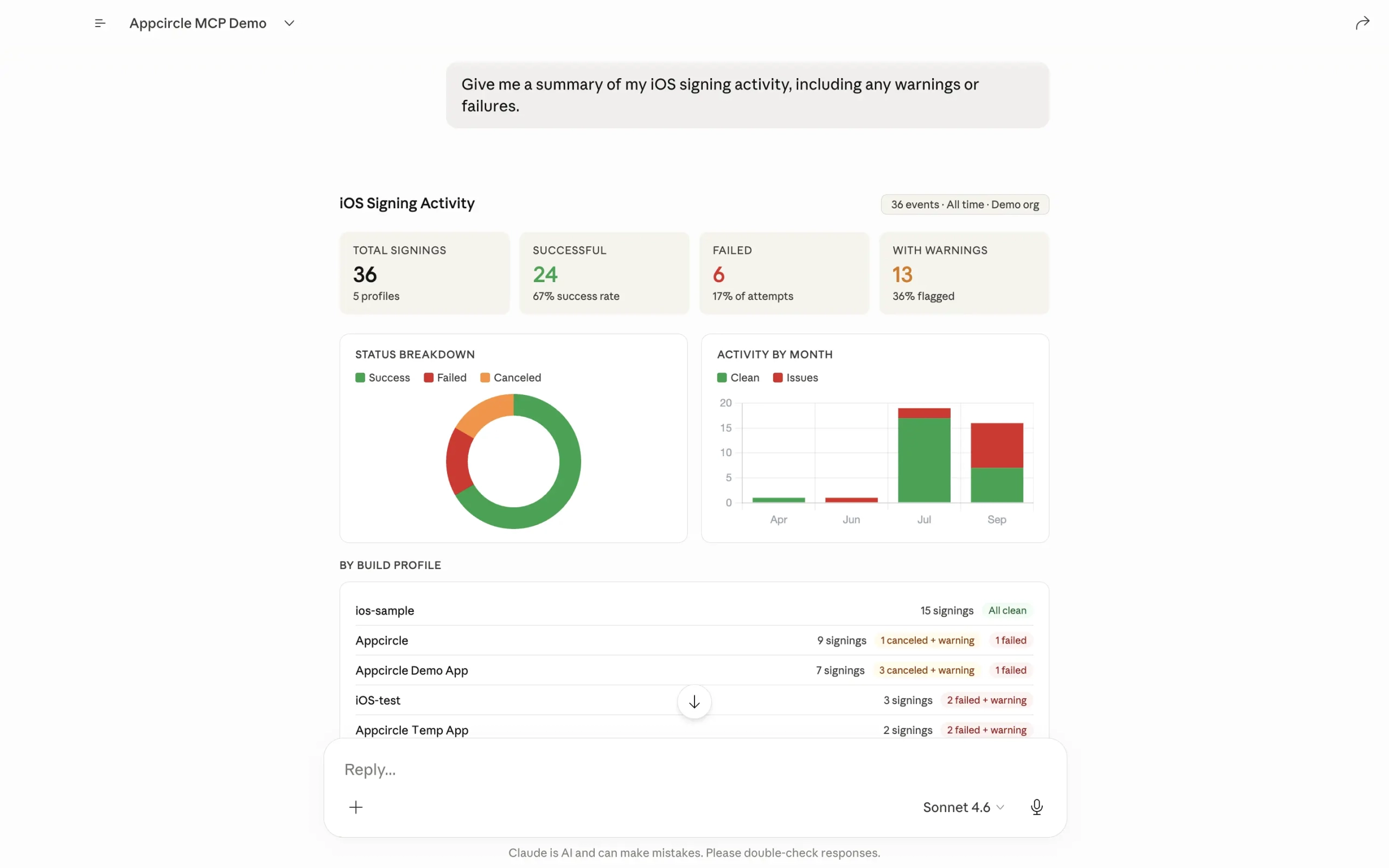
iOS Signing Activity
A full picture of signing health across all your profiles: success rates, warning patterns, and a month-by-month activity breakdown, without opening a single report manually.
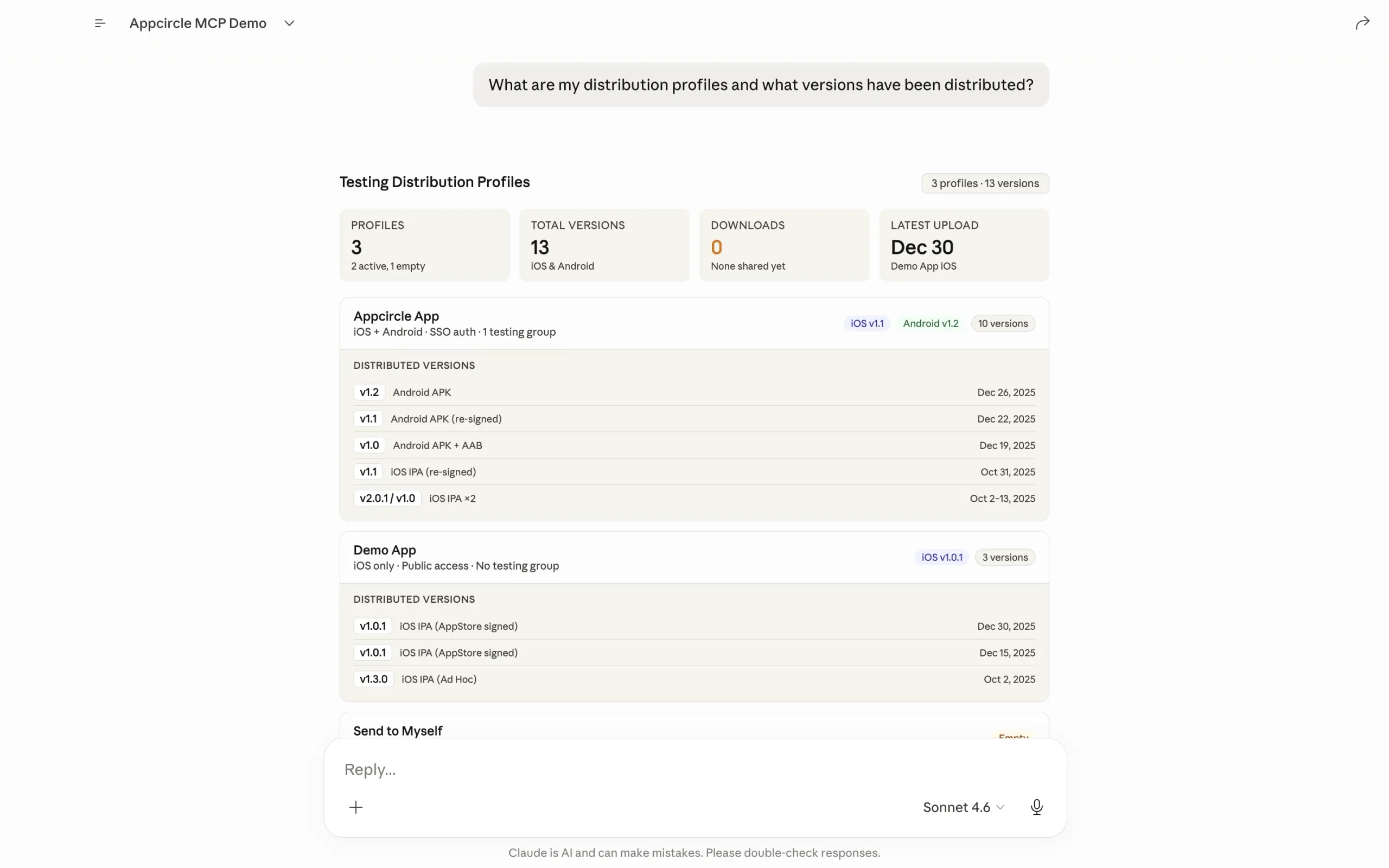
Testing Distribution Summary
See exactly what has been distributed, across which profiles, and when. Version history, authentication types, and platform details all in a single response.
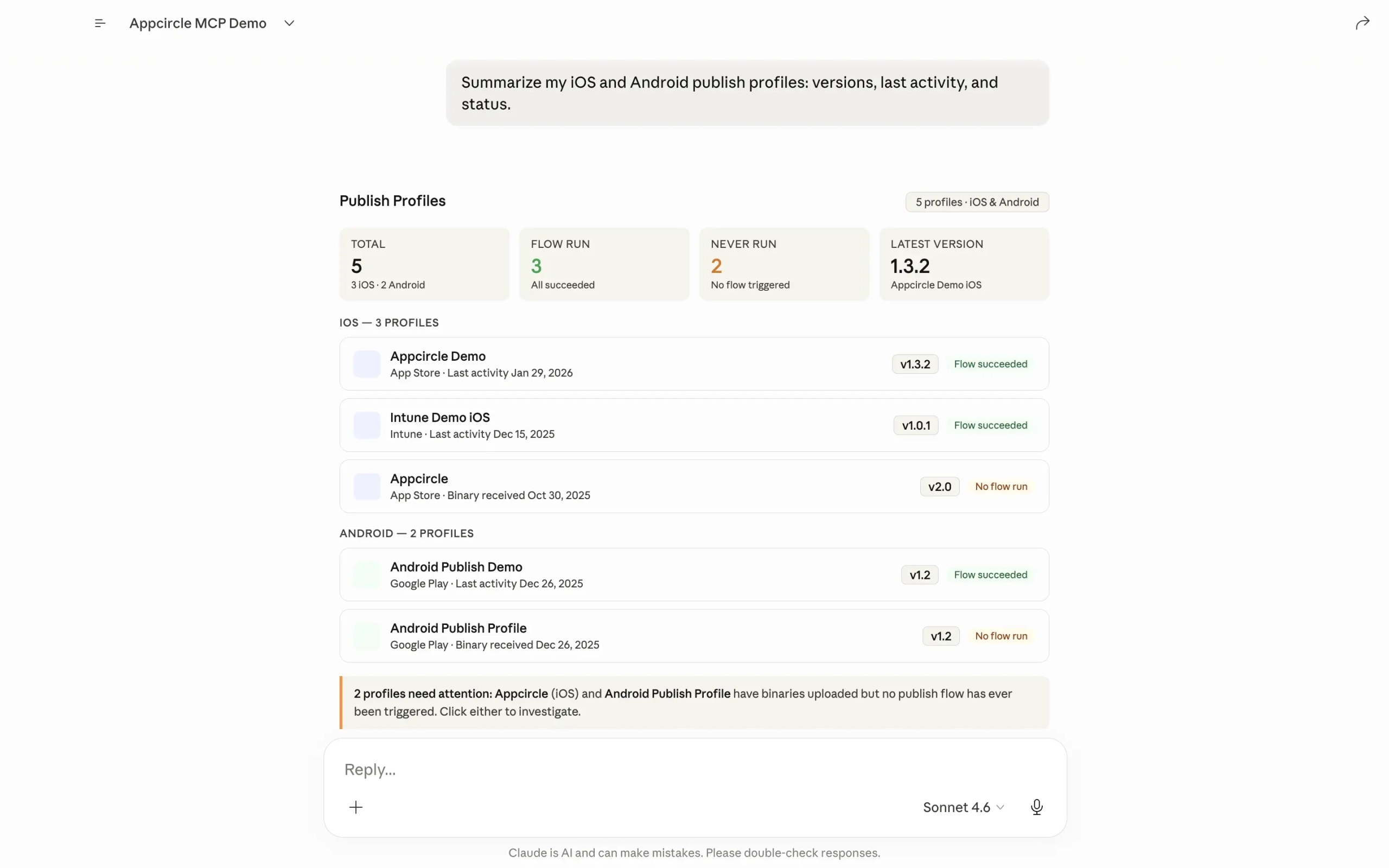
Publish Profile Overview
Every iOS and Android publish profile in one view. Current versions, last activity, flow status, and which profiles have binaries sitting there with no publish flow triggered yet.
Getting Started in Minutes
You do not need to rebuild your workflow to get started. The Appcircle MCP Server plugs into the AI tools your team already uses. Here is how to get up and running:
1. Log in to your Appcircle account, or sign up if you are new.
2. Generate an access token.
- Use a Personal Access Key for individual use
- Or an API key for team and integration setups
3. Follow the installation guide to connect the MCP to your AI assistant of choice:
4. Start asking questions about your pipelines.
That is it. No custom integration, no extra code, no new tooling to learn. Just a few minutes and you are ready to go.
What’s Next
The use cases in this post are just a starting point. The Appcircle MCP Server is built to grow, and new tools are already in the pipeline. As mobile CI/CD workflows evolve, so will the ways your AI agent can interact with them, from deeper automation to richer cross-pipeline reasoning that goes even further than what you have seen here.
If there is a specific workflow you want to automate, a question you wish you could just ask, or a tool you think should exist, we want to hear from you. The best ideas for what comes next will come from the teams using it every day.
FAQs
1. Is Appcircle MCP open source?
Yes. MCP is an open standard, and the reference implementations, SDKs, and specification are all open source, as is the Appcircle MCP Server. You can access the codebase and run the server locally.
2. Is the Appcircle MCP Server free to use?
Yes. The Appcircle MCP Server is available to all Appcircle users. However, usage is subject to your account’s plan limits. For example, if your plan includes 50 builds, a maximum of 50 builds can be triggered through MCP.
3. Which AI assistants and tools does the Appcircle MCP Server support?
The Appcircle MCP Server works with any MCP-compatible AI client. Currently supported tools include Claude Desktop, Claude Code, Cursor IDE, Windsurf IDE, VS Code with GitHub Copilot, Codex (App and CLI), Gemini CLI, and GitHub Copilot CLI. Because MCP is an open standard, support is expanding rapidly across the AI tooling ecosystem. If your tool supports MCP, it will work with Appcircle.
4. What kind of data can the Appcircle MCP Server access?
The Appcircle MCP Server gives your AI agent read access to your build profiles, workflow configurations, commit history, signing identities (certificates and provisioning profiles), testing distribution profiles, Enterprise App Store content, publish profiles, and historical reports including build history, signing reports, and distribution activity etc. Access is scoped to your Appcircle account and authenticated via your personal access token or API key. No data is shared outside of your account.
5. Do I need to change my existing Appcircle setup to use the MCP Server?
No. The Appcircle MCP Server connects on top of your existing setup and reads from the same data your Appcircle dashboard already shows. There is no migration, no pipeline changes, and no new infrastructure to manage. You generate an access token, follow the installation guide for your AI tool, and start asking questions. Your existing builds, profiles, and workflows remain completely unchanged.

