Continuous Integration for React Native
Continuous Integration for React Native
Continuous Integration for React Native automates the process of building, testing, and deploying mobile applications, ensuring code quality and accelerating development cycles across both iOS and Android platforms.
Understanding the Role of Testing Types in Continuous
What is Static Testing in React Native?
Static analysis is the process of examining code without executing it to detect syntax errors, code smells, and potential bugs. It is important because it provides a quick way to enforce coding standards and maintain consistency, allowing developers to catch issues early in the development process before they escalate into larger bugs. Tools like ESLint and Flow can be integrated into the CI pipeline to ensure code quality from the start.
What is Unit Testing in React Native?
Unit tests in React Native focus on individual components or functions in isolation, ensuring that each component behaves correctly on its own within the mobile app. For example, testing a Button component to verify that it renders correctly and triggers an onPress event when clicked can be done using Jest and React Native Testing Library. This allows developers to ensure that the button behaves as expected without needing to test the entire app’s functionality.
What is Integration Testing in React Native?
Integration testing verifies how different units of the application work together. This type of testing is essential for ensuring that separate components function properly when combined. Including integration tests in the CI pipeline helps teams identify interface-level issues before they can lead to larger integration problems in production.
What is UI Testing in React Native?
UI testing simulates real-world user scenarios to verify the app’s functionality from the user’s perspective. It is important because it provides a comprehensive view of the app’s performance and ensures that every change is tested in a real-world context. Incorporating UI tests into the CI pipeline minimizes the risk of bugs reaching production, ensuring a smooth user experience.
Introduction to Continuous Integration (CI) for React Native
Continuous Integration (CI) is a software development practice that automates the building, testing, and deployment of applications. In React Native, CI is particularly beneficial due to the complexity of building apps for multiple platforms (iOS and Android) simultaneously.
CI tools like Appcircle allow developers to automatically trigger builds and tests when code is pushed to the repository, reducing manual effort and catching errors early. By incorporating unit tests and UI tests, CI ensures that code changes don’t introduce regressions or break functionality.
The Importance of Continuous Integration in React Native Projects
React Native development can be complex due to the need to maintain both iOS and Android apps from a single codebase. Continuous Integration simplifies this process by automating the testing and deployment steps, ensuring that your code is consistently verified across both platforms.
- Automated Testing: CI ensures that unit tests and UI tests (such as Detox tests) are executed on every code change, helping maintain code quality and stability.
- Faster Development Cycles: With CI, the time between code changes and releases is reduced, allowing faster deployment of updates and features.
- Error Prevention: By automatically running tests, CI catches issues early in the development process, preventing costly bugs from reaching production.
How to Run Tests and Analyze Results on Appcircle
Appcircle has developed a workflow step specifically for running unit tests and UI tests (using Detox) for React Native projects. This step is integrated into the CI pipeline, making it easy to automatically run tests as part of your development workflow.


Running Tests on Appcircle:
- Configuring the Workflow: Set up your project by choosing the “React Native UI Test” or “React Native Unit Test” workflow component. Ensure your
.detoxrc.jstest files and yours are configured correctly. - Triggering the Tests: Once the workflow is set up, push code changes and run your workflow.
- Test Execution: Monitor the progress of the tests in the Appcircle dashboard, where you can view live logs of both unit and UI test execution.
Analyzing Test Results:
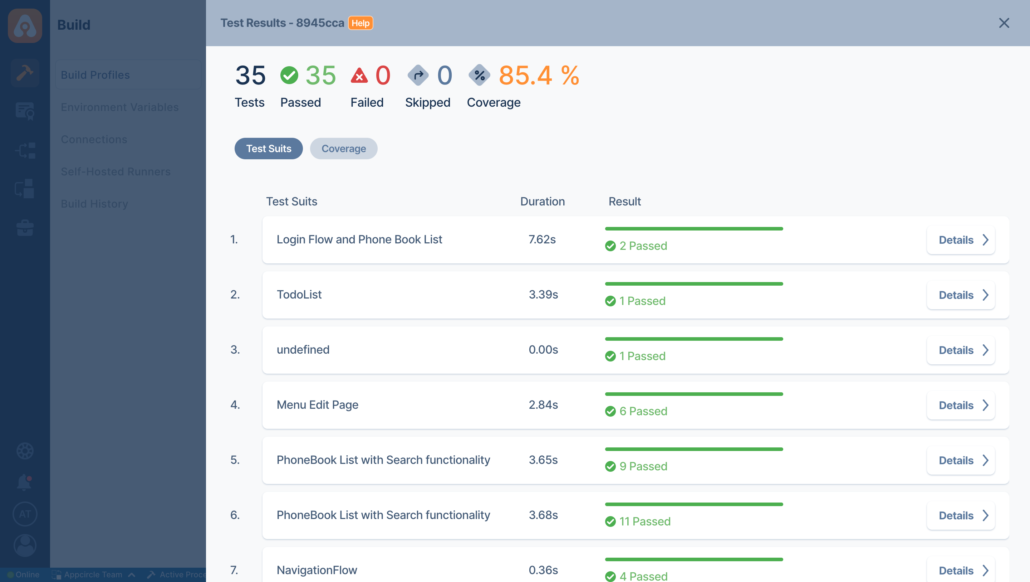
- Viewing Reports: After the tests run, Appcircle provides detailed test reports, including pass/fail status.
- Interpreting Detox UI Test Logs: Detox provides UI interaction logs, which are especially useful for tracking down user interaction issues across devices. In addition, you will see the screenshots of every test attached as “test_attachments” to download artifacts.
- Improving Feedback Loops: By incorporating Appcircle’s CI workflow, developers receive immediate feedback on their code changes, speeding up the development and bug-fixing process.