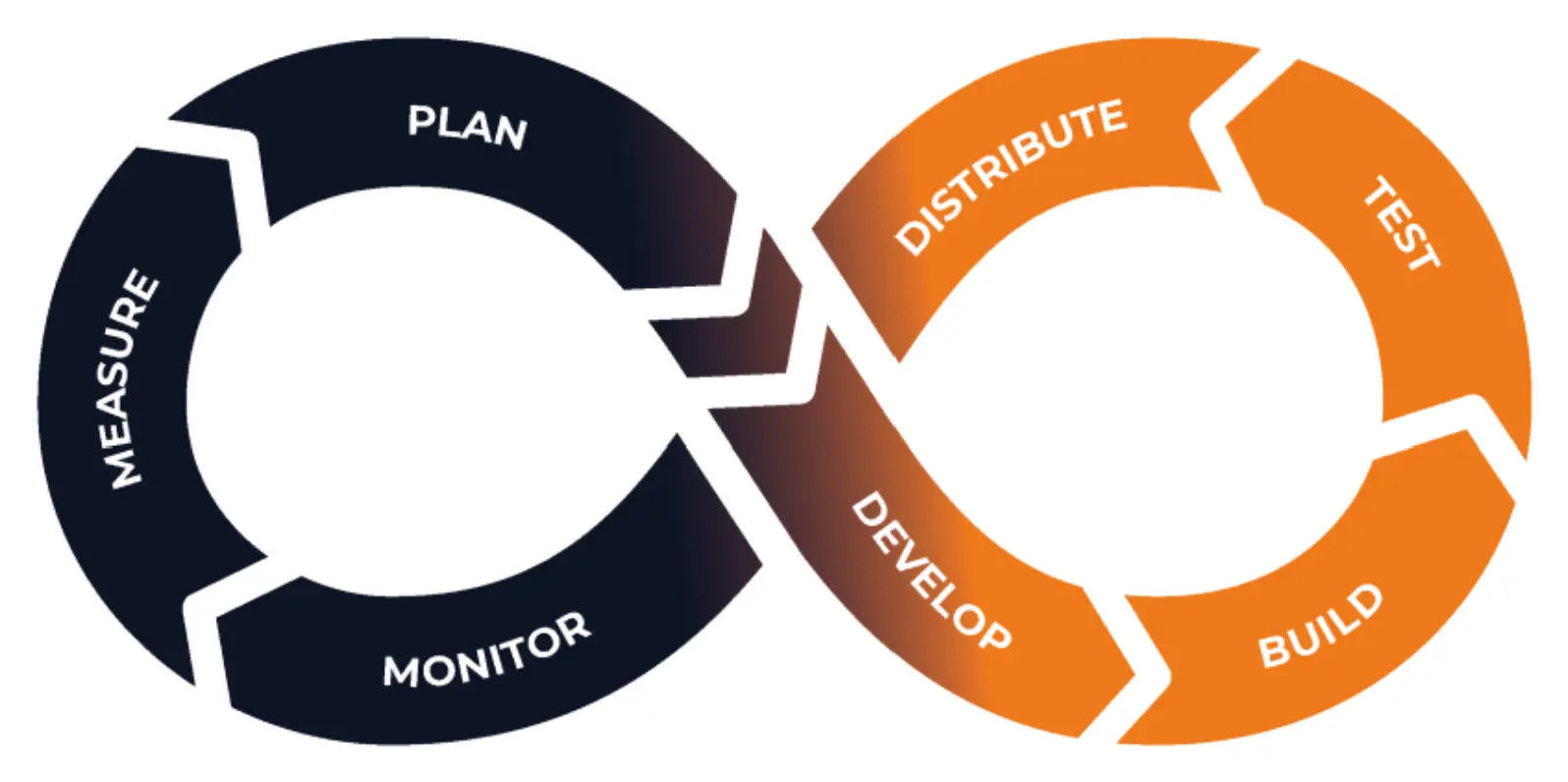
mobile cicd

What is CI/CD and Why CI/CD is a Must-Have for Mobile App Development?

As backend systems increasingly migrate to cloud-native setups and mobile apps become the standard for user interaction, continuous integration (CI) and continuous delivery (CD) are transforming software development workflows of all kinds. In mobile app development, the impact of CI/CD is particularly powerful, helping teams deliver better apps, faster. Let’s start by unpacking what CI/CD is and why it’s a game-changer for mobile developers.

The Basics: What is CI/CD

CI/CD

CI/CD stands for continuous integration and continuous delivery (or continuous deployment). This DevOps practice eliminates manual hand‑offs by automating the build, test and deployment steps whenever new code is pushed to a shared repository. Instead of waiting for a scheduled release day, every change is validated and packaged immediately so that features and fixes flow smoothly from development to users.
Beyond automation, CI/CD offers strategic benefits. Frequent, automated releases reduce downtime, uncover issues earlier and create rapid feedback loops. This approach speeds up feature delivery, improves code quality and enhances the user experience. In a typical pipeline, continuous integration merges and tests new code, while continuous delivery handles packaging, releasing and deploying that code. Together, these practices create a seamless process that reliably gets updates into the hands of users.

What is Continuous Integration (CI)?

Continuous integration is a development practice where developers merge code changes into a central branch early and often, triggering automated builds and tests. Each commit to the main branch is automatically compiled and checked through static analysis, unit tests and other quality gates. A build server integrates the code into the main branch and produces a new build artifact. By integrating frequently, teams avoid long‑lived feature branches and minimise conflict, making it easier to fix problems while they’re still small.
Effective CI pipelines share several common characteristics:
  • Frequent commits to a shared repository: Developers push small, incremental changes to the main branch rather than maintaining long‑lived branches.
  • Automated builds and tests: Every commit triggers scripts that compile the code and run unit, integration and regression tests, along with static analysis, to ensure quality and security.
  • Quick feedback and visibility: Developers receive rapid feedback on build status, and version control makes it easy for everyone to see what has changed.
  • Incremental improvements: Small, frequent iterations make rollbacks simpler and reduce the risk of large, conflicting merges.
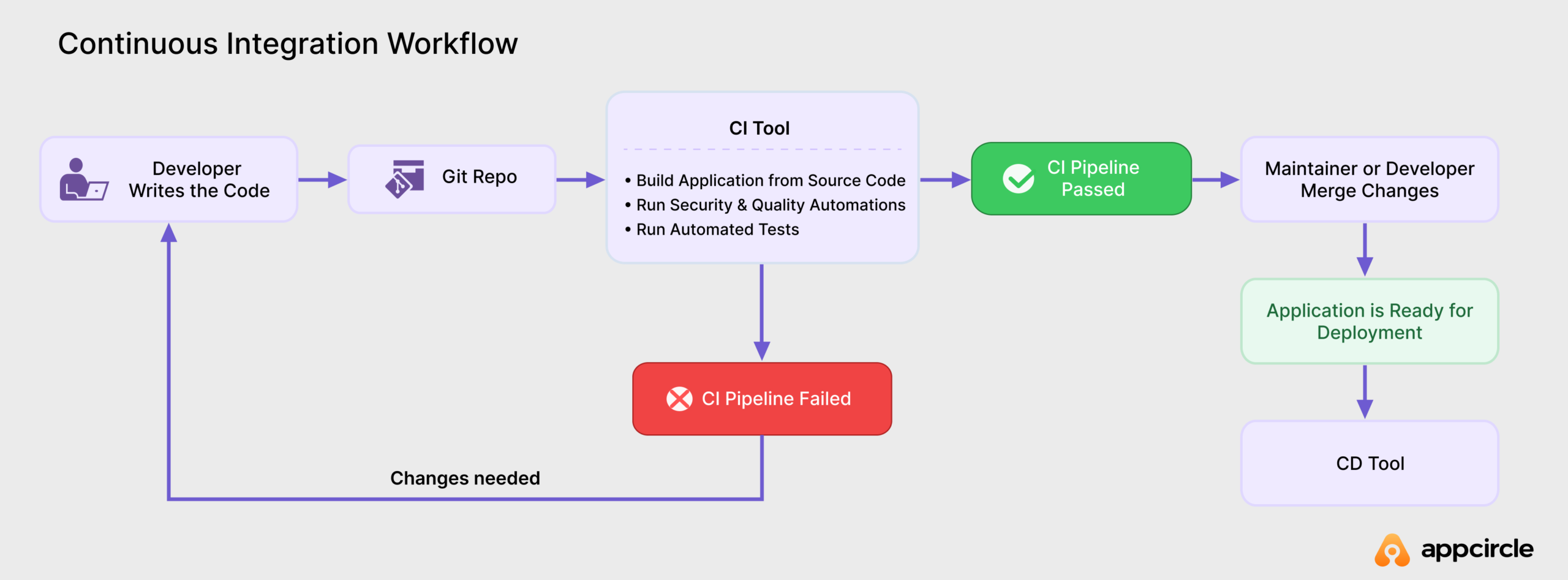
Continuous integration workflow

By adopting CI, teams reduce the gap between writing code and validating it. Automated tests catch errors early and help keep the main branch stable. Continuous integration also encourages collaboration, since everyone can see and respond to issues promptly. Streamlining repetitive tasks like building and testing saves development time, freeing the team to focus on new features and quality improvements.

What is Continuous Delivery (CD)?

Continuous delivery is the practice of automatically preparing and packaging tested code so it’s always ready for deployment to any environment. After the CI pipeline has built and tested the code, CD automates the remaining steps: assembling deployment artifacts, provisioning environments and managing releases. The goal is to make software deployable on demand, whether deployment happens automatically or after a manual decision.
Key aspects of continuous delivery include:
  • Automated release packaging: Builds are assembled with the correct configurations and dependencies, so the resulting artifact behaves the same in testing and production.
  • Environment provisioning and deployment: Tested builds are automatically deployed to staging or test environments. The same process can deploy to production, either automatically or after a manual approval, enabling frequent, predictable releases.
  • Release management and gating: Manual gates can be inserted at critical points to allow stakeholders to decide when to promote a release to production.
  • Integration with continuous deployment: When deployments happen automatically without manual gates, the process is known as continuous deployment. CD lays the groundwork for this by ensuring every build is fully deployable.
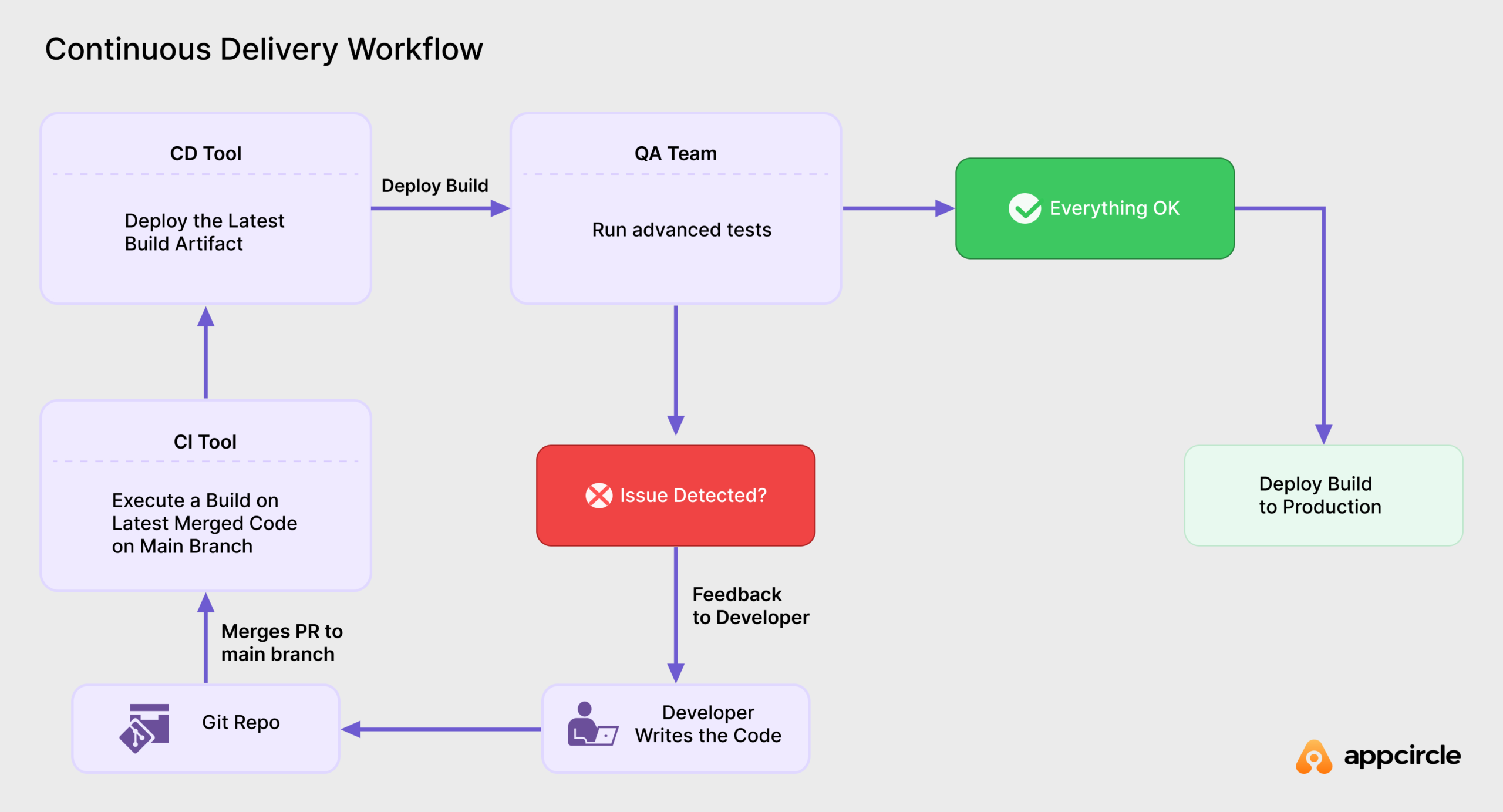
Continuous Delivery workflow

Continuous delivery reduces the risk and stress of traditional releases. By keeping application artifacts and environments consistent across development, staging and production, CD enables predictable, low‑risk updates. Teams can deliver new features and fixes quickly and respond to feedback almost in real time. Automating everything from environment setup to deployment lets developers and operators focus on improving the product instead of managing releases.

How CI/CD Tackles Common Mobile Development Challenges

Mobile app development presents unique challenges, such as platform-specific requirements, frequent OS updates, and consistent, reliable testing. Here’s how CI/CD helps teams overcome these hurdles:

Encouraging frequent commits and collaboration:

CI/CD promotes frequent and smaller code commits, ensuring developers remain synchronized. This practice reduces conflicts, streamlines collaboration, and enhances overall development efficiency by up to 30%.

Minimizing manual errors:

By automating the build and deployment processes, CI/CD significantly reduces manual intervention. This automation improves software quality and decreases the likelihood of bugs reaching production environments.

Time-consuming builds for large apps:

CI/CD platforms leverage cloud-based agents to handle build processes, freeing local developer resources. This approach significantly speeds up build times, especially crucial for larger, more complex mobile applications.

Staying current with OS and framework updates:

Given the rapid pace of mobile OS updates, CI CD platforms maintain up-to-date environments, automatically addressing compatibility issues. Developers can thus focus more on innovation rather than managing environment changes.

Simplifying complex code signing:

Mobile applications, particularly on iOS, require strict code signing practices. CI/CD platforms automate and streamline these requirements, ensuring secure, compliant builds without burdening developers.

Managing multiple build artifacts across the app lifecycle:

CI/CD tools organize and store build artifacts for every stage, making it easy to track and access each version from a central location. Given these common challenges, a dedicated mobile CI/CD platform like Appcircle can greatly simplify workflows and increase productivity across the team.

Automating testing:

CI/CD integrates automated testing at every stage of development, making it easy to catch issues early and often. By setting up workflows that include unit tests, integration tests, and UI tests, teams ensure that every new code change is thoroughly vetted. Automated testing not only increases reliability but also saves considerable time, as tests run without manual intervention and provide immediate feedback on potential issues.

Seamless Distribution of App Binaries:

CI/CD simplifies the distribution of builds to testers and internal users, making it easy to share new versions with the team as soon as they’re ready. Automated distribution workflows let developers deploy new builds to specific groups (e.g., QA, stakeholders) and provide them with direct access to test versions of the app. This streamlined distribution process keeps everyone in the loop, enabling faster testing cycles and quicker feedback.

Automating App Store Publishing:

Publishing apps to the App Store or Google Play often involves many repetitive tasks, from generating release notes to setting up metadata. CI/CD automates app store submissions, handling everything from signing and versioning to uploading builds and setting up release notes. Automating this process not only reduces errors but also ensures that each release is consistent and timely, helping teams get updates to users faster and with less hassle.
Left Icon

Tired of These Mobile Development Challenges?

Right Icon See How Appcircle Can Simplify Your Pipeline

Why Mobile Teams Need Continuous Integration
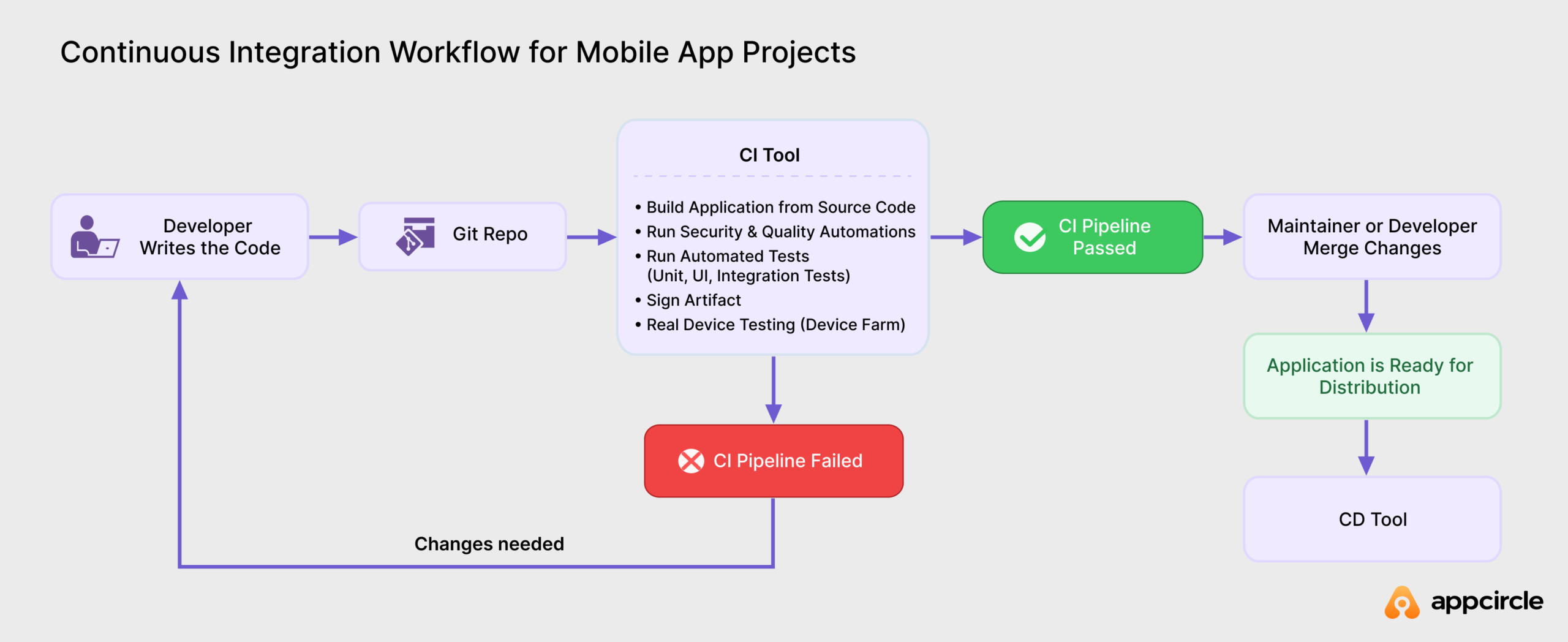
Continuous Integration (CI) is more than just using a shared code repository. It’s about building a disciplined development culture. With CI, developers make frequent code updates, reducing the risk of big, hard-to-manage changes and encouraging collaboration.
CI’s automated builds and testing workflows are particularly useful for mobile development, where platform-specific requirements add complexity. For instance, building apps for iOS and Android often involves distinct processes, even if the codebase is shared. With CI, these builds can be automated to ensure faster testing, quicker bug fixes, and seamless platform-specific updates.
Continuous integration workflow for mobile

Why Continuous Delivery is Key to Mobile App Success
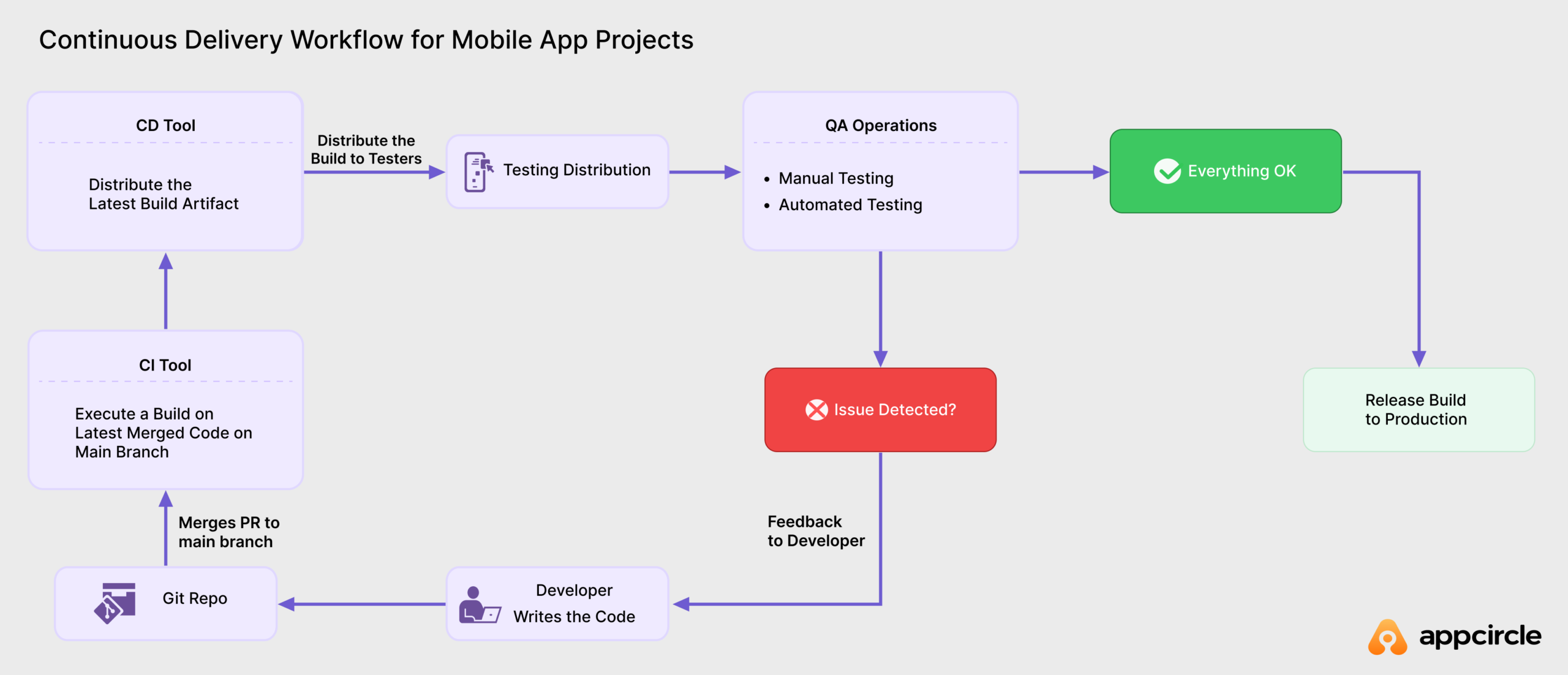
Continuous Delivery (CD) goes beyond simple distribution; it automates the entire release process. This consistency eliminates bottlenecks and ensures every update is reliable.
By automating critical steps like binary distribution, and app store publishing, CD enables fast, streamlined releases. Teams can automatically distribute new builds to testers and internal stakeholders, keeping everyone up-to-date and enabling quick feedback cycles.
Additionally, CD manages the intricate code signing process, particularly for iOS, where distribution methods require specific signatures. This helps avoid errors and saves time. With app store publishing integrated into the pipeline, every new release is prepared, signed, and uploaded consistently, reducing friction and bringing updates to users faster.
Continuous Delivery workflow for mobile

The Ultimate Checklist for Choosing Your Mobile CI/CD Tool

chose ci-cd platform

The mobile CI/CD landscape offers many options, but not all tools are created equal. While general-purpose CI/CD platforms can manage basic automation, mobile development brings unique challenges that require specialized solutions. Choosing the right tool can speed up your release cycles and eliminate manual bottlenecks, while the wrong choice can create friction, slow down teams, and hurt productivity.
Mobile apps need platform-specific builds, complex code signing, device testing, and app store submissions, tasks that generic tools often handle poorly or not at all. That’s why mobile-focused platforms like Appcircle deliver better results for development teams working on mobile applications.
Here’s what really matters when evaluating mobile CI/CD tools:
  • Automation and build speed: Look for fully automated pipelines that cover everything from build to publish, smart triggers on commits and tags, and build caching to avoid redundant work.
  • Clean, isolated builds: Make sure every build runs in a fresh VM or container to ensure consistency and security, with seamless support for multiple Xcode versions.
  • Continuous feedback and control: Choose tools with integrated tests, automated distribution to testers, commit status updates, real-time notifications, and approval gates when you need to pause the pipeline.
  • Scalability and flexibility: Your tool should support concurrent builds, complex pipelines, and both native and cross-platform stacks. Multi-tenancy support is essential for larger organizations.
  • Integrations and plugins: Choose native integrations with your existing tools, along with smooth Git connectivity and an extensible pipeline architecture.
  • Observability: Look for searchable build logs, activity and audit logs, clear error messages, and a full binary history from commit to store to help track down issues.
  • Distribution to testers: A built-in tester portal, SSO/LDAP support, device-aware filtering, automatic release notes, and traceable build tags simplify and secure the testing process.
  • In-house app distribution: Consider a secure internal store for beta and live channels, in-app updates, and reporting across teams.
  • Release management and store submission: The best tools publish to App Store, Google Play, Huawei AppGallery, Microsoft Intune, and TestFlight from a single hub, with re-signing, metadata syncing, and customizable publish workflows.
  • Self‑hosted deployment options: If you work in industries that require strict security and compliance, such as banking and healthcare, make sure to check whether the platform offers self-hosted deployment options.
  • Security and compliance: Features like secrets management, role-based access control, and compliance with industry standards such as SOC 2 and ISO 27001 protect your pipeline.
If you want a complete breakdown with decision factors and team-specific tips, we’ve put everything together in our full guide: “How to Choose the Right Mobile CI/CD Tool in 2025.”

How Appcircle Solves Common Mobile App Lifecycle Challenges
Appcircle Mobile CI/CD platform

Mobile development comes with unique challenges that general CI/CD tools often don’t fully address. Appcircle covers the entire mobile app lifecycle with its Build, Signing Identities, Testing Distribution, Enterprise App Store, and Publish to Stores modules. Below is a brief overview of ten common pain points in the mobile app lifecycle and how Appcircle helps solve them.
  • Mobile-first support: Most CI/CD platforms cater to a wide range of projects and require significant adjustments to handle mobile-specific needs. Appcircle is built specifically for iOS and Android workflows, letting you connect your repository and start building right away.
  • Eliminating manual handoffs: Manual steps in the mobile app lifecycle cause bottlenecks and errors. Appcircle automates everything from code checkout to deployment, streamlining the process and freeing your team from repetitive tasks.
  • Cross-platform complexity: Maintaining separate pipelines for iOS and Android can be tedious. Appcircle removes OS-specific complexity with a unified, low-maintenance interface for both platforms.
  • Balancing simplicity and flexibility: Traditional CI/CD tools often force a choice between ease of use and customization. Appcircle provides an intuitive interface for quick starts while still supporting sophisticated, customizable workflows.
  • Managing signing identities and environment variables: Sharing signing certificates and environment variables across machines is risky and time-consuming. Appcircle offers a secure, centralized hub for these credentials, reducing exposure and simplifying management.
  • Automating unit and UI tests: As codebases grow, running reliable tests becomes harder. Appcircle’s continuous testing pipelines automate unit and UI test execution and reporting, ensuring consistent quality without manual effort.
  • Improving visibility: Manual lifecycle management can lack transparency. Appcircle’s detailed logs and dashboards give you clear insights into build status, performance, and test results, helping identify bottlenecks and improvement areas.
  • Structured team management: Mobile projects involve multiple stakeholders. Appcircle’s role-based permissions make it easy to control access and maintain accountability within large teams.
  • Flexible deployment options: Some organizations need on-premises or private cloud setups for security and compliance. Appcircle runs on public cloud, private cloud (GCP, AWS, Azure), hybrid, and on-premises.
  • Enterprise-ready scalability: Large-scale mobile projects demand robust, secure pipelines. Appcircle is built for enterprise workloads with customizable workflows, centralized signing identities, and performance-optimized infrastructure that scales with your team.
To explore these challenges further and see how Appcircle delivers complete end-to-end solutions, read our full article “10 Common Problems in the Mobile App Lifecycle and How Appcircle Solves Them”.
Left Icon

Ready to experience the benefits of mobile CI/CD?

Right Icon Get started with Appcircle today!

Frequently Asked Questions:

1. Is CI/CD different than DevOps?

Yes, CI/CD and DevOps are related but not the same. CI/CD refers to the automation of building, testing, and deploying applications. It’s a key practice within a broader DevOps strategy, which also includes collaboration, culture, monitoring, and more. In short, CI/CD is a vital component of DevOps that focuses on streamlining the software delivery pipeline, while DevOps covers the full spectrum of development and operations practices.

2. What are the key benefits of using CI/CD for mobile app development?

CI/CD helps mobile teams deliver reliable apps faster by automating builds, tests, and releases. It reduces developer errors, saves time, increases release confidence, and eliminates the need for complex infrastructure. To see a full breakdown of how CI/CD can transform your mobile workflow, check out the benefits page.

3. How does CI/CD improve app store submission?

CI/CD simplifies and automates the entire app store publishing process. Instead of managing each store manually, teams can use a centralized platform like Appcircle to deploy to the App Store, Google Play, Huawei AppGallery, TestFlight, Microsoft Intune, and more, all from a single hub. This helps reduce human error, speed up release cycles, and improve visibility through audit logs and performance reports.

4. Do I need a specific tool for mobile CI/CD?

While general-purpose CI/CD platforms can be used, using a mobile-specific CI/CD tool is often much more effective. Mobile app development has unique challenges like code signing, device fragmentation, and app store publishing. To better understand the differences between mobile and backend CI/CD, check out this blog: 5 Differences Between Mobile CI/CD and Web/Backend CI/CD.