Outsourcing mobile app development has become a strategic necessity for many organizations aiming to accelerate digital transformation while managing costs. However, partnering with external development teams also introduces significant security and operational risks that, if ignored, can have serious consequences for your business.
From lost intellectual property to exposed app store accounts, the risks in mobile app outsourcing are higher than ever. This comprehensive guide covers the five most critical factors every organization must consider when collaborating with third-party mobile app development teams.
1. Intellectual Property Ownership in Mobile App Development Outsourcing
The foundation of any successful outsourcing relationship starts with clearly defining
intellectual property (IP) ownership. This decision fundamentally shapes how you’ll manage quality control, security, and long-term maintenance of your mobile application.
When IP Stays with the Vendor
If the third-party vendor keeps ownership of the source code, your control becomes limited but not lost. Since you cannot access the source code directly, your focus should shift entirely to output quality assurance.
Key strategies include:
- Requesting detailed code quality reports (e.g., SonarQube)
- Requiring automated test results to validate functionality
- Setting clear KPIs, such as a minimum of 95% unit test coverage
- Enforcing security testing compliance before accepting any delivery
Remember, you’re not just purchasing an app; you’re investing in a solution that will be distributed to your customers. The stability and quality of that solution directly affect your reputation and business continuity.
When Your Organization Owns the IP
When intellectual property remains with your organization, the source code must be stored in your repositories. This is non-negotiable. The golden rule applies here: whoever owns the source code controls the pipeline.
Best Practices for IP Ownership:
- Create project-specific repositories with limited access for external developers.
- Use VPN access or cloud-based permission systems to ensure secure collaboration.
- Require frequent code commits instead of bulk monthly deliveries.
- Keep repository ownership internal, with your team members serving as maintainers.
Avoid a common pitfall: Don’t allow vendors to “develop internally and deliver monthly.” This approach often leads to outdated code versions, inconsistent local environments, and broken pipelines when large code changes are integrated all at once.
2. Source Code Control
The location and management of your source code directly impact your ability to maintain quality standards and ensure long-term project sustainability.
Repository Management
When you control the repository, you gain several critical advantages:
- Real-time visibility into development progress
- Continuous quality monitoring through integrated tools
- Direct control over code standards and architecture decisions
- Smooth knowledge transfer when vendor relationships end
Since you will maintain the project long after the vendor’s involvement ends, having a team member as the repository owner and maintainer is not just best practice but essential for business continuity. This person becomes the keeper of institutional knowledge, ensuring critical project understanding stays within your organization rather than leaving with the outsourcing company.
3. CI/CD Pipeline Ownership
Your CI/CD pipeline acts as the quality gatekeeper for your mobile application. Maintaining control over this critical infrastructure ensures consistent quality standards and security protocols.
The pipeline becomes your enforcement mechanism for code quality, security compliance, and auditability. Without pipeline control, you’re essentially trusting the vendor’s internal processes, which may not align with your organization’s standards or compliance requirements. This is why maintaining pipeline ownership is non-negotiable when outsourcing mobile app projects.
Testing Environment Strategy for Outsourced Mobile Projects
A well-structured pipeline for outsourced projects should include multiple testing environments:
Alpha Testing Environment
- Managed by the vendor’s dev/QA team
- Automated tests (unit & integration) + system/regression/exploratory checks
- In-house stability/quality check before involving external users
Beta Testing Environment
- Limited release to selected external users/customers
- Real-world validation (usability, reliability, devices/networks, performance)
- Structured feedback; no critical blockers remaining
User Acceptance Testing (UAT)
- Conducted exclusively by your internal team
- Check the agreed acceptance criteria, full business flows, and compliance
- Test in staging that matches production to confirm you’re ready to go live
4. Signing Identity Management
One of the most critical and commonly overlooked aspects of mobile app outsourcing is the management of
signing identities.The Critical Mistake: Sharing Signing Identities
Here’s where many organizations make a critical mistake: sharing iOS Certificates, Android Keystores, and Provisioning Profiles with external vendors. This practice creates severe security vulnerabilities and potential business disasters waiting to happen.
The security risks are significant. Your certificates may be exposed to multiple developers within the vendor organization, and you have no visibility into their internal security practices or audit procedures. From a business standpoint, vendor disputes can quickly turn ugly when they have access to your signing materials. We’ve seen real cases where conflicts led to withheld certificates, blocked app releases, and even extortion attempts using account access as leverage.
Consider this: you wouldn’t share your SSL certificates with a third party, so why would you hand over your app signing identities? These signing identities are the digital DNA of your application. Losing control of them can lead to unauthorized modifications, app removals, or worse.
Secure Signing Practices
The solution is straightforward: never share production signing materials with external vendors. Instead:
- Limit vendor access to development and testing signing identities only
- Manage environment variables directly within the CI/CD pipeline
- Implement automated signing as part of the build process
When external developers push code to the master branch, your pipeline should automatically sign the application using your own certificates or keystores and generate the distribution packages.
5. App Store Accounts Security
App store accounts represent the final bridge between your application and end users. Losing control of these accounts can be devastating for your business.
Common Mistakes in Mobile App Store Account Management
Many organizations fall into the trap of sharing credentials for their app store accounts, often due to:
- Limited in-house expertise with iOS or Android platforms
- The convenience of letting vendors handle the publishing process
- A belief that managing app store accounts is overly complex
The Hidden Risks of Sharing App Store Access
Sharing credentials might seem harmless, but it can lead to serious issues, including:
- Unauthorized changes or even removal of your app
- Conflicts with vendors, with account access being used as leverage
- Loss of valuable analytics and user data
- Compliance issues and potential audit failures
To avoid risks, organizations should ensure they have exclusive ownership and control of their app store accounts (such as Apple App Store Connect, Google Play Console, Huawei AppGallery), as well as all signing identities.
Release Governance
Separate who builds, who tests, and who releases. Limit store submission rights to a small Release Owner group, enforce role-based access control, require approvals for production, and keep full audit logs of all publish actions.
The management of app store accounts should be done through a secure, centralized hub with role-based access control within the organization and full reporting of all actions. With the Appcircle’s
Publish to Stores automation, your organization can manage this process securely with enhanced governance.
The Complete Solution: Appcircle’s All-in-One Hub
Whether your IP stays with the vendor or remains in-house, Appcircle provides a secure way to handle mobile app outsourcing without compromising on security.
Two Simple Workflows for Different Scenarios
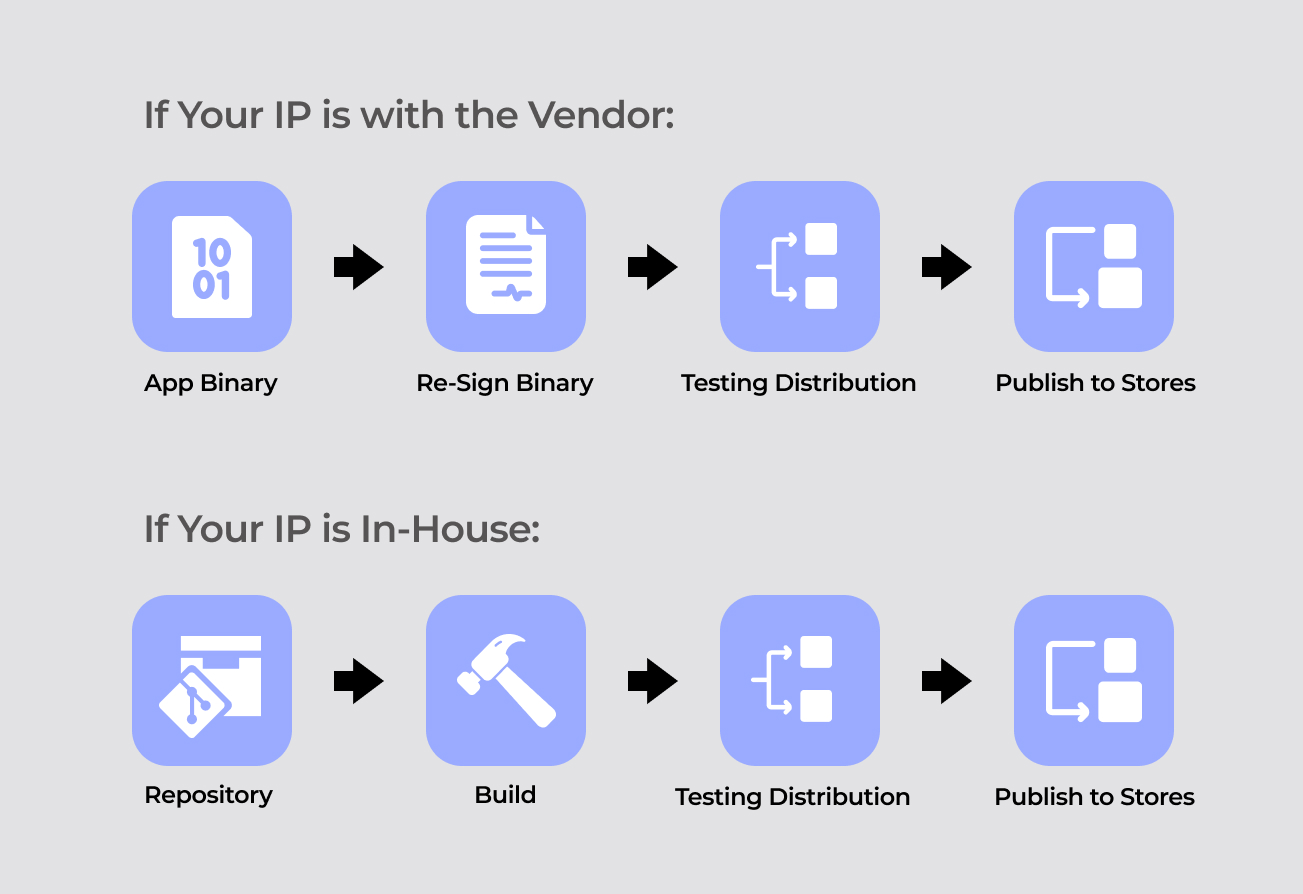
If Your IP Is with the Vendor:
If the third-party vendor maintains intellectual property rights, your workflow becomes: App Binary File → Re-sign Binary → Testing Distribution → Publish to Stores
Here’s how it works: Request compiled application files (IPA for iOS, AAB/APK for Android) from your development partner (unsigned or vendor-signed). Upload the application to Appcircle platform and apply or change your signing details using the
Re-sign feature.
Next, leverage
Testing Distribution to securely share the re-signed application with your internal testing teams, or stakeholders without exposing sensitive signing materials. Finally, use the
Publish module to create sophisticated release workflows that automatically distribute your application to App Store, Google Play, Huawei AppGallery, or Microsoft Intune while maintaining complete audit logs and reports.
This workflow is also the foundation for white-label app delivery at scale. To see how providers build once and clients re-sign and publish with clear ownership boundaries, read
White-Label Mobile App CI/CD for Enterprises.
If Your IP Is In-House:
If your organization maintains intellectual property rights, your source code is stored in your repositories, enabling this workflow: Repository → Build → Testing Distribution → Publish to Stores
In this scenario, connect your repositories directly to Appcircle’s
Build module, which compiles your source code while applying your signing identities during the build process. The compiled and signed applications are automatically distributed to Testing Distribution for internal testing, quality assurance, and stakeholder approval. Once testing is complete, the Publish module takes over, managing the entire store submission process with customizable publish flows, and comprehensive compliance reporting.
Either way, your signing identities stay secure, you maintain full control over distribution, and you get complete audit trails for compliance. It’s that simple!
Conclusion: Building Secure Outsourcing Partnerships
Outsourcing mobile app development doesn’t have to compromise security or control. With these five critical considerations, you can benefit from external expertise while maintaining control, protecting your organization, and ensuring compliance.
Key Takeaways:
- Always retain IP ownership and source code control when possible
- Maintain CI/CD pipeline ownership with comprehensive quality gates
- Never share production signing credentials
- Keep exclusive control of app store accounts and distribution
- Be careful with test data shared with the vendor
- Separate duties: developers build, QA tests, release owner publishes (SoD)
- Carefully define your rights and security requirements in outsourcing contracts
FAQs
1. Is outsourcing mobile app development secure?
Yes, it can be secure with the right approach. However, you must retain control over key aspects such as IP ownership, source code access, CI/CD pipeline, signing identities, and app store accounts. Platforms like Appcircle help ensure secure collaboration with external development teams by enabling safe distribution, re-signing, and publishing, without exposing critical assets.
2. Who should own the source code in outsourced mobile app development?
You should always own the source code. This ensures long-term control over updates, maintenance, and security. If the vendor controls the code, you risk losing visibility and flexibility.
3. How do I keep my Apple Developer account and certificates secure when outsourcing mobile app development?
Never share your Apple Developer account credentials or production signing identities with external vendors. Keep exclusive control of the account and your signing identities, use a secure CI/CD platform with Signing Identity management like Appcircle, so you can sign builds without exposing sensitive materials. Also review access and activity logs in App Store Connect and the Apple Developer Portal to track who did what and when. This way you manage all signing identities in one secure place while collaborating safely with partners. For more detail on Appcircle’s approach, see our “CI/CD Security in Appcircle” blog.
4. What types of re-signing operations does Appcircle support?
Appcircle supports both manual and automatic re-signing for iOS and Android apps. You can update app metadata, version info, version code, build numbers, entitlements, provisioning profiles, bundle identifiers, and package names. It also allows re-signing with a new keystore, replacing embedded certificates, and converting AAB files to APK.