
React Native CodePush: 10 Key Considerations for Over-the-Air Updates
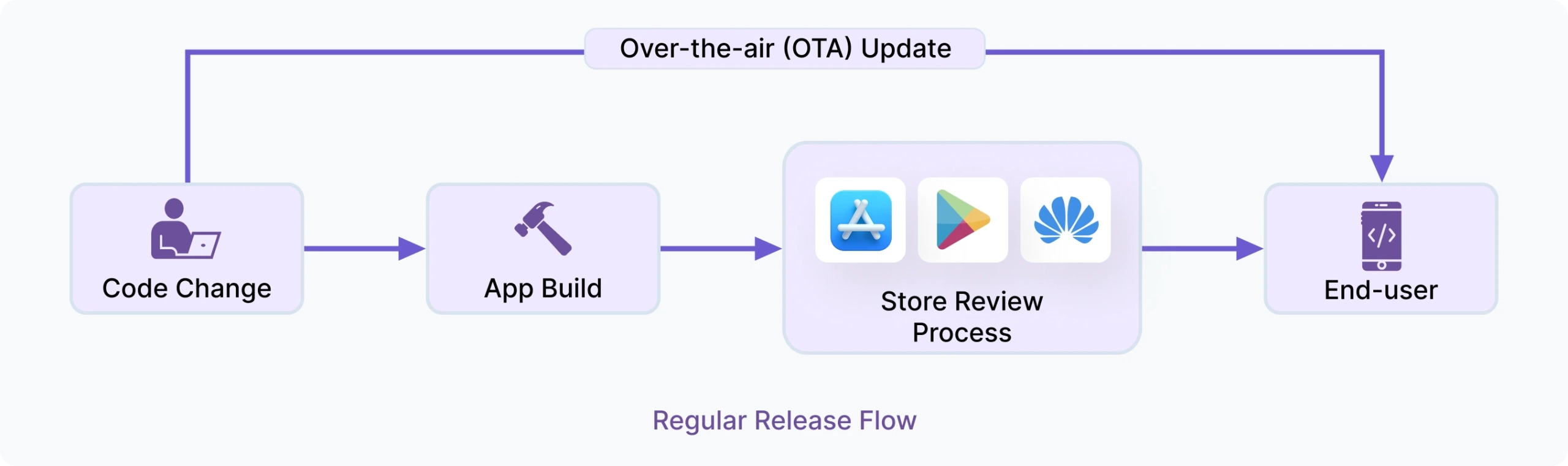
1. Controlled Rollouts and Instant Rollbacks
When you set a rollout percentage, such as 50%, the update is delivered only to a portion of eligible devices that check for updates. This means the affected population can vary based on user activity, device state, and update timing. That is why starting low, monitoring closely, and increasing gradually is essential. Rollback is your safety net when a bad update reaches users.
- Start at 5-10% of users, monitor crashes and failed installs, then gradually increase to 25%, 50%, and 100%.
- Use mandatory updates only for security fixes or critical data-corruption patches. For most updates, let users receive the update silently on the next app resume.
- Always have a rollback plan ready before you promote a release. Waiting until something breaks is too late.
- Monitor rollback counts per release, not just install counts. A spike in rollbacks can be an early signal of a broken bundle.
- Keep the previous stable release available so rollback lands users on a known-good state.
Note: The standard CodePush rollback behavior re-promotes the previous bundle as the latest release. The rollback is pushed as a new update, which means it goes through the same update check and install cycle as any other release. Users on affected devices will receive it as a new version. Keep this in mind when communicating incidents to your team or users.
2. Binary Diffing for Optimized OTA Delivery
- Delta packages are significantly smaller than full bundles, especially for incremental fixes
- Smaller updates mean higher install success rates on low-bandwidth connections
- Diff-based delivery reduces CDN costs at scale, which matters once you have millions of active users
- Ensure your OTA provider supports diff calculation across all active versions
- Faster updates improve the background download experience and support high-frequency release strategies
For enterprise React Native apps with large user bases, optimized delta delivery can significantly improve OTA update performance and scalability.
3. CI/CD Integration: Automate Your CodePush Releases
- Automatically generate OTA bundles during CI workflows and run automated tests
- Inject sensitive keys from your CI secret store at build time rather than hardcoding them
- Trigger staging deployments after successful builds
- Send release notifications to your team on every successful deployment
- Track OTA releases alongside mobile build history
- Manage all mobile CI/CD operations from a single hub
- Centralize CodePush OTA deployment operations across teams
When CodePush releases are part of your pipeline, OTA updates become as predictable and repeatable as any other build artifact.


4. Manage iOS and Android Apps Separately
Managing both platforms under the same deployment also creates version targeting confusion and makes it difficult to roll back one platform without affecting the other. Keeping them separate gives you clean, independent release histories.
- Create separate CodePush deployment workflows for iOS and Android from the start
- Maintain separate update histories and monitoring dashboards
- Handle platform-specific rollout percentages and rollback scenarios independently
- Align OTA releases with each platform’s binary version separately
- Monitor crash patterns across platforms
- Use platform-separated data for a more accurate picture than combined cross-platform metrics
Separating platforms from day one is a small investment that significantly simplifies OTA release management.
5. Keep Staging and Production Channels Separate
Map your CodePush deployments to your existing release environments. If you already have Staging and Production pipelines, your OTA channels should follow the same structure.
- Create dedicated staging deployment channels for internal testing
- Configure your iOS and Android configurations to use the correct deployment key per environment
- Validate bundle compatibility before production rollout
- Test rollback mechanisms regularly in staging environments
- Add a QA or UAT channel if your release process requires additional sign-off before production
- Promote releases to move validated releases from Staging to Production instead of deploying directly
- Treat deployment keys as secrets; rotate them if they are ever exposed in logs or version control
Tip: If you have multiple release environments such as Debug, Staging, Pre-production, or UAT, create a matching CodePush deployment for each. For instructions on configuring CodePush for multiple environments, see the Appcircle CodePush SDK Docs.
6. Semantic Versioning and Binary Version Targeting
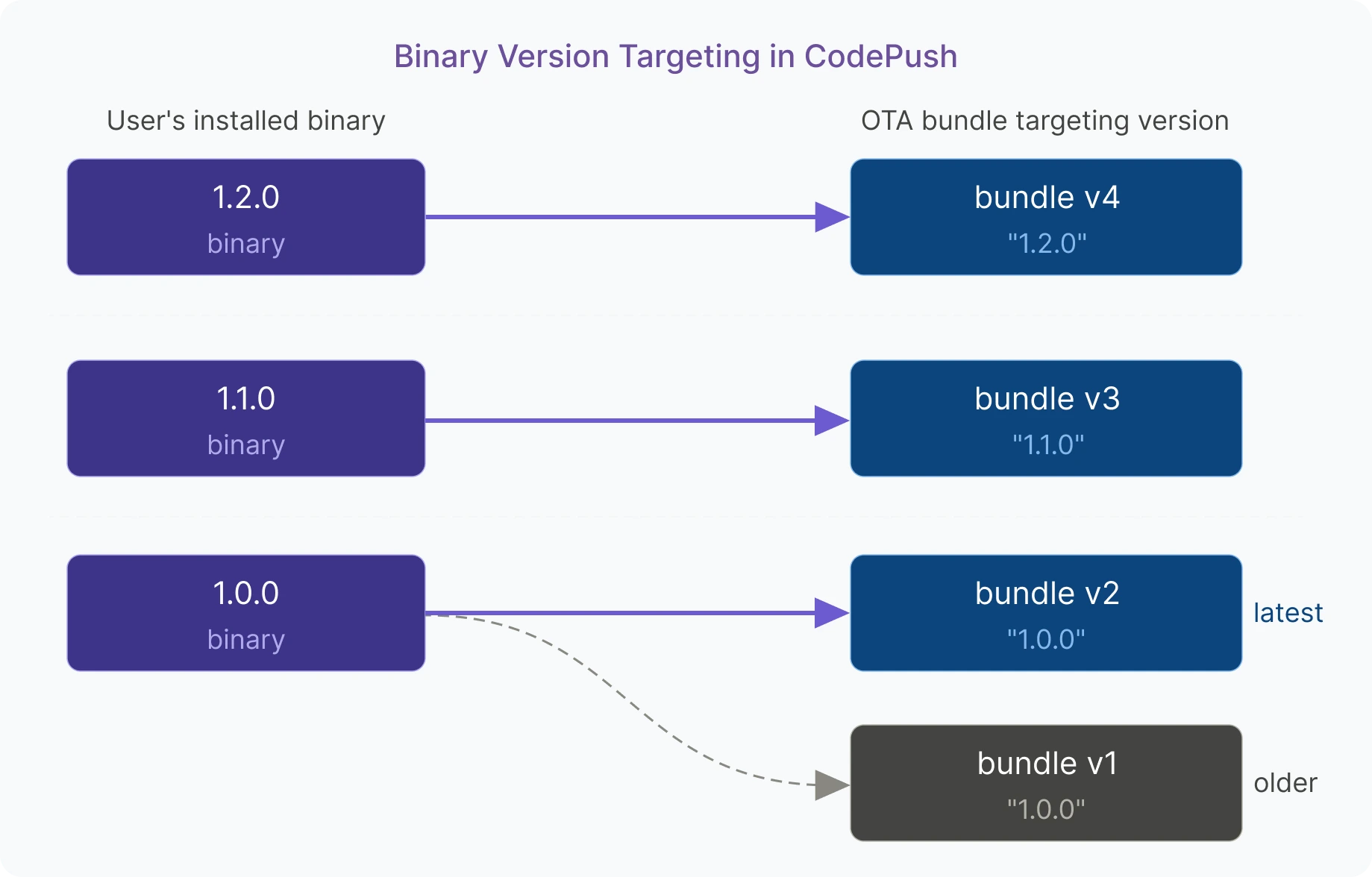
"1.2.0" but a user is on binary version 1.1.0, they will not receive it, even if they are otherwise eligible. Getting this relationship right is what prevents you from serving a bundle that references native modules that do not exist in older binaries.- Always use semantic versioning names (
1.0.0, not1.0or1.0.0-beta.1); non-semver versions can cause errors - Use an exact version like
"1.2.0"to target only users on that specific binary version, especially when your JS update relies on a native module added in that release - Maintain clear release notes for each update to track what changed
- Document which OTA release targets which binary version; mismatches are difficult to debug after the fact
- Track binary versions and update history separately for iOS and Android
A disciplined approach to version targeting is one of the most effective ways to prevent OTA-related incidents in production.
7. Securing Your OTA Updates
- Sign every release with a private key; the public key embedded in your binary verifies the signature before applying the update
- Always serve OTA updates over HTTPS and enforce TLS certificate validation
- Obfuscate your JavaScript bundle before release; plain bundles may expose business logic and sensitive data to anyone who extracts the app package
- Protect deployment credentials and access tokens using secure secret management practices
- Treat a production deployment key with the same care as an Apple certificate; implement centralized authentication mechanisms
A secure OTA pipeline protects both your users and your codebase from the moment a bundle leaves your CI system to the moment it runs on a device.
8. Error Boundaries and OTA Failure Handling
- Wrap your root component in an error boundary so unhandled render errors are caught before they crash the entire app
- Monitor for app startup crashes caused by faulty OTA bundles
- Test rollback behavior in Staging before promoting to Production; confirm the previous release loads correctly after a rollback
- Log error boundary catches so broken OTA updates are visible alongside native crashes
Operational reliability becomes especially important as OTA release frequency increases across production environments.
9. CodePush Governance and Compliance
- Implement role-based access control to restrict deployment permissions based on team roles
- Track who created and deployed each OTA update, maintain centralized audit logs and release history
- For teams in regulated industries (finance, healthcare, government), verify that your OTA provider can produce compliance reports on demand
- Follow Apple and Google OTA policies: updates must not change the app’s primary purpose or bypass store review
- Store audit logs in a location that complies with your organization’s data retention policy
Teams that invest in governance early avoid the operational risks that come with scaling OTA updates across large organizations.
10. Self-Hosted CodePush for Full Control
- Microsoft’s open-source CodePush server is available but you need to manage uptime, storage, CDN, security, scaling, and upgrades
- Self-hosting is the right choice for teams with strict data sovereignty requirements, air-gapped environments, or internal security policies that prohibit third-party data processors
- Ensure your self-hosted instance is compatible with the CodePush CLI so existing automation does not need to be rewritten
- Plan for CDN configuration, SSL termination, internal authentication systems integration, backup, and recovery from day one
- Evaluate managed self-hosted solutions that give you full control without the operational overhead
The right self-hosted setup gives your team the speed of OTA updates with the control and compliance guarantees your organization requires.
How Appcircle CodePush Addresses These Considerations
Key capabilities that map directly to the considerations above:
- Controlled Rollouts and Instant Rollbacks: Gradually release updates by tuning rollout percentages and monitoring performance on limited audiences. If issues arise, rollback to a prior version immediately to maintain stability.
- Package Diff Support: Deliver only what changed between releases, reducing bundle size and improving install success rates across all network conditions.
- CI/CD Integration: Seamlessly integrate OTA updates into your pipeline and manage them from a centralized hub. Automate CodePush deployments to reduce manual work and run built-in tests to validate updates before they reach users.
- Separate iOS and Android App Management: Manage iOS and Android as independent CodePush profiles with separate deployment histories, version targeting, and rollback controls.
- Staging and Production Channel Separation: Map your existing release environments to dedicated CodePush deployment channels and promote releases through a controlled, auditable workflow.
- Version Management: Define precise target version ranges for each OTA release to ensure updates are delivered only to compatible binary versions.
- Code Signing and Secure OTA Delivery: Deliver updates through a secure CDN with SSL and code signing to ensure every bundle is verified before installation. Use JavaScript bundle obfuscation to help protect your business logic from reverse engineering.
- Flexible Release Management: Upload and manage OTA releases through the dashboard, automate deployments via the CLI, or add the CodePush step directly to your build pipeline to fit any team workflow.
- CodePush Governance and Compliance: Implement fine-grained access controls to protect your OTA updates from unauthorized access and potential security threats. Maintain centralized audit logs & reports, and meet SOC 2 Type 2, ISO 27001, GDPR compliance requirements.
- Self-Hosted CodePush: Deploy Appcircle CodePush within your own infrastructure for full data residency control and enterprise security compliance, making it the right choice for teams operating in regulated industries.
Want to see how Appcircle CodePush works in practice? Watch the CodePush Overview to get a closer look at the OTA update workflow and release management capabilities.
Conclusion
For teams looking to modernize their React Native release workflows, OTA infrastructure is no longer optional. It is becoming a core part of modern mobile DevOps. Appcircle CodePush is built to address these challenges out of the box, combining enterprise-grade security, integrated CI/CD workflows, and self-hosted flexibility in a single platform.
FAQs
1. What is the difference between CodePush and a full app update?
2. Does CodePush work with native code changes?
3. What is the difference between full bundle delivery and differential updates?
4. Is CodePush allowed by Apple App Store and Google Play?
5. Is CodePush secure for enterprises?
6. Does Appcircle CodePush support React Native’s New Architecture?
7. How can I access CodePush logs on a physical device?
adb logcat '*:S' ReactNative:V ReactNativeJS:V to stream React Native logs in real time. On iOS, connect your device, open the Console app, select your device from the Devices list, click Start, and filter by [CodePush] to isolate CodePush-related output.