
Android Code Review Practices for Efficient Pull Requests
Bugs have been a reality of software development since the first computers were programmed. The best way is to write bug-free code, but this is not always possible. If that fails, we have a responsibility to address them as quickly and effectively as possible. Successfully implementing the code review process is the most significant factor in preventing software errors.
Appcircle values automated code reviews during the pull request phase. Several popular tools are available for Android that simplify and automate various stages of the code review process. Let’s explore these tools together.
The essential tools in a PR Workflow can be grouped as follows:
- Code Analyses Tools
- Testing Tools
- Build Management Tools
- Security Tools
- Issue Tracking Update tool
1. Code Analyses Tools
First and foremost, code analysis tools are a must-have to spot problems before they snowball. They scan your code for vulnerabilities, performance issues, and security gaps that manual checks can overlook.
Lint and Detekt
Android Lint and Detekt are static analysis tools designed to improve code quality and maintainability in Android development.
- Android Lint: Provided by the Android SDK, it analyzes source code to detect issues such as unused resources, layout performance problems, memory leaks, and security vulnerabilities.
- Detekt: Specifically designed for Kotlin, it identifies common programming errors, performance bottlenecks, usability issues, and deviations from coding standards.
Example Use Cases:
- Code Quality Assurance: Analyze the app’s source code to identify potential security flaws, performance bottlenecks, and other issues before releasing to production.
- Detecting Android-Specific Issues: Find and remove unused XML layouts, drawables, or strings, helping to reduce APK size and maintain cleaner code.
- Enforcing Code Style Guidelines: Identify and address deviations from coding standards to ensure consistency across the codebase.
- Analyzing Third-Party Library Vulnerabilities: Flag outdated library versions and recommend secure updates.
By identifying coding issues early, Lint and Detekt ensure higher-quality Android code reviews and consistent standards.
Danger
Danger automates code reviews through CI tools, aiding both code reviewers and developers who submit pull requests. It reduces the time reviewers spend on routine tasks, allowing more efficient code evaluation.
For detailed information on the benefits that Danger, please refer to the following blog post:
Example Use Cases:
- Automating Routine Code Review Checks: Automatically checking for common issues like missing documentation, improper commit messages, or coding style violations (e.g., inconsistent indentation).
- Enforcing Coding Standards: Checking if the pull request follows defined naming conventions for classes, methods, and variables.
- Ensuring Proper Test Coverage: Checking if new code is covered by unit or integration tests before merging.
- Automatically Blocking Merges Based on Review Criteria: Automatically marking a pull request as “Blocked” if it contains critical issues, such as failing tests or unapproved dependencies.
For more information about Danger, please visit our technical documentation.
SonarQube
Sonarqube allows you to analyze your code quality with the SonarQube CLI. The most important feature that distinguishes SonarQube from its competitors in terms of mobile security is its comprehensive static code analysis that not only identifies security vulnerabilities but also provides detailed insights into code quality, technical debt, and maintainability, helping developers build secure, high-quality mobile apps.
Example Use Cases:
- Detecting Code Smells: Scan their Android app’s codebase for code smells, such as overly complex methods or redundant logic.
- Identifying Security Vulnerabilities: Used to analyze the code of a mobile banking app, uncovering insecure API usage and unsafe data handling practices.
- Enforcing Coding Standards: The tool ensures that code pushed by all contributors adheres to agreed coding guidelines, avoiding unnecessary technical debt.
- Monitoring Code Quality: A fitness app team schedules regular SonarQube scans to compare the quality of their codebase across different sprints.
For more information about SonarQube, please visit our technical documentation.
Android Dependency Report
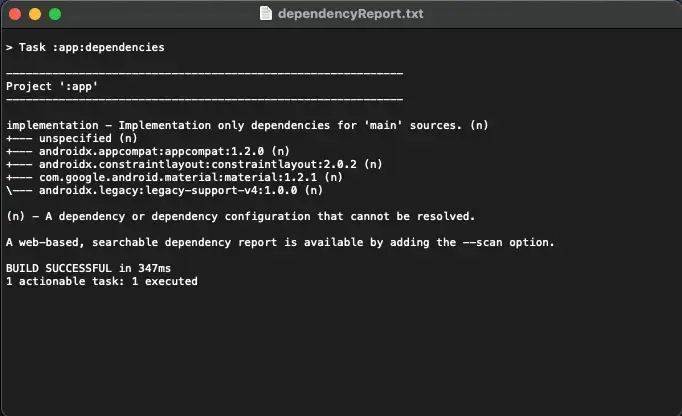
The Android Dependency Report step visualizes the whole dependency tree for every configuration available in the project.
Rendering the dependency tree is particularly useful if you’d like to identify which dependencies have been resolved at runtime. The dependency report always contains declared and transitive dependencies.
Here is an example of the output:
Example Use Cases:
- Resolving Dependency Conflicts: Identifying cases where multiple libraries require different versions of the same dependency (e.g., two libraries using different versions of
Gson). - Ensuring Consistent Dependencies Across Environments: Ensuring that dependencies, especially transitive ones, are consistent across different development environments, preventing issues when building or deploying the app in various stages.
- Tracking Transitive Dependencies: Getting an overview of indirect dependencies included in the project through other libraries, which can help avoid unnecessary bloat or uncover hidden vulnerabilities.
For more information about Android Dependency Report, please visit our technical documentation.
2. Testing Tools
The second important thing to use is testing tools to ensure that the code you have written delivers the expected results. Testing tools are non-negotiable for ensuring apps run smoothly across countless devices and OS versions. They catch vulnerabilities, optimize performance, and guarantee compliance. Automated tools slash QA time, keeping development fast and output secure. Simply put, testing tools make Android apps reliable and ready for the real world.
The following tools integrate directly into your Appcircle workflows, providing real-time feedback so you can make quick adjustments and stay on course throughout development.
Android Unit Tests
The Android Unit Tests step runs the unit tests in your project to verify the correctness of your code and ensure good test coverage. After the tests are completed, the results are saved as part of the build’s artifact archive, making it easy to review and analyze them later.
Example Use Cases:
- Validating Business Logic: Verifying that a tax calculation function produces the correct output for various inputs.
- Preventing Regressions in Critical Functions: Checking that an API response parser continues to handle edge cases like null or malformed data.
- Ensuring Compatibility with Multiple Scenarios: Running parameterized tests to check if a sorting algorithm works for ascending, descending, or random order inputs.
For more information about Android Unit Test, please visit our technical documentation.
Android Build for UI Testing
The Android Build for UI Testing step is tailored to compile both your Android application and its associated test application, ensuring they are ready and optimized for automated UI testing scenarios.
Example Use Cases:
- Validating UI Functionality Securely: Generates test-ready APKs, allowing developers to validate UI functionality while maintaining high security standards before release.
- Preparing APKs for Automated Testing Platforms: Creates debug APKs with test coverage enabled, ready for automated UI testing on platforms like Firebase Test Lab or Appium.
- Custom Test Builds Using Environment Variables: Builds APKs with environment-specific configurations, such as a mock server URL, to test in isolated environments without affecting the production backend.
For more information about Android Build for UI Testing, please visit our technical documentation.
Test Reports for Android
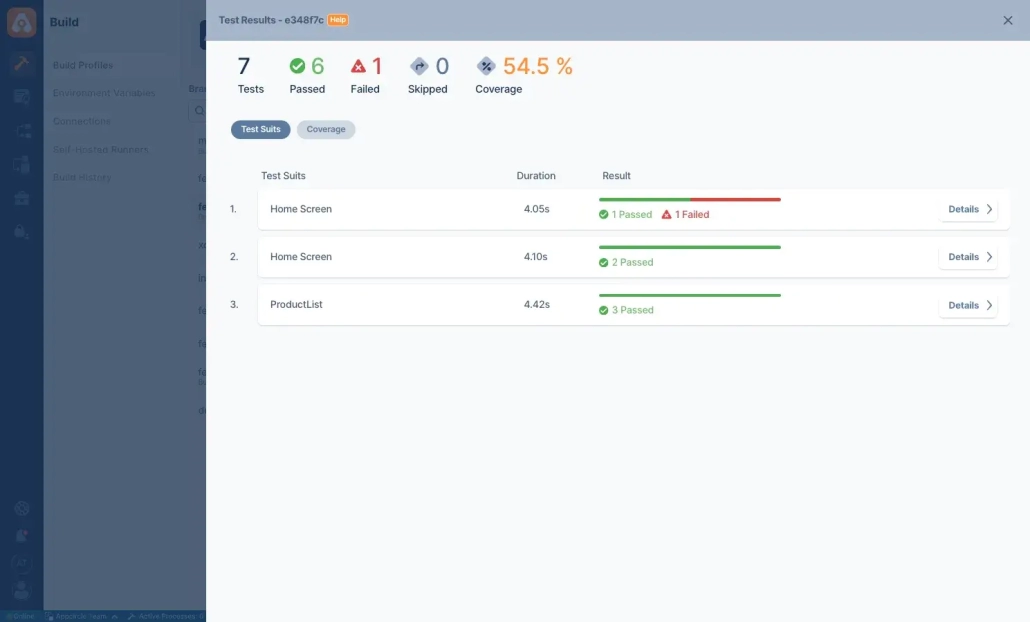
The Appcircle Test Report step displays your test results and code coverage in an aesthetically pleasing user interface.
This component supports the following test and coverage formats:
Example Use Cases:
- Centralized Test Results for Quick Review: Reviewing failed unit or instrumentation tests from JUnit directly in an easy-to-read Appcircle interface.
- Monitoring Code Coverage Metrics: Displaying code coverage metrics using JaCoCo to identify untested areas in the application.
- Facilitating Team Collaboration: Sharing visually appealing test reports with the team to discuss failures or low coverage areas.
For more information about Test Report for Android, please visit our technical documentation.
Add Badge to App Icon
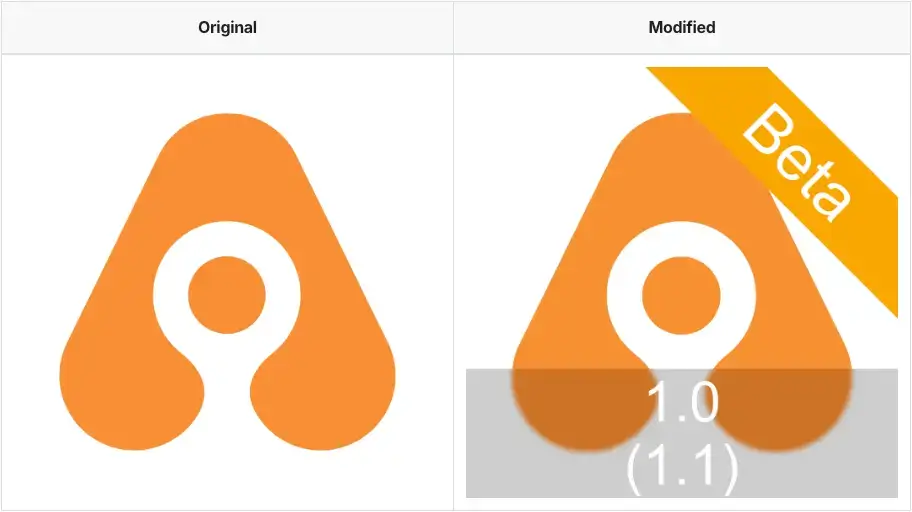
After a PR is approved, the associated development or bug fix must be thoroughly tested. However, in large teams, testing and release processes can become highly complex. As a result, testers may occasionally get confused about which specific package they are testing. Additionally, this situation might be managed continuously within the project itself. The Add Badge to App Icon step in Appcircle visually differentiates app builds by overlaying badges on app icons. This is essential for distinguishing environments (e.g., staging vs. production) or build statuses (e.g., beta, release candidate).
Example Use Cases:
- Adding “Beta” badges to staging environment builds.
- Customizing app icons for specific version code and version number.
- Customizing text and text background color.
Clear visual cues enhance tester review by avoiding deployment mistakes and streamlining testing processes.
For more information about Add Badge to App Icon, please visit our technical documentation.
Firebase Test Lab for Android
Appcircle is integrated with the Firebase Test Lab for continuous testing. Your app can be built in Appcircle and directly deployed to the Firebase Test Lab to run automated tests.
Example Use Cases:
- Testing Across Devices and Configurations: Testing on different Android versions, from the latest release to older versions still used by your audience.
- Identifying Performance and Stability Issues: Detecting crashes or ANRs during automated test runs.
- Generating Test Reports for Debugging and Analysis: Sharing test reports with the team for collaborative debugging and resolution.
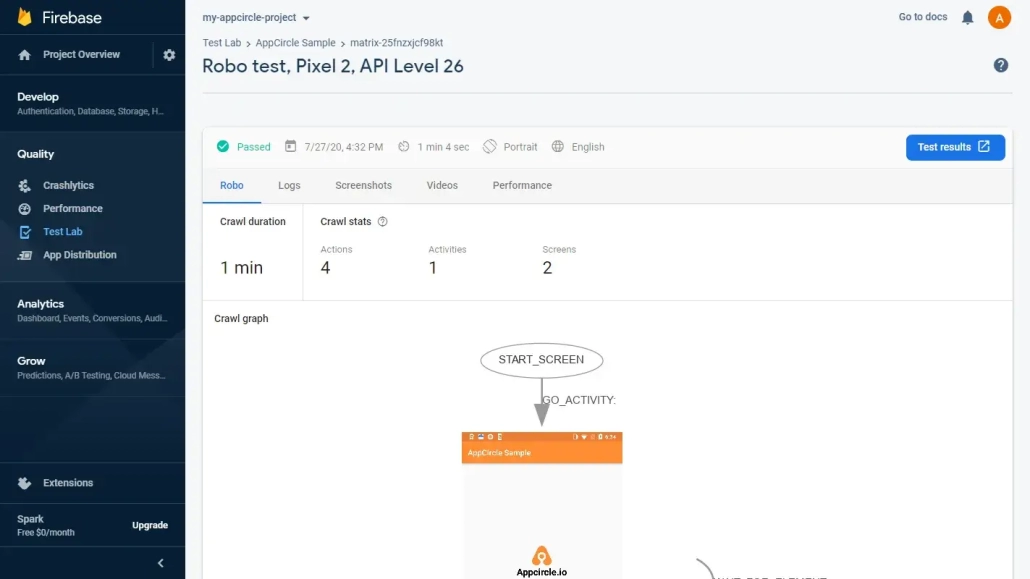
For more information about Firebase Test Lab for Android, please visit our technical documentation.
Testinium
The Testinium allows automated testing of mobile applications directly within the Appcircle environment. This step enables developers to execute test scripts, analyze test outcomes, and verify the quality of their mobile apps before deployment.
Example Use Cases:
- Automated Regression Testing: This step ensures core features like booking rides and payment processing remain functional.
- Automated Functional Testing: The tests run after every commit in Appcircle, preventing the introduction of bugs in the main branch.
- Device-Specific Testing: A team uploads their mobile banking app to Testinium and tests it on high-priority devices, such as Samsung Galaxy S23 and iPhone 14 Pro.
For more information about Testinium, please visit our technical documentation.
3. Build Management Tools
Efficient build management is essential for ensuring high-quality releases and streamlined CI/CD processes. These tools help automate versioning, optimize app size, and enforce development standards. Appcircle offers powerful components that simplify build management and ensure consistent, reliable delivery of app packages. Below are key features and use cases:
Android Increment Build and Version Number
In application release and testing processes, multiple packages can be released within the same day, each serving a different purpose. Therefore, version tracking is crucial. Implementing version management for each PR will minimize this confusion. Managing version numbers and build codes is fundamental to app development. The Android Increment Build and Version Number step in Appcircle automates this process, ensuring that each build is assigned a unique version code and name. This prevents versioning conflicts and simplifies release management in CI/CD pipelines.
Example Use Cases:
- Version Code update: Incrementing the version code after each CI pipeline execution.
- Version Name automation: Automatically update the version name before publishing to Google Play Store.
- Consistent versioning across variants: Ensuring version consistency across multiple build variants (e.g., beta, production).
For more information about Android Increment Build and Version Number, please visit our technical documentation.
File Size Check
The File Size Check component checks the size of your generated app file. It compares it against the size you have given and if the size is exceeded, it either breaks the pipeline or shows it as a warning.
Example Use Cases:
- Supporting Consistent App Quality Across Releases: Using the File Size Check step to compare the current build size to the previous one, ensuring the new release does not unnecessarily bloat the app.
- Ensuring Compliance with Company Standards: Enforcing a company-wide standard for app size limits (e.g., APK size must not exceed 200MB) and preventing any build that exceeds this size.
- Optimizing App Size: Issuing a warning when the app size approaches the target, encouraging developers to optimize assets like images, resources, or libraries to reduce the size.
For more information about File Size Check, please visit our technical documentation.
4. Security Tools
After successfully passing code analysis and testing tools, the next critical step for your project is to pass security tools. These tools are designed to examine your codebase for vulnerabilities, misconfigurations, and other security risks. They ensure your application meets security standards and best practices, protecting it from potential threats and breaches.
Security tools are separate from static and dynamic testing tools. To categorize them, we can group them as follows:
Static Security Tools:
Fortify on Demand Mobile Assessment
Fortify on Demand Mobile Assessment is an AppSec as a service offering complete with essential tools, training, AppSec management, and integrations, so you can easily create, supplement, and expand your software security assurance program. It supports secure development through continuous feedback to the developer’s desktop at DevOps speed and scalable security testing embedded into the development toolchain.
Example Use Cases:
- Early Detection of Security Vulnerabilities: Automatically detect and resolve vulnerabilities in both the app’s source code and runtime environment, ensuring robust security for mobile apps before deployment.
- Faster Release Cycles: Integrating Fortify on Demand Mobile Assessment into the CI pipeline to automatically scan the app for vulnerabilities whenever a new version or pull request is submitted.
- Prioritizing Critical Vulnerabilities: Automatically categorizing vulnerabilities based on severity and risk level, and flagging critical issues that must be fixed before the app is released.
For more information about Fortify on Demand Mobile Assessment, please visit our technical documentation.
Snyk Scan Security
Snyk Security Scan is a powerful tool designed to identify and resolve vulnerabilities within your project’s dependencies. Leveraging Snyk’s extensive vulnerability database, this tool thoroughly analyzes libraries and frameworks used in your project, offering actionable insights to mitigate potential risks.
Example Use Cases:
- Identifying Vulnerabilities: Identify and remediate security vulnerabilities in third-party libraries and dependencies during mobile app development to prevent risks before deployment.
- Zero-Day Vulnerabilities: Developers are alerted to critical zero-day vulnerabilities in dependencies, allowing immediate remediation before release.
- Securing Open-Source Dependencies: Scans the open-source libraries used in a mobile fitness app to detect vulnerabilities and license compliance issues.
For more information about Snyk Scan Security, please visit our technical documentation.
Dynamic Security Tools:
Appdome Build-2Secure for Android
Appdome Build-2Secure automates the integration of advanced security features, adaptive protections, code-signing, and certification processes into mobile applications, enhancing security without the need for manual coding or code analysis.
For more details, check out this post on Appdome Build-2Secure:
Example Use Cases:
- No-Code Integration: Automatically integrates selected protections, such as anti-reverse engineering, anti-tampering, and encryption, into the app without requiring changes to the source code.
- Protecting Against Reverse Engineering: Obfuscating code to make it harder for hackers to analyze the app’s logic.
- Providing Comprehensive Security Audits: Generating detailed security integration reports for audits or compliance checks.
For more information about Appdome Build-2Secure for Android, please visit our technical documentation.
Both Static and Dynamic Security Tools:
Data Theorem Mobile Secure
The Data Theorem Mobile Secure is an automated, continuous security service that finds vulnerabilities and data privacy issues within mobile apps, shortening time to resolution with secure code recommendations.
Example Use Cases:
- Proactive Detection of Security Vulnerabilities: Automatically scanning the app for common vulnerabilities such as SQL injection, cross-site scripting (XSS), or insecure data storage before releasing it to production.
- Ensuring Compliance: Ensuring that personal data is stored and transmitted securely, meeting the requirements set by data protection regulations.
- Protecting API Endpoints: Monitor and secure API interactions to prevent unauthorized access, data leaks, or vulnerabilities in API endpoints, ensuring secure communication between the app and back-end services.
For more information about Data Theorem Mobile Secure, please visit our technical documentation.
AppSweep Mobile Security Testing
AppSweep Mobile Security Testing is a comprehensive security solution designed to protect mobile applications from various threats and vulnerabilities. It offers advanced scanning capabilities to identify security flaws, privacy concerns, and compliance issues within mobile apps. By analyzing app code, configurations, and dependencies, AppSweep helps developers and organizations mitigate risks and ensure the integrity and safety of their mobile applications.
Example Use Cases:
- Comprehensive Security Scanning: Scanning the app for vulnerabilities, privacy issues, and compliance violations (such as GDPR), ensuring the app is secure, compliant, and safe for users before it’s released.
- Monitoring Third-Party Dependencies: Highlighting outdated dependencies that need to be updated for security patches.
- Improving Team Awareness of Security Practices: Using scan reports as training material to educate the team on common security issues.
For more information about AppSweep Mobile Security Testing, please visit our technical documentation.
5. Issue Tracking Report Tools
After analyzing the code, completing unit and UI tests, and generating security reports, the next step is to document these outputs in an issue tracking tool. This helps ensure that your development workflow remains organized and that issues are tracked and resolved efficiently.
Jira Comment
Jira is a software development tool used for issue tracking, project management, and agile software development. It allows users to plan, track, and release software projects. Jira’s core functionality includes the ability to create and assign tasks, track progress and status, and collaborate with team members. This helps maintain the flow of communication within the team, particularly in larger teams where manual tracking can become tedious.
Example Use Cases:
- Automatically Updating Jira Issues: If the build fails, the component can post a comment like “Build failed on Android Signing step – Check build logs” keeping the team informed of the failure and reducing manual tracking efforts.
- Changing the Status of Jira Issues: When the workflow finishes without errors, the status of the attached Jira issue is automatically set to “Done”.
- Reducing Manual Updates: This allows developers to focus on coding rather than task management, and Jira is always kept up to date automatically.
For more information about Jira Comment, please visit our technical documentation.
Azure Boards
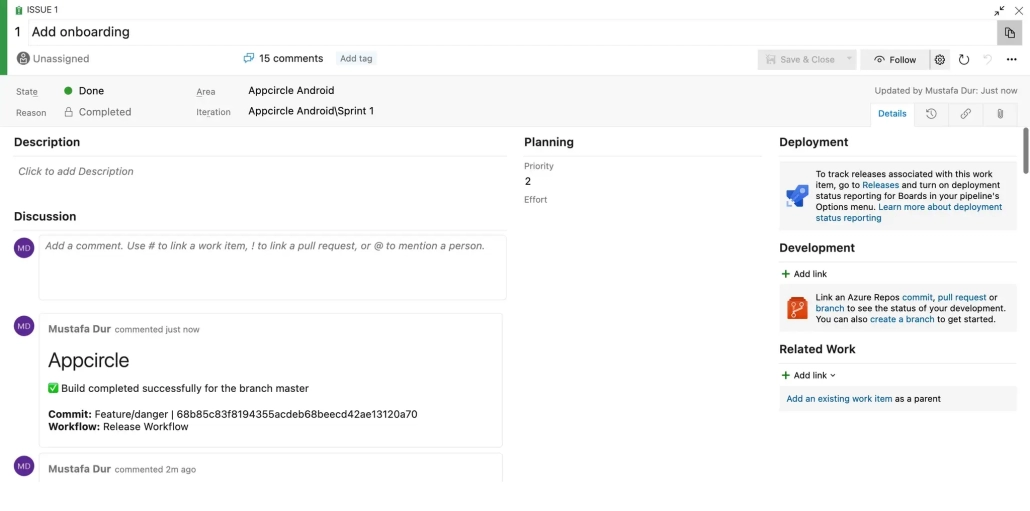
Azure Boards is a standalone service within the Azure DevOps suite that helps teams plan, track, and discuss work across the entire software development process. It provides a flexible, customizable platform for managing work items, such as user stories, bugs, tasks, and issues, so you can track your work item’s progress throughout the development lifecycle.
You can use the Appcircle Azure Boards step to add a comment and change the status of your issues according to the status of your workflow.
Example Use Cases:
- Automating Status Updates Based on Workflow Results: Marking a task as “Done” after a successful build or test step in the workflow.
- Adding Comments to Provide Context: Automatically add comments with build or test results to the relevant work item for tracking progress.
- Enforcing Workflow and Process Consistency: Automatically transitioning tasks between stages to maintain consistent tracking across the team.
For more information about Azure Boards, please visit our technical documentation.
Azure DevOps Bot for Detekt Report
The Azure DevOps Bot for Detekt Report step analyzes your Detekt report and posts the details to an open pull request in Azure DevOps. It also allows you to modify the pull request status.
Example Use Cases:
- Automated Code Quality Feedback: Posting detailed Detekt analysis results, such as rule violations or coding standard breaches, to a pull request in Azure DevOps.
- Streamlining Code Review Processes: Helping reviewers focus on more strategic aspects of the code by automating style and rule enforcement checks.
- Enforcing Project-Wide Coding Standards: Using this step to enforce standards like method complexity limits or consistent naming conventions across the team.
For more information about Azure DevOps Bot for Detekt Report, please visit our technical documentation.
Conclusion
Bugs are inevitable in software development, but effective code review processes are essential in minimizing and resolving them efficiently. Appcircle simplifies this with automated tools that enhance code analysis, testing, security, and issue tracking throughout the PR workflow. By integrating these tools, development teams can produce high-quality, secure Android applications while maintaining smooth and efficient development processes.

