
Enhancing Jenkins Pipelines for Mobile CI/CD
- Why Jenkins CI needs specialized mobile CD capabilities for distribution and publishing
- How Appcircle Testing Distribution outperforms Firebase App Distribution for enterprise teams
- Replacing MDM/MAM solutions with Enterprise App Store for internal app delivery
- Native Jenkins plugins that integrate in hours for distribution needs
- End-to-end store automation that goes beyond Fastlane’s binary submission
- A complete Jenkins + Appcircle workflow that takes apps from build to production seamlessly
Beyond Jenkins Builds: Mobile Delivery Needs
- Manage signing identities (certificates, identifiers, provisioning profiles, keystores) to ensure correct, compliant signing
- Distribute binaries to testers across different devices and platforms
- Organize tester groups, control access, and collect actionable feedback
- Deliver in-house apps to employees without relying on public app stores or MDM/MAM solutions
- Submit apps to public app stores with a consistent, governed, and auditable flow
Mobile App Distribution for Testing
Appcircle vs. Firebase App Distribution: Key Differences

Feature | Firebase App Distribution | Appcircle Testing Distribution |
Device Registration | Manual UDID collection & profile management | Automatic device provisioning (UDID capture via profile) |
SSO/LDAP & RBAC Support | No native support | Built-in SSO/LDAP and role-based access control |
Tester Access | Google account required | Any email; no Google account required |
Tester & User Limits | Limited | Unlimited |
Signing Identity Management | Not supported | Available via Appcircle Signing Identities module |
Re-sign Binary Support | Not supported | Manual and automatic re-signing |
Reporting & Visibility | Basic reporting | Enterprise-grade reporting and audit logs |
Key Benefits of Appcircle Testing Distribution
- User-Friendly Access: Testers see only builds compatible with their device and OS, reducing confusion and failed installs.
- No Restrictions on Emails or Testers: Any email works; no caps on number of testers/groups.
- Flexible & Secure Login: Supports username/password login, LDAP, and SSO for secure access at any team scale.
- Version Control & Validation: Enables re-signing builds, comparing binaries, and tracking versions for consistency.
- Automated Release Notes: Delivers release notes with every build to keep testers updated.
- Binary Metadata Tags: Adds tags (commit ID, configuration, workflow name etc.) for easy build identification.
Enterprise App Store: Your Private App Store
Key Benefits of Appcircle Enterprise App Store:
- Branded App Portal: Create a company-specific app store that matches your corporate identity.
- Centralized Management: One portal to manage all your internal apps across iOS and Android.
- User Authentication: Integrate with LDAP or SSO for secure access control.
- Channel-based Delivery: Share your app in ‘Beta’ mode to test new features or identify bugs, or in ‘Live’ mode for stable versions.
- In-app Updates: Deliver new versions with minimal disruption, keeping users smoothly up-to-date.
- Enterprise-grade Reporting & Audit Trails: Track who installed which version and when, supporting adoption monitoring and compliance.


Native Jenkins Plugins for Seamless Distribution
Installing Appcircle Plugins
- Navigate to Manage Jenkins → Plugins
- Search for “Appcircle Testing Distribution” or “Appcircle Enterprise App Store“
- Install and configure with your Appcircle API credentials
- Add plugin steps to your pipeline configuration
App Store Publishing: End-to-End Release Automation
Disadvantages of Fastlane:
- Complex Learning Curve: Configuration and setup can be challenging for beginners.
- Requires Ongoing Maintenance: Regular updates are needed to keep up with platform changes.
- Limited Enterprise Features: Lacks built-in role-based access control and user management.
- Minimal Reporting Capabilities: Does not provide detailed audit trails or compliance reporting.
- Technical Expertise Required: Code signing and certificate management can be complicated.
- DIY Approach: It is not an all-in-one platform and requires integration with other tools.
- CI/CD Integration Effort: Manual setup is needed for each CI/CD platform.
Key Benefits of Appcircle Publish to Stores:
- Centralized Publishing Hub: Manage and publish your apps to the App Store, Google Play, Huawei AppGallery, Microsoft Intune, and TestFlight all from a single, unified platform.
- Automated Binary Re-signing and Comparison: Automatically ensure your builds are correctly signed for each target environment and compare binaries to prevent unnecessary uploads.
- Metadata Management: Keep your app listings accurate and consistent by automatically updating metadata such as descriptions, release notes, and screenshots on multiple app stores.
- Customizable Publishing Workflow: Adapt the publishing process to fit your organization’s release requirements. Add internal approval steps or customize flows for different apps and environments.
- Faster, Safer Releases: Automate repetitive tasks to enforce release consistency, reduce errors, and accelerate the delivery of new app versions.
- Audit Trails and Detailed Reporting: Access comprehensive audit logs and publish reports for full transparency, critical for compliance and monitoring release performance.
Complete Mobile CI/CD with Jenkins and Appcircle
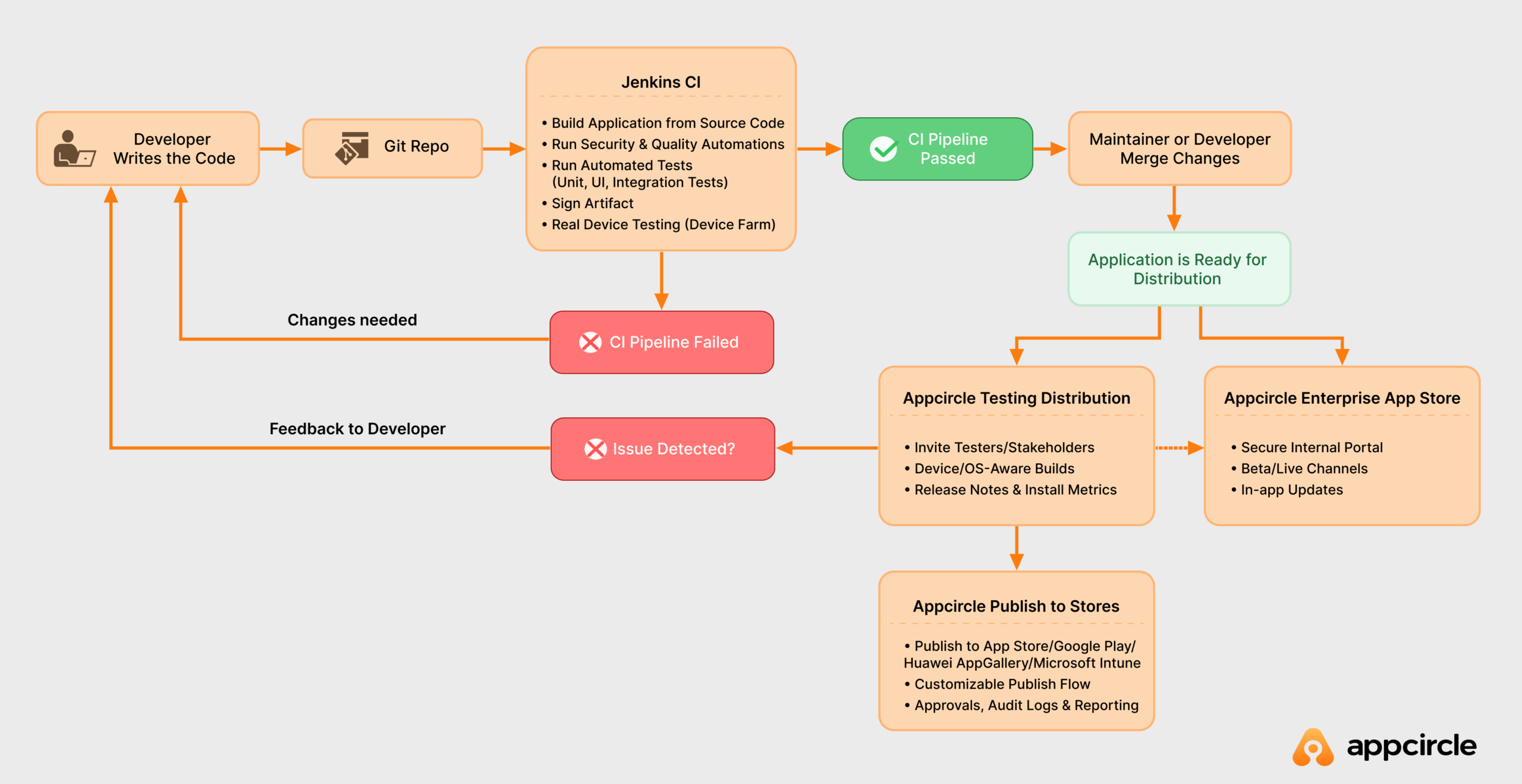
- Enterprise-grade app distribution for testing
- Secure in-house app delivery
- Seamless end-to-end store publishing
FAQs
1. What is Jenkins and what is it used for?
Jenkins is an open-source automation server that helps developers build, test, and deploy software reliably and efficiently. It is widely used for implementing Continuous Integration (CI) and Continuous Delivery/Deployment (CD) workflows, automating the entire software development lifecycle by running automated tests, building software, and deploying it across different environments. This streamlines development, improves code quality, and accelerates release cycles.
2. Is Jenkins still used in 2025?
Yes. Jenkins remains widely used in 2025, especially in enterprises with long-running pipelines, self-hosted or on-premise requirements, and strict compliance needs. Its large plugin ecosystem and strong community support keep it relevant, often working alongside modern tools and complementary platforms, such as using Jenkins for continuous integration (CI) and Appcircle for mobile distribution and publishing.
3. Is Jenkins a CI or CI/CD Tool?
Jenkins is a CI/CD tool. It is an open-source automation server that supports both Continuous Integration (CI) and Continuous Delivery/Deployment (CD). Many teams continue to use Jenkins for CI while leveraging specialized tools for CD, such as Appcircle for mobile app distribution, internal app store, and publishing.
4. Can I use Jenkins for mobile app development?
Yes, Jenkins is widely used for mobile app development as a powerful continuous integration (CI) and continuous delivery (CD) tool. With its extensive plugin ecosystem and API support, you can extend Jenkins pipelines by integrating mobile-specific tools like Appcircle to automate mobile app distribution and release processes. This integration reduces manual work, minimizes errors, and accelerates your mobile development lifecycle.
5. Can I use Appcircle if I’m already heavily invested in Jenkins?
Absolutely! You can keep your existing Jenkins build pipelines and simply add Appcircle’s distribution and publishing modules as post-build steps. This way, You enhance your existing process without the hassle of starting from scratch.
6. Can Appcircle replace Fastlane in my pipeline?
Yes. While Fastlane primarily focuses on automating binary submission, Appcircle offers a complete release automation platform. It handles metadata management, multi-store publishing, approval workflows, audit trails, and compliance reporting, all from a single, unified interface.

