
Deploy iOS and Android Apps to AWS Device Farm and Run Tests
Testing mobile apps across a variety of devices and platforms is a critical step in ensuring app quality and user satisfaction. However, manually managing this process can be time-consuming, error-prone, and resource-intensive. AWS Device Farm provides a powerful solution by allowing developers to test their apps on a wide range of physical devices. This article explores the challenges of mobile app testing, the benefits of AWS Device Farm, and how Appcircle simplifies the process with seamless automation.
Why Mobile App Testing is Critical
Mobile apps must perform flawlessly across a diverse ecosystem of devices, operating systems, and screen sizes. However, ensuring compatibility often introduces several challenges:
- Device Fragmentation: Testing on a wide range of devices is necessary but can be overwhelming due to the sheer variety of hardware configurations.
- Manual Test Limitations: Manually testing apps is time-consuming and often leads to inconsistent results.
- Scaling Challenges: As app complexity grows, scaling testing operations without automation becomes nearly impossible.
These challenges can lead to delayed app launches, poor user experiences, and costly post-release fixes. Therefore, leveraging a robust testing framework is essential.
How AWS Device Farm Addresses Testing Challenges
AWS Device Farm enables developers to test their apps on real devices hosted in Amazon’s cloud. Key features include:
- Wide Device Coverage: Access to hundreds of real devices running various operating systems and versions.
- Automated Testing Support: Integration with popular testing frameworks like Appium, Espresso, and XCTest.
- Actionable Insights: Comprehensive test results with detailed logs, screenshots, and videos.
While AWS Device Farm provides an excellent foundation for mobile app testing, integrating it into your CI/CD workflow can be complex. This is where Appcircle comes in.
Streamlining Testing with Appcircle
Appcircle integrates seamlessly with AWS Device Farm, simplifying the process of deploying apps for testing. Here’s how Appcircle enhances your testing workflow:
1. Automated App Deployment:
- Appcircle automatically builds your iOS and Android apps and deploys them to AWS Device Farm for testing, eliminating the need for manual uploads.
2. Pre-Configured Workflows:
- Use Appcircle’s customizable workflows to trigger app builds and testing automatically, reducing the risk of human error.
3. Centralized Reporting:
- Access test results directly within Appcircle’s interface, streamlining the debugging and iteration process.
Step-by-Step: Deploying Apps to AWS Device Farm Using Appcircle
1. Connect Your Repository
To get started, link your GitHub, GitLab, or Bitbucket repository to Appcircle. This ensures that your CI/CD pipeline always uses the latest code changes for testing.
- Navigate to the Appcircle dashboard and choose the repository integration option.
- Use OAuth to securely authorize Appcircle to access your repositories.
- Once connected, Appcircle will automatically fetch branches, commits, and tags from your repository, ensuring a seamless workflow.
For private repositories, use SSH keys to establish a secure connection. Appcircle supports a wide range of repository providers, allowing flexibility in choosing your preferred version control system.
2. Configure Your Build Profiles
Set up separate build profiles for your iOS and Android apps. Build profiles in Appcircle to define the workflows and settings for each app and target platform.
- Go to the Build Profiles section in Appcircle and create a new profile.
- Select the operating system (iOS or Android) and the framework (e.g., native or cross-platform frameworks like Flutter).
- Configure workflow steps such as code signing, environment variables, and custom scripts to align with your project’s requirements.
Each build profile is independent, allowing granular control over build settings for different platforms, branches, or app versions.
3. Add AWS Device Farm Integration
Integrate AWS Device Farm into your workflow to enable automated testing on real devices.
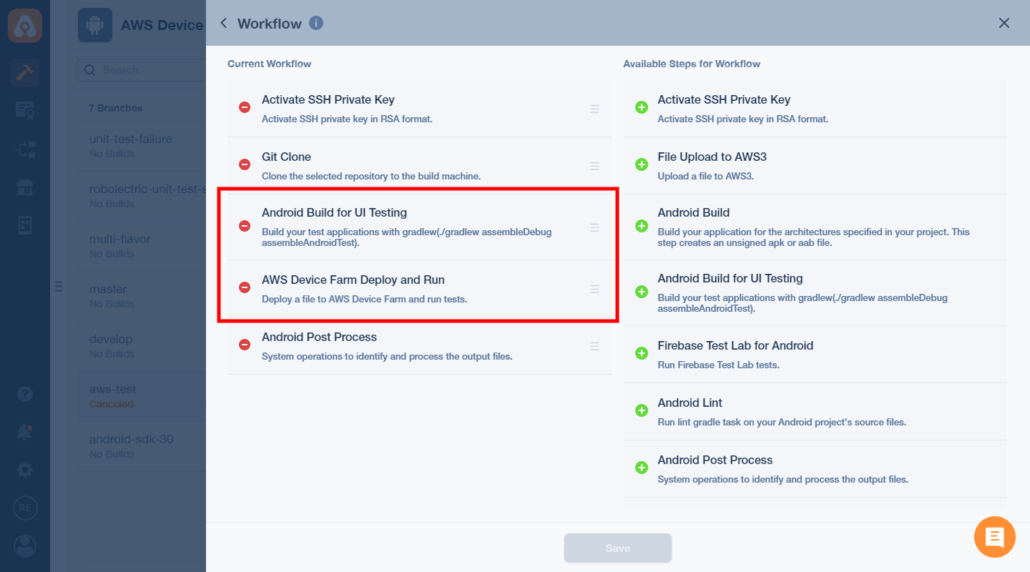
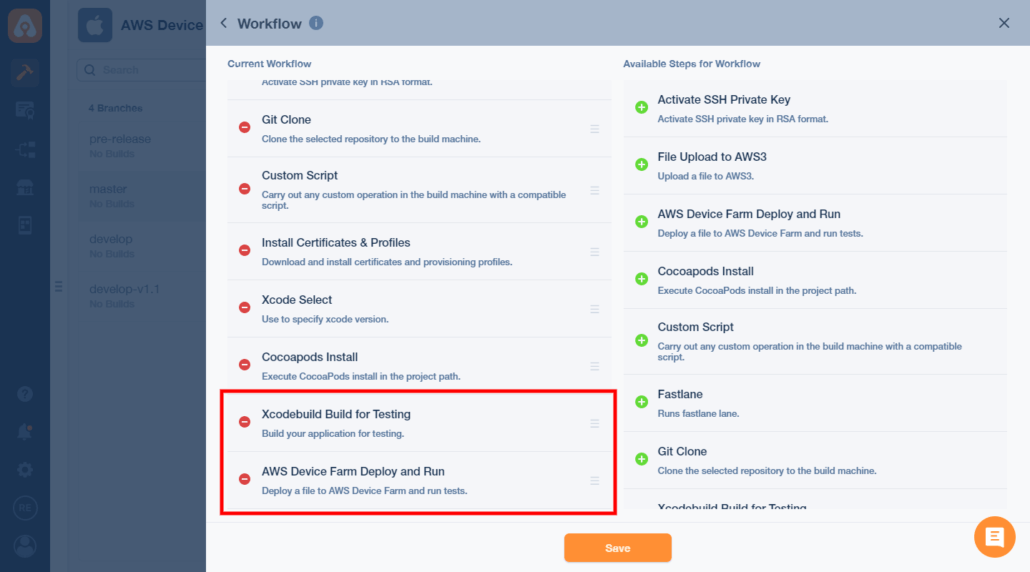
- Navigate to the workflow editor in your build profile and select the AWS Device Farm integration step from the workflow marketplace.
- Provide the required AWS credentials (Access Key and Secret Key) to securely connect Appcircle with your AWS account.
- Select the device pool and test configurations you want to use. You can choose specific device models, operating system versions, and screen sizes to ensure comprehensive test coverage.
- Optionally, configure additional parameters like test duration limits and custom environment variables.
This integration allows you to deploy your app builds directly to AWS Device Farm, eliminating the need for manual uploads.
Android workflow for Device Farm
iOS workflow for Device Farm
4. Automate the Testing Process
Leverage Appcircle’s automation capabilities to trigger tests on AWS Device Farm automatically whenever a new build is created.
- Enable the On Push or On Tag Push triggers in your build profile to automatically initiate builds whenever code changes are pushed to the repository.
- Use conditional workflows to ensure tests are run only on specific branches, such as staging or production.
- Combine multiple workflow steps, such as cache management and build artifact uploads, to optimize the testing pipeline.
By automating the testing process, you save time and reduce the risk of errors caused by manual intervention.
5. Analyze Test Results
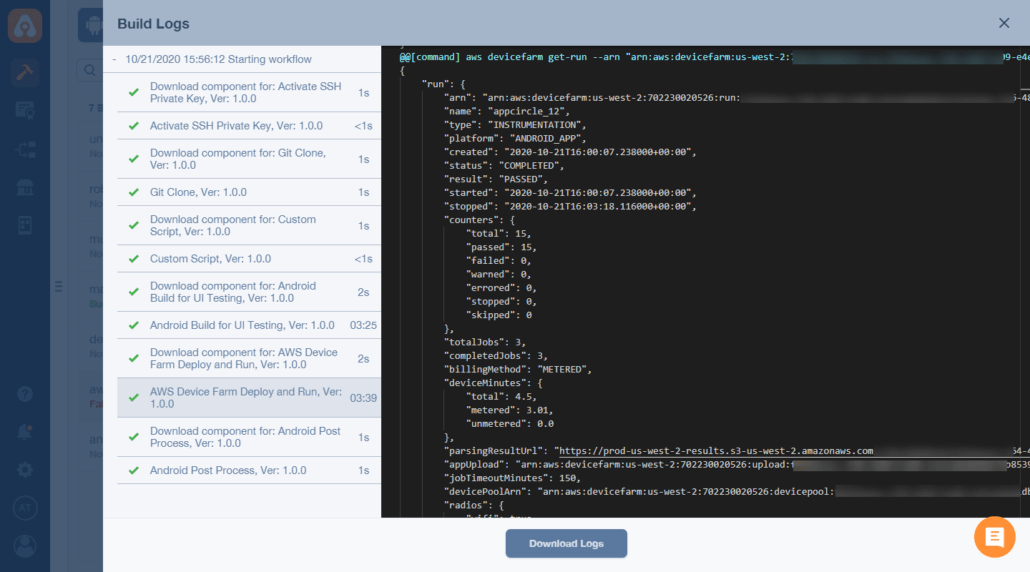
Once the testing process is complete, Appcircle retrieves detailed test reports from AWS Device Farm, including logs, screenshots, and performance metrics.
- Access the test results directly from the Appcircle dashboard for centralized reporting.
- Review crash logs, memory usage, and device-specific behaviors to identify and resolve potential issues.
- Share test reports with your team using Appcircle’s collaborative features to streamline debugging and iteration.
With these insights, you can quickly address issues and ensure your app performs reliably across a wide range of devices and environments.
Scaling Securely with Appcircle’s Private Cloud Options
As mobile app testing grows more complex, ensuring secure and scalable solutions becomes a top priority. Potential challenges include:
- Data Privacy Concerns: Sensitive data may be exposed during testing on public cloud platforms.
- Compliance Requirements: Regulated industries often demand strict adherence to data security protocols.
Appcircle addresses these issues by offering:
- Private Cloud Deployment: Host your testing environment securely within your infrastructure.
- On-Premise Options: Maintain full control over your data by running Appcircle on your servers.
These solutions ensure that your testing operations meet the highest standards of security and compliance.
Conclusion
By integrating Appcircle with AWS Device Farm, developers can automate the entire testing process, reduce manual effort, and ensure consistent results across a wide range of devices. Appcircle’s advanced workflows, secure deployment options, and centralized reporting make it the ideal solution for scaling mobile app testing operations efficiently.

