

How to Enable Slack Notifications for Mobile App Builds with Appcircle
In the fast-paced world of mobile app development, staying updated on build statuses is critical. Integrating Slack notifications into your Mobile CI/CD pipeline not only keeps your team informed but also ensures a seamless workflow. This article explores how Appcircle simplifies Slack notifications for Mobile CI/CD, enhancing communication and efficiency.
Why Slack Notifications Matter in Mobile CI/CD
Effective communication is the backbone of successful development teams. With Mobile CI/CD pipelines running multiple builds daily, teams need:
- Real-Time Updates: Instant alerts for build successes, failures, or pending actions.
- Improved Collaboration: Notifications ensure everyone is aligned, reducing miscommunication.
- Faster Issue Resolution: Developers can act on build errors immediately, minimizing delays.
Without an efficient notification system, crucial updates can go unnoticed, leading to wasted time and resources.
Setting Up Slack Notifications in Appcircle
Appcircle makes it easy to integrate Slack notifications into your Mobile CI/CD pipeline. Here’s how to get started:
1. Connect Your Slack Workspace
- Go to the Appcircle dashboard and navigate to the Notification Settings under your build profile.
- Click Add Notification and select Slack.
- Authorize Appcircle to access your Slack workspace.
2. Customize Notification Rules
• Choose the build events to trigger notifications, such as:
- Build Success
- Build Failure
- Pending Actions
• Configure specific channels or team members to receive notifications.
3. Test and Verify
- Send a test notification from Appcircle to ensure successful integration.
- Adjust notification preferences based on team feedback.
For more information, please visit our technical documentation.
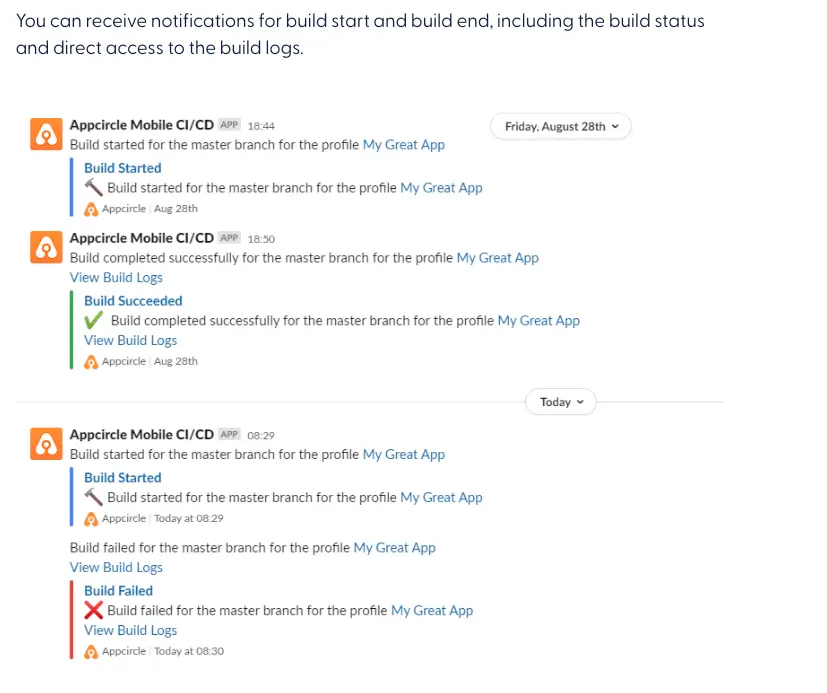
Benefits of Slack Notifications in Mobile CI/CD
- Proactive Monitoring: Developers stay ahead of potential issues with real-time alerts.
- Streamlined Workflow: Team members receive only relevant notifications, minimizing noise.
- Centralized Communication: All build-related updates appear in a single Slack channel, improving accessibility.
For more details, refer to Slack Notification Documentation.
Advanced Use Cases
- Conditional Notifications: Notify specific teams based on the platform (iOS/Android) or build stage.
- Automated Reporting: Schedule daily summaries of build statuses to keep stakeholders informed.
- Error Analysis: Integrate Slack with debugging tools to provide actionable insights with every failed build notification.
Why Choose Appcircle for Slack Integration?
Appcircle goes beyond basic Slack integration by offering:
- Intuitive Setup: No complex scripts or configurations required.
- Custom Workflow Steps: Tailor notifications to your unique CI/CD process.
- Enhanced Security: Appcircle ensures secure communication between Slack and your CI/CD pipeline.
Conclusion
Integrating Slack notifications into your Mobile CI/CD pipeline with Appcircle revolutionizes team collaboration and response times. Stay informed, act swiftly, and maintain an edge in your development workflow.

