
Introducing Test Results for iOS and Android: Simplify Continuous Testing with Appcircle
Why Mobile Unit/UI Testing is a Must for Developers
Let’s face it—mobile app development can be a chaotic process. Code is written, bugs are squashed, features are tested, and everything happens at lightning speed. In the midst of all this, there’s one thing that developers universally agree on: testing is non-negotiable. Whether your team has strict rules about writing tests for every line of code or takes a more relaxed approach, one truth remains: testing is the backbone of creating great software.
But let’s be real. Writing tests is only half the battle. Running them? An entirely different beast. When your project grows and your test suite balloons, running all those tests locally before pushing your code can feel like running a marathon—exhausting, inefficient, and something you dread. That’s where tools like Appcircle swoop in to save the day.
Why Mobile Unit/UI Testing Matters More Than Ever
Unit/UI testing isn’t just about catching bugs—it’s about delivering an amazing user experience. Your users don’t care about your perfectly written backend logic if the app crashes when they try to upload a photo or the UI lags when scrolling. Unit/UI tests ensure that:
- Your app looks and feels great on every device.
- Features work flawlessly, no matter how users interact with them.
- You don’t end up pushing bugs that could’ve been caught with proper testing.
But here’s the kicker: as your app grows, so does the complexity of these tests. And that’s why automating them with a tool is a no-brainer.
Testing Is Essential, But It Doesn’t Have to Be Overwhelming
Testing is your safety net. It ensures your app doesn’t crash when a user clicks that one button you didn’t think they’d press. It guarantees the smooth animations you spent hours perfecting don’t glitch on certain devices. It’s your insurance policy for a seamless user experience.
But here’s the challenge:
- More code means more tests—and more time waiting for results.
- Running your entire test suite on your local machine? Let’s just say your coffee breaks get longer and your frustration grows.
- Analyzing logs to figure out which test failed and why? Time-consuming and tedious.
And yet, testing is non-negotiable. So, how do you keep your sanity? You automate it.
Enter Appcircle: Your Testing Superpower
Appcircle isn’t just another CI tool—it’s the ultimate sidekick for mobile developers. Think of it as the friend who volunteers to do all the heavy lifting so you can focus on the fun part: writing killer code. Here’s how Appcircle changes the game:
1. Leave the Heavy Lifting to CI
Imagine this: You write your code, run a few key tests locally, and when you’re happy, you push it to your Git provider. Now, instead of sitting there running tests for what feels like an eternity, Appcircle’s CI takes over. It automatically runs your tests every time you push, create a pull request, merge a branch, or tag a release.
This means you can spend your time actually coding instead of waiting for tests to finish. It’s like having a personal assistant for your test suite—efficient, reliable, and always on time.
2. See Results, Not Just Logs
Let’s talk about the real magic: Appcircle’s test result visualization. Gone are the days of scrolling through endless build logs, trying to figure out why your tests failed. With Appcircle, you get clean, intuitive dashboards that show you exactly what’s working and what’s not.
Think about how much time you’ll save. Instead of decoding cryptic logs, you can jump straight to fixing issues—and maybe even finish early for the day.
3. Scale Without Stress
The bigger your project, the bigger your test suite. And with a growing team, you’re dealing with multiple branches, features, and code pushes daily. Appcircle scales effortlessly, handling your testing load like a pro. Whether you’re running a quick sanity check or a full regression suite, Appcircle’s got your back.
Why Developers Love Appcircle’s Approach to Testing
Let’s break it down:
1. Saves You Time
With Appcircle, you’re not sitting around running tests manually or combing through logs. You can focus on what really matters: writing great code.
2. Boosts Your Efficiency
Automating your testing pipeline means fewer bottlenecks, faster iterations, and a smoother development process.
3. Gives You Confidence
When Appcircle’s CI runs your tests and gives you the green light, you know your code is solid. No more crossing your fingers during deployment.
4. Makes Collaboration Easier
When everyone on your team follows the same testing pipeline, you get consistency across the board. No surprises, no last-minute issues.
Introducing: Test Results for iOS and Android
With Appcircle, you can now view summarized and detailed reports of your test results directly on the dashboard:
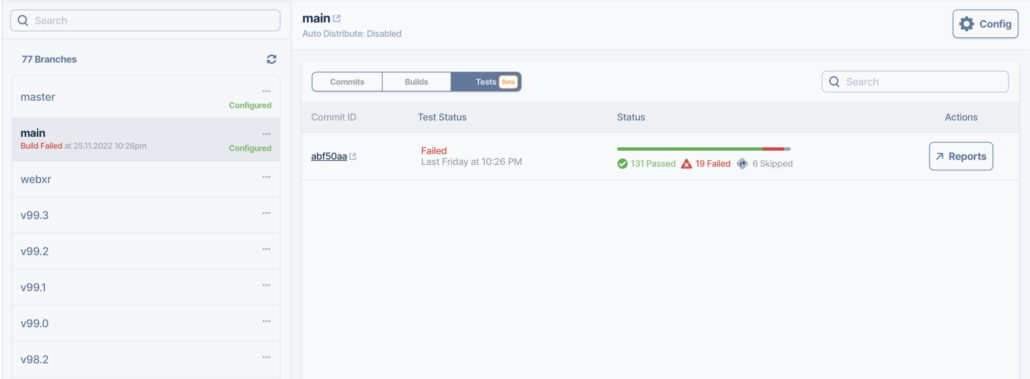
And click Reports to see a detailed breakdown of your tests:
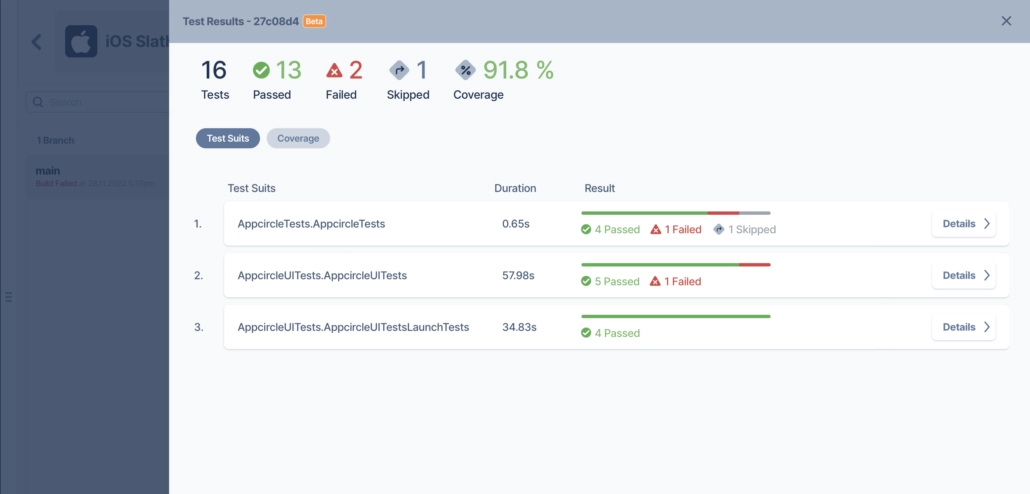
Full breakdown and coverage data on Reports Page,
You can go deeper by clicking details on any test suite and see why a test case has failed and the artifacts it produced:
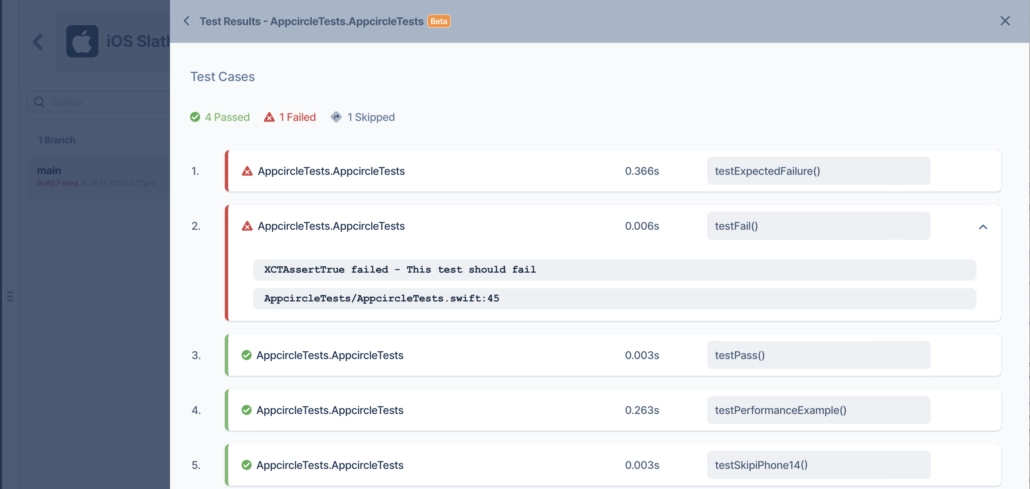
See which cases failed and their artifacts
How to Enable Test Results for iOS Projects
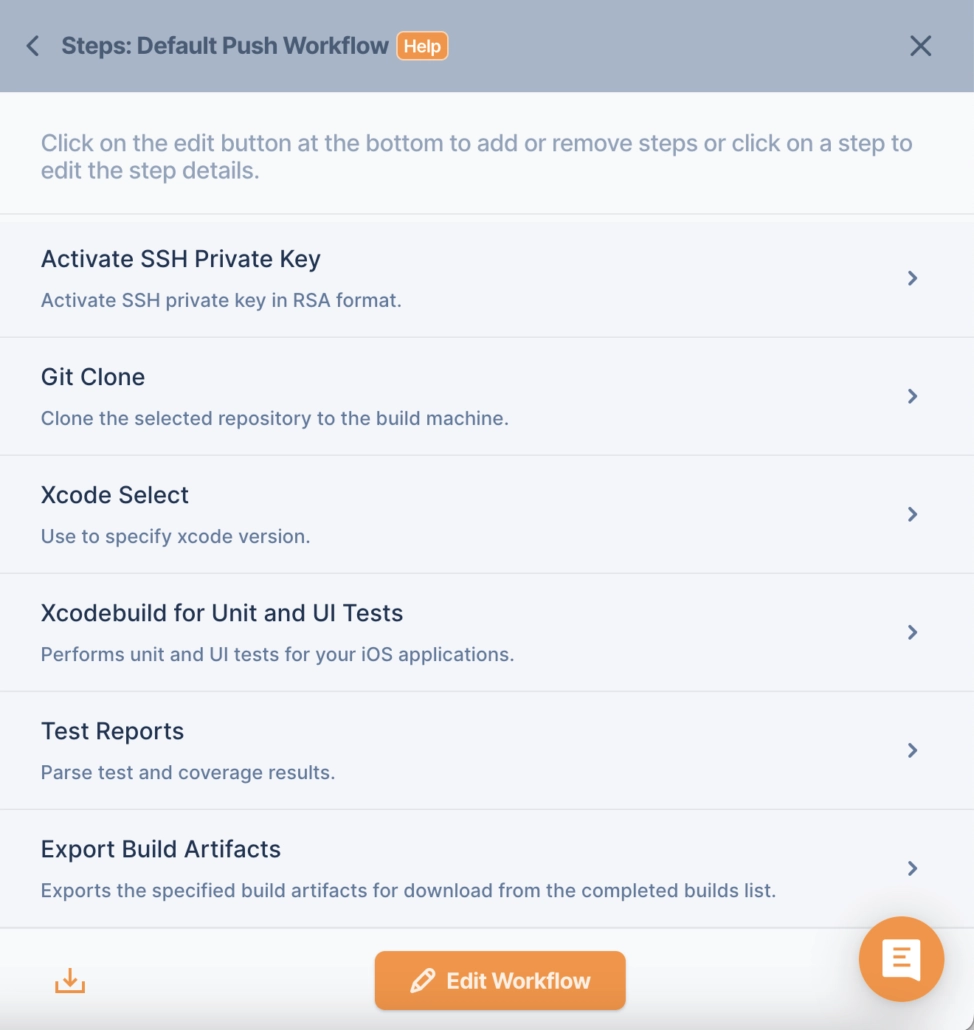
In order to enable this feature in iOS, you need to have 3 steps in your workflows:
- Xcodebuild for Unit and UI Tests
- Test Reports
- Export Build Artifacts
An example workflow:
For a detailed walkthrough on running iOS unit and UI tests, feel free to have a look at the document: Running iOS Unit & UI Tests | Appcircle Documentation
How to Enable Test Results for Android Projects
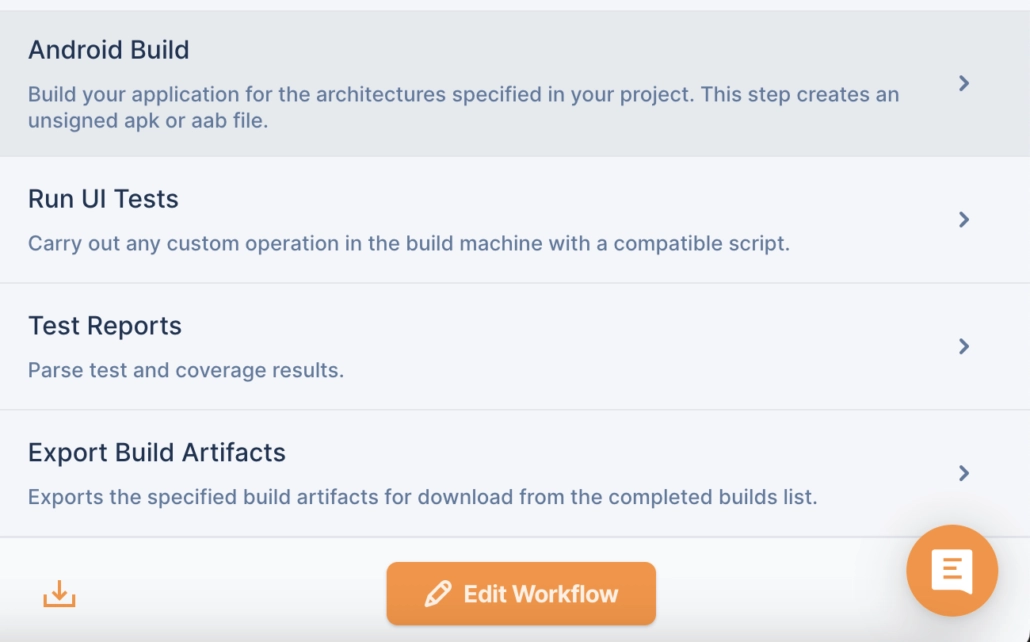
In order to enable this feature on Android, you need to have 3 + 1 optional steps in your workflows:
- Android Build
- Run UI Tests (Optional if you don’t have UI tests)
- Test Reports
- Export Build Artifacts
An example workflow:
For a detailed walkthrough on running Android unit and UI tests, feel free to have a look at the document: Running Android Unit & UI Tests | Appcircle Documentation
Cross-Platform Testing Capabilities
Appcircle supports not only native mobile development platforms but also cross-platform frameworks. With test components and reporting tools tailored for React Native and Flutter, you can ensure a seamless testing process for cross-platform projects as well.
For detailed setup, check out:
Conclusion
Appcircle’s CI expertise combined with robust Continuous Testing (CT) capabilities ensures a smooth integration process for your development workflows. With Appcircle’s test solutions and reporting features, large teams can save significant amounts of time while improving their development cycles.
Thanks to the user-friendly interface, teams can review test reports easily and act on issues directly, making Appcircle a powerful ally in mobile development.
Start simplifying your testing processes today with Appcircle’s advanced testing solutions! 🚀

