

Using Jira for Mobile App Development: Effective Strategies for Issue Tracking and Management
When it comes to project management in software development, Jira is a household name. Known for its robust capabilities, it is the go-to tool for tracking issues, managing bugs, and streamlining tasks throughout the development lifecycle. But what about mobile app development? its flexibility makes it a powerful ally here too.
In this blog, we’ll explore how to use it effectively in mobile app development and how integrating it with Appcircle can supercharge your workflows.
Using Jira Effectively for Mobile DevOps
Managing mobile app projects in Jira can be incredibly efficient—if done right. Here are some tips to help you get the most out of it:
1. Create Separate Projects for Each App
If you’re developing multiple mobile apps, keep things organized by creating separate Jira projects for each one. This ensures that each app’s issues and progress are tracked independently, avoiding unnecessary confusion.
2. Use Labels Wisely
Labels are your best friend when it comes to categorizing and prioritizing tasks. Use consistent, meaningful labels to categorize issues based on factors like priority, severity, or feature type. For example, labels like
UI, backend, or critical can help streamline task tracking.3. Define a Clear Workflow
A clear workflow ensures that issues progress smoothly through the development lifecycle. Define issue types (e.g., bug, task, story), states (e.g., backlog, in progress, completed), and transitions so that your team always knows what’s next.
4. Leverage Agile Boards
Agile boards in Jira are fantastic for visualizing project progress and identifying bottlenecks. Use them to track tasks, assign responsibilities, and monitor progress in real-time.
5. Automate Repetitive Tasks
Jira’s automation features can save you tons of time. Automate tasks like assigning team members or transitioning issue statuses to reduce manual overhead and keep workflows moving smoothly.
Appcircle + Jira: A Perfect Pair
Jira becomes even more powerful when integrated with Appcircle. Appcircle’s integration ensures your CI/CD workflows remain efficient and well-documented, without requiring constant manual intervention.
How to Integrate Jira with Appcircle
Integrating Jira with Appcircle is straightforward. Here’s how it works:
1. Add Jira as a Component: You can integrate it into any step of your Appcircle workflow.
2. Automate Issue Updates: Depending on the build or testing status, Appcircle can automatically:
- Add comments to Jira issues.
- Transition issues to different states.
3. Real-Time Notifications: Keep your team in the loop with instant updates directly in Jira.
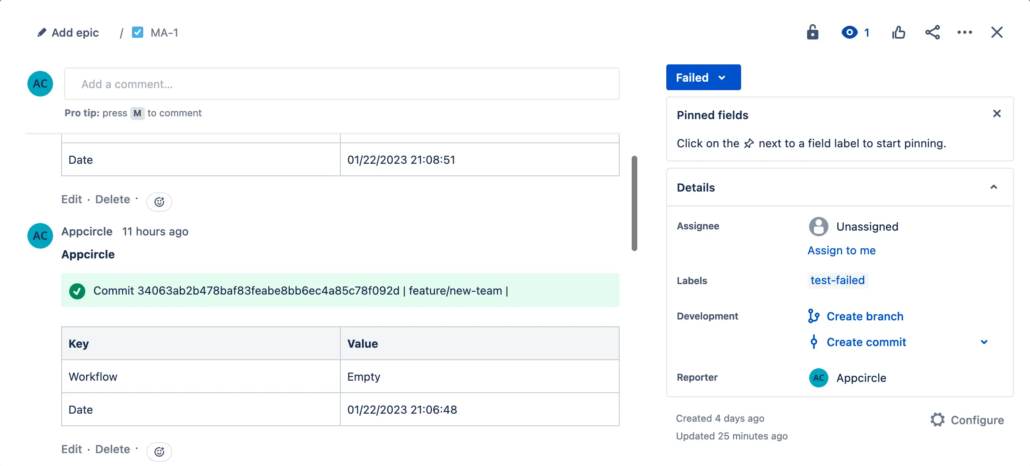
For detailed instructions, check out Appcircle documentation.
Benefits of Appcircle’s Jira Integration
Appcircle’s Jira integration is a game-changer for mobile app development. Here’s how it can elevate your workflows:
- Minimized Manual Updates: Automate issue comments and status changes to reduce manual operations.
- Real-Time Tracking: Keep your team updated on build and development progress instantly.
- Faster Testing Cycles: Automate workflow updates to help QA teams start testing sooner.
- Streamlined CI/CD Workflows: Complete your CI/CD processes with less effort, thanks to automated updates.
Why Should You Integrate Jira with Appcircle?
Let’s face it: manual task tracking is tedious, prone to errors, and often gets overlooked. When developers forget to update Jira, it creates bottlenecks for team leads and project managers, slowing down the entire workflow.
Integrating Jira with Appcircle’s CI/CD platform ensures:
- Improved Productivity: Automation frees up your team to focus on more meaningful work.
- Simplified Task Tracking: Effortlessly track task progress across your team with automated updates.
- Fewer Manual Errors: Automated updates mean fewer mistakes in issue tracking.
- Less Burden on Team Leads: Allow team leads to concentrate on critical tasks instead of chasing updates.
Conclusion
Jira is already a powerhouse for project management, but when combined with Appcircle’s seamless integration, it becomes a productivity powerhouse. By automating issue updates, transitions, and notifications, you can keep your team aligned, accelerate development cycles, and deliver high-quality apps faster.
If you’re ready to simplify your mobile app development process and supercharge your workflows, integrate Jira with Appcircle today. It’s a smarter, faster way to keep your projects on track and your team focused on what matters most—building amazing apps.

