

What’s New in UIKit
Hello technology lovers, in this article, we will look at the innovations in the UIKit framework, which is still the apple of Apple’s eye and many big companies continue to use. UIKit continues to grow unabated. Here are the most notable features of UIKit.
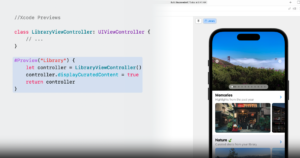
Preview for UIKit
The Preview feature, which many Apple application developers love, is now available with Xcode 15 and iOS 17. We saw this feature when SwiftUI was first introduced. Finally, its development in UIKit is complete. In this way, you will be able to see your interface improvements in real time with a simple code block.
New life-cycle (viewIsAppearing)
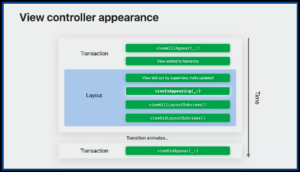
Added a lifecycle that saves us from a dead end paradox: viewIsAppearing. Most of us are familiar with the viewWillAppear(called just before the controller is displayed), viewDidAppear(called just after the controller appears) methods. Now, viewIsAppearing method is the most suitable method for updating view elements. The viewIsAppearing method is called just after viewWillAppear, just before viewDidAppear.
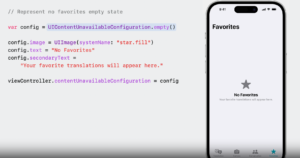
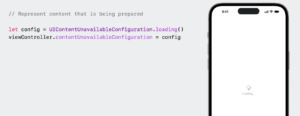
Processing of Empty States (UIContentUnavailableConfiguration)
Another new feature that powers UIKit: UIContentUnavailableConfiguration. You know, in our applications, we design blank views while there is no data on some screens in our application. Apple has not indifferent to this problem. You can design blank view screens very easily by creating the UIContentUnavailableConfiguration class.
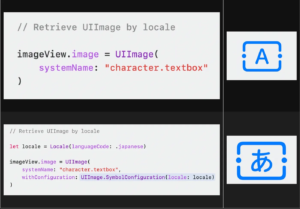
Retrieve UIImages by locale
With iOS 17, we will be able to use system icons more generically. By entering the current country’s settings in the UImageView class, we will now be able to get dynamically changing icons. In this way, you can create a sense of familiarity and belonging for users around the world.
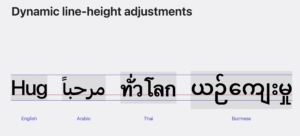
Dynamic line-height adjustments
Font metrics encompass various terms that describe the characteristics of a font. The baseline acts as an imaginary reference line with letters or words on it, while the line height indicates the vertical spacing between these baselines. The x-height, on the other hand, represents a line that sits on lowercase letters.
Apple now calculates rows dynamically to fix this issue. Although this seems very simple, separate processes are carried out for many languages in the background. The problem that we frequently encounter in languages such as Arabic, Chinese, Japanese and Korean disappears with iOS 17.
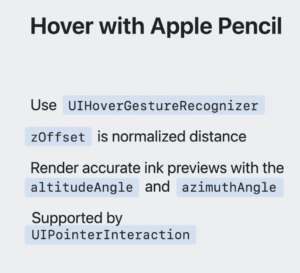
Hover with Apple Pencil (UIPointerInteraction)
Hovering can navigate the toolbar icons on the home screen and in apps. If you are using UIPointerInteraction, no additional adoption is required. It’s worth noting, however, that the visual interactions between the mouse or trackpad input and the Apple Pencil input are slightly different. For example, pointer styles such as system pointer are not visible when using Apple Pencil.
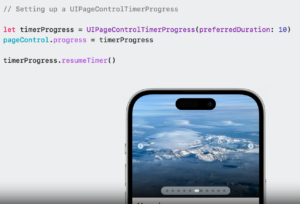
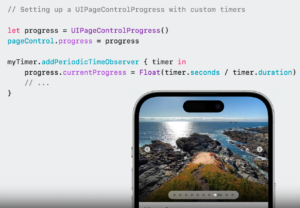
TimerProgress in UIPageControl (UIPageControlTimerProgress)
We all know how much Apple cares about application experience and animations. Some simple details win the hearts of users, remember the Pareto Law. UIPageControl has a timer feature and an animated flow that progresses during the time you give.
We have come to the end of another article. UIKit is now more powerful than ever. If you want to learn about many more features, you can watch Apple’s UIKit Session content.
To stay updated with upcoming posts about Apple sessions, be sure to subscribe to our newsletter below.
See you in our next article!

