
iOS Code Review Practices for Efficient Pull Requests
In the fast-moving world of software development, effective practices for iOS code reviews are just as important as hitting those tight deadlines. For iOS developers, adopting efficient pull request (PR) practices can significantly reduce errors, enhance collaboration, and accelerate deployment cycles. By leveraging automation tools integrated with Appcircle, teams can streamline their workflows, maintain high standards, and deliver faster. This article highlights the top 10 tools and practices that make iOS code reviews seamless and efficient.
Danger
What is Danger?
In development processes, it is essential to have specific PR rules to minimize complexity and time loss. With these rules in place, a significant amount of time can be saved during the review process by ensuring all requirements are met before proceeding. Danger automates code reviews by providing actionable feedback on PRs based on rules defined in a Dangerfile. It ensures that every PR meets the team’s standards before merging, reducing manual effort and improving collaboration.
Example Use Cases:
- Ensuring PRs include descriptive titles and changelog entries.
- Flagging large PRs that exceed a specific line count.
- Highlighting files missing unit tests or documentation.
- Customizing feedback messages for team workflows.
Danger plays a key role in efficient iOS code review by automating feedback and enforcing best practices.
For more information about Danger, please visit our technical documentation.
SwiftLint
What is SwiftLint?
Code readability is one of the key parameters in development processes. Unused variables and lines exceeding character limits are among the most time-consuming issues during PR processes. SwiftLint enforces Swift coding style and conventions, helping maintain a consistent codebase. It detects both stylistic issues and potential programmatic errors early in development, ensuring adherence to team standards.
Example Use Cases:
- Detecting unused variables or force unwrapping in code.
- Enforcing custom team-specific style guides via .swiftlint.yml configurations.
- Breaking builds on severe violations to maintain code quality.
By identifying coding issues early, SwiftLint ensures higher-quality iOS code reviews and consistent standards.
For more information about SwiftLint, please visit our technical documentation.
Xcodebuild for Unit and UI Testing
What is Xcodebuild for Unit and UI Testing?
A completed PR undergoes detailed testing during the build phase through unit and UI tests. This allows any overlooked issues during the PR process to be easily identified, ensuring the release of a more stable version.
The Xcodebuild for Unit and UI Testing step in Appcircle automates testing for iOS apps using the xcodebuild command. It generates detailed .xcresult files, helping developers catch bugs and regressions early in the cycle.
Example Use Cases:
- Running tests for every PR to catch regressions.
- Testing specific OS versions to replicate production environments.
- Integrating test results into dashboards for visibility.
Robust testing workflows ensure comprehensive iOS code reviews by validating functionality and preventing regressions.
For more information about Xcodebuild Unit and UI Testing, please visit our technical documentation.
SonarQube
What is SonarQube?
For companies with multiple teams handling diverse tasks, code analysis is one of the most critical criteria. Metrics such as: Are there any security vulnerabilities? Has a potentially error-prone development been implemented? Does the code involve excessive complexity? need to be thoroughly analyzed.
SonarQube performs static code analysis to identify bugs, code smells, and vulnerabilities. Integrated with Appcircle, it helps maintain high standards of code quality and reliability.
Example Use Cases:
- Identifying security vulnerabilities in Swift code.
- Enforcing code quality gates to block subpar code.
- Monitoring code complexity and maintainability metrics.
SonarQube’s insights drive efficient iOS code reviews by ensuring maintainable and secure codebases.
For more information about SonarQube, please visit our technical documentation.
Test Reports for iOS
What are Test Reports for iOS?
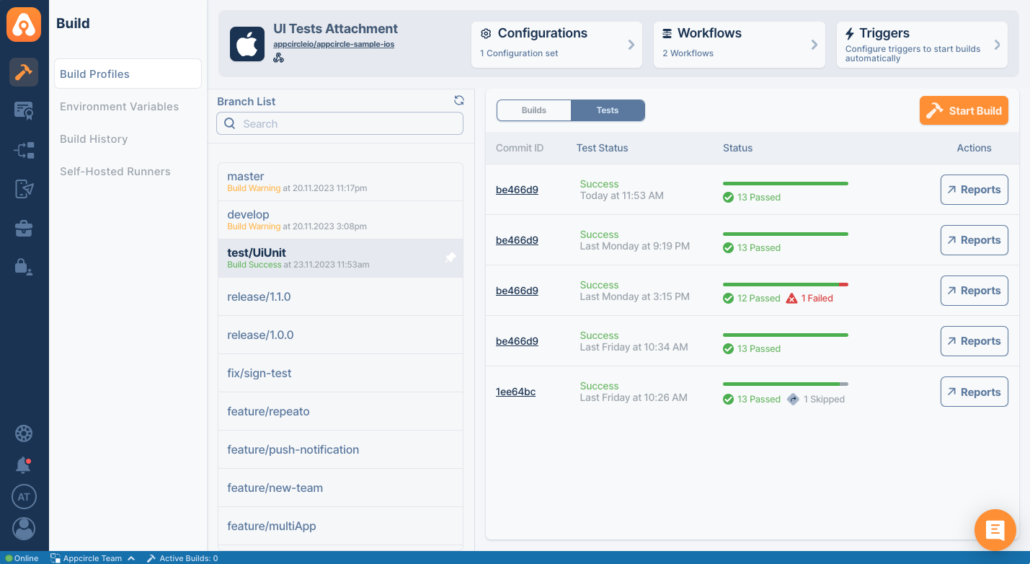
After a development is completed and its PR processes are finalized, the project’s tests are run to check for any errors or mistakes. The results of these tests should be compiled into a report and thoroughly reviewed before proceeding with physical tests. The Test Reports for iOSstep in Appcircle processes test results and generates detailed reports. These reports provide insights into test coverage, making it easier to debug and improve code quality.
Example Use Cases:
- Sharing test summaries with the team.
- Highlighting failed tests for faster debugging.
- Generating user-friendly reports for audits.
Detailed test reports enhance iOS code review by making test results accessible and actionable.
For more information about Test Report for iOS, please visit our technical documentation.
iOS Increment Build and Version Number
What is iOS Increment Build and Version Number?
In application release and testing processes, multiple packages can be released within the same day, each serving a different purpose. Therefore, version tracking is crucial. Implementing version management for each PR will minimize this confusion. Managing version numbers and build codes is fundamental to app development.
The iOS Increment Build and Version Number step in Appcircle automates this process, ensuring that each build is assigned a unique version code and name. This prevents versioning conflicts and simplifies release management in CI/CD pipelines.
Example Use Cases:
- Incrementing the build number after each CI pipeline execution.
- Automatically updating the version name before publishing to the App Store.
- Reducing human errors in versioning through automation.
- Maintaining consistency across environments (e.g., staging, production).
Efficient iOS code review relies on consistent build versions to prevent errors and ensure smooth workflows.
For more information about iOS Increment Build and Version Number, please visit our technical documentation.
Add Badge to App Icon
What is Add Badge to App Icon?
After a PR is approved, the associated development or bug fix must be thoroughly tested. However, in large teams, testing and release processes can become highly complex. As a result, testers may occasionally get confused about which specific package they are testing. Additionally, this situation might be managed continuously within the project itself.
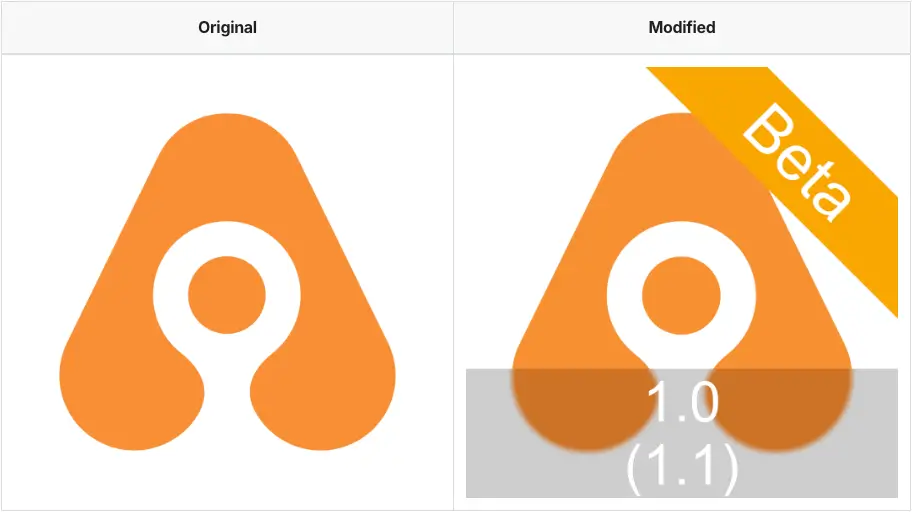
The Add Badge to App Icon step in Appcircle visually differentiates app builds by overlaying badges on app icons. This is essential for distinguishing environments (e.g., staging vs. production) or build statuses (e.g., beta, release candidate).
Example Use Cases:
- Adding “Beta” badges to staging environment builds.
- Customizing app icons for specific environments.
- Preventing accidental deployment of production apps during testing.
Clear visual cues enhance iOS code review by avoiding deployment mistakes and streamlining testing processes.
For more information about Add Badge to App Icon, please visit our technical documentation.
File Size Check
What is File Size Check?
Binary size is one of the crucial parameters in PR processes. A developer on the team might unknowingly increase the binary size by integrating a third-party library that connects to other services. The File Size Checkstep validates the size of build artifacts, ensuring apps meet size constraints for better user experiences and download speeds.
Example Use Cases:
- Preventing oversized builds from being deployed.
- Highlighting unnecessary file additions in PRs.
- Generating size reports for optimization.
File size checks prevent potential issues during iOS code review by maintaining optimal app performance.
For more information about File Size Check, please visit our technical documentation.
Publish Release Notes
What is Publish Release Notes?
The Publish Release Notesstep automates the generation of release documentation by extracting commit messages or changelogs. It ensures consistency and accuracy across updates.
Example Use Cases:
- Generating release notes automatically from commit messages.
- Including notes in build artifacts for external sharing.
- Standardizing the format of release documentation.
Clear and consistent release notes support iOS code review by improving transparency and collaboration.
For more information about Publish Release Note, please visit our technical documentation.
Issue Tracking
What is Issue Tracking?
Issue tracking is the process of monitoring, managing, and resolving bugs, or feature requests and much more. It helps teams stay aligned, keep track of progress, and stay on top of responsibilities across different projects.
Jira Comment Integration
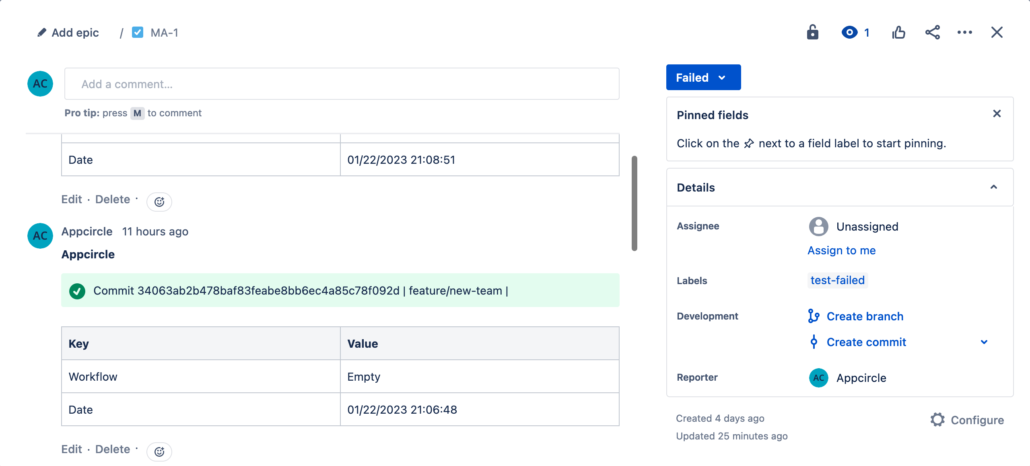
The Jira Comment step integrates with workflows to automatically post updates to Jira issues. It improves traceability and collaboration by linking relevant details to corresponding tickets.
Example Use Cases:
- Posting build status updates to Jira issues.
- Adding test results or deployment links to task descriptions.
- Improving tracking of code changes and project management tools.
Automated Jira updates enhance iOS code review by improving communication and tracking. Additionally, Appcircle supports Azure Boards, allowing you to integrate its component to update related developments.
For more information about Jira Comment, please visit our technical documentation.
Conclusion
Efficient pull requests and robust code reviews form the backbone of successful iOS development workflows. Tools like SwiftLint, Danger.js, and SonarQube automate repetitive tasks, while features such as Test Reports for iOS and Add Badge to App Icon ensure seamless processes from code to deployment. By integrating these practices into Appcircle’s workflows, teams can focus on innovation, reduce errors, and achieve faster delivery cycles.
For more iOS Specific step, please visit our iOS Integrations documentations.

