

How to Use Environment Variables with Gradle
In mobile app development, two critical components stand out: Gradle, the backbone of Android builds, and environment variables, which ensure flexibility and security. In this blog post, we’ll walk you through how to use environment variables with Gradle, helping you streamline your Android development process in a secure and efficient way.
Enabling Environment Variables in Gradle
Gradle simplifies the integration of environment variables for Android projects, allowing developers to configure variables at the module level. This capability is particularly useful in modern Android CI/CD workflows, where automation and flexibility are essential for managing builds across multiple environments.
For instance, you can define environment variables in the
build.gradle file:android {
compileSdkVersion 34
defaultConfig {
applicationId "com.example.appcircle_sample_android"
minSdkVersion 21
targetSdkVersion 34
versionCode 1
versionName "1.0.0"
buildConfigField "String", "APPCIRCLE_API_URL", "\"${System.env.AC_API_URL}\""
}
buildTypes {
release {
minifyEnabled false
proguardFiles getDefaultProguardFile('proguard-android-optimize.txt'), 'proguard-rules.pro'
}
}
}During the build, Gradle generates a
buildConfig class, making these variables accessible at runtime. For example:TextView appVersionTextView = findViewById(R.id.appVersionTextView);
String apiUrl = BuildConfig.APPCIRCLE_API_URL;
appVersionTextView.setText("API URL: " + apiUrl);By integrating environment variables into Gradle, you can enhance the adaptability and security of your Android projects. However, managing these variables manually can still be time-consuming and prone to errors, especially in complex CI/CD workflows. This is where Appcircle steps in to provide a more streamlined approach.
Understanding Gradle Files
Gradle projects rely on multiple files, each serving a specific function to ensure a seamless build process. Here’s an overview of these files and their roles:
- The Gradle Wrapper Properties (
gradle-wrapper.properties) File
This file specifies properties like
distributionUrl, indicating which version of Gradle should be used for the project.- The Gradle Settings (
settings.gradle) File
Located in the root directory, this file defines project-level repository settings and specifies which modules should be included in the final build. It is essential for multi-module projects.
- The Top-Level Build (
build.gradle) File
Found in the root directory, this file defines configurations shared across all modules, such as plugin versions.
- The Module-Level Build (
build.gradle) File
Each module in the project contains a module-specific build file, which allows for customized build settings, including additional build types or product flavors.
Understanding Appcircle Environment Variables
Environment variables in Appcircle are essential tools that help you customize and secure your workflows. They store data like API keys, project paths, and app configurations, making workflows more dynamic and flexible without hardcoding sensitive information.
Types of Environment Variables:
- System-Defined Variables: Predefined variables (e.g.,
AC_PROJECT_DIR) that simplify access to common settings. - User-Defined Variables: Custom variables you can create for project-specific needs.
- Secrets: Securely store sensitive data like tokens and passwords, hidden from logs.
Why Use Environment Variables?
- Security: Protect sensitive information by storing it securely.
- Flexibility: Easily switch between environments (development, staging, production).
- Efficiency: Avoid changing code for different setups and reduce errors.
How to Use Environment Variables in Appcircle:
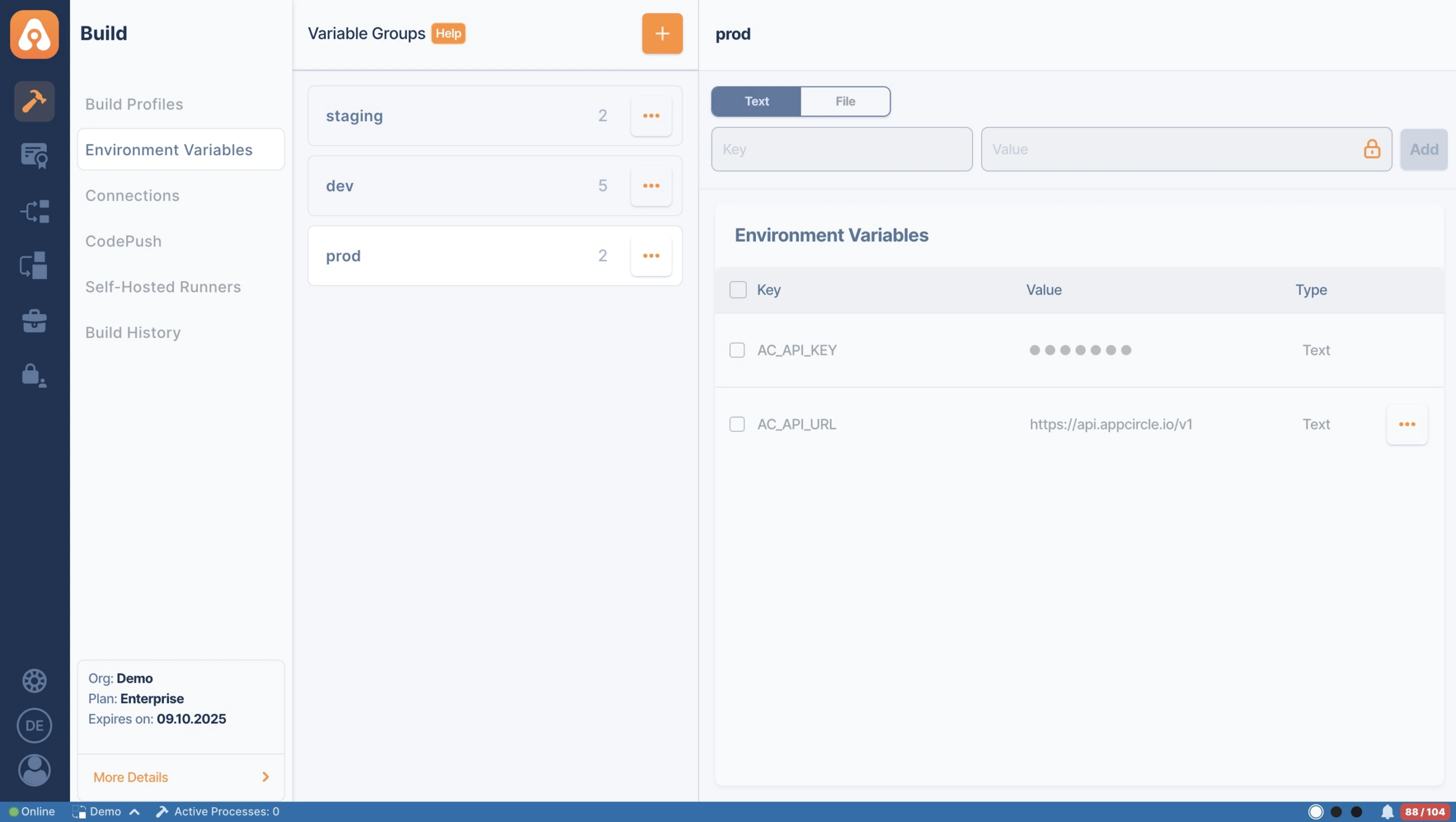
- Define variables in the Environment Variables section in Appcircle.
- Use
$VARIABLE_NAMEin your scripts to access their values. - Integrate them into workflows for dynamic configurations.
Best Practices:
- Use clear names (e.g.,
AC_API_URL). - Keep secrets secure by using Appcircle’s encryption.
- Avoid overcomplicating workflows with unnecessary variables.
By leveraging environment variables, you can make your Appcircle workflows more secure, efficient, and adaptable.
Gradle Automation with Appcircle
Appcircle takes Gradle-based Android development a step further by automating key tasks like building, testing, and deploying applications. With its seamless integration of environment variables, Appcircle eliminates the need for manual configurations, making your workflow faster and more efficient.
Key Benefits of Gradle Automation with Appcircle
- Seamless Environment Variable Integration
Appcircle securely handles environment variables for development, staging, and production.
- Improved Workflow Automation
Developers can easily set up Gradle tasks and custom builds using an intuitive interface.
- Faster CI/CD Pipelines
Appcircle accelerates development cycles with automated processes, error reduction, and instant app previews.
For more information, check the following documentation:
- Gradle Runner Workflow Steps
- Building Android Applications with Gradle
- Managing Java_HOME in Gradle
- Gradle Cache Push Workflow


Conclusion
Combining Gradle and environment variables creates a robust foundation for Android development. Appcircle further enhances this synergy by automating complex workflows, improving efficiency, and securely managing sensitive data. As an enterprise-grade mobile CI/CD platform, Appcircle empowers developers to streamline processes, reduce errors, and accelerate the delivery of high-quality apps across various environments.
FAQs
1. What Is Gradle?
Gradle is an open-source build system widely used for Java, Android, and Kotlin projects. As defined by Gradle.org:
“From mobile apps to microservices, from small startups to big enterprises, it helps teams deliver better software, faster.”Essentially, Gradle serves as a “chef,” combining code, resources, and libraries into a “recipe” that produces a fully functional application. Without build tools like Gradle, developers would need to handle these processes manually, increasing effort and error risk.
2. What are the benefits of Gradle?
- Build Anything: Gradle supports multiple languages, such as Java, Kotlin, and C++, and can handle diverse platforms and project structures.
- Automate Everything: With extensive tools and plugins, Gradle automates the entire development pipeline, from building to deploying.
- Deliver Faster: Features like caching and smart compiling optimize build times, allowing developers to release updates quickly.

