

Posts

Automate Your Mobile Code Reviews with Danger CI

Automate Your Mobile Code Reviews with Danger CI

In the fast-paced world of mobile app development, ensuring code quality is a critical yet time-consuming task. Code reviews play a pivotal role in identifying issues, maintaining code standards, and avoiding costly mistakes. However, manual reviews often fall short in covering all aspects consistently. Enter Danger CI: a tool designed to streamline and automate mobile code reviews within your CI/CD pipeline.

Why Automate Mobile Code Reviews?

Manual code reviews, while essential, have their limitations:
  • Inconsistency in Standards: Different team members may focus on varying aspects of the code.
  • Time-Consuming: Reviewing code line-by-line for every pull request slows down development cycles.
  • Missed Opportunities: Minor but important checks, such as code formatting or dependency updates, are often overlooked.
For mobile development, where frameworks like Swift, Kotlin, and React Native are frequently updated, keeping up with best practices becomes an added challenge.
Automation tools like Danger CI address these pain points by performing routine checks, ensuring compliance with coding standards, and freeing up developers to focus on more complex issues.

How Danger CI Works in Mobile CI/CD Pipelines

Danger CI integrates seamlessly into your CI/CD workflows to automate routine checks during the pull request process. Here’s what it brings to the table:
  1. Automated Static Checks: Ensures proper code formatting, naming conventions, and file structure alignment.
  2. Pull Request Validation: Verifies critical details such as whether tests were updated or if documentation changes align with the code.
  3. Custom Rules Implementation: Allows teams to define specific rules, such as preventing the addition of certain deprecated APIs or libraries.
  4. Pre-Merge Confidence: Developers can catch errors before merging, reducing post-deployment issues.
For example, Danger CI can be configured to flag large pull requests, untested code changes, or missing comments.

Implementing Danger CI with Appcircle

Appcircle makes integrating Danger CI into your workflows a breeze. Here’s how you can get started:

1. Set Up Danger in Your CI/CD Pipeline

  • Install Danger in your mobile project by adding it as a dependency in your Gemfile (for Ruby-based setups) or using the appropriate package manager for your stack.
  • Configure a Dangerfile to define rules tailored to your team’s coding standards and practices.

2. Leverage Appcircle’s Workflow Automation

  • Use Appcircle’s workflow editor to add a custom script step that triggers Danger CI during the build or testing phases.
  • With Appcircle’s pre-configured environments, setting up and running Danger CI checks requires no additional infrastructure.

3. Monitor and Act on Results

  • Danger CI results are accessible directly from your Appcircle build logs, providing actionable insights for your pull requests.
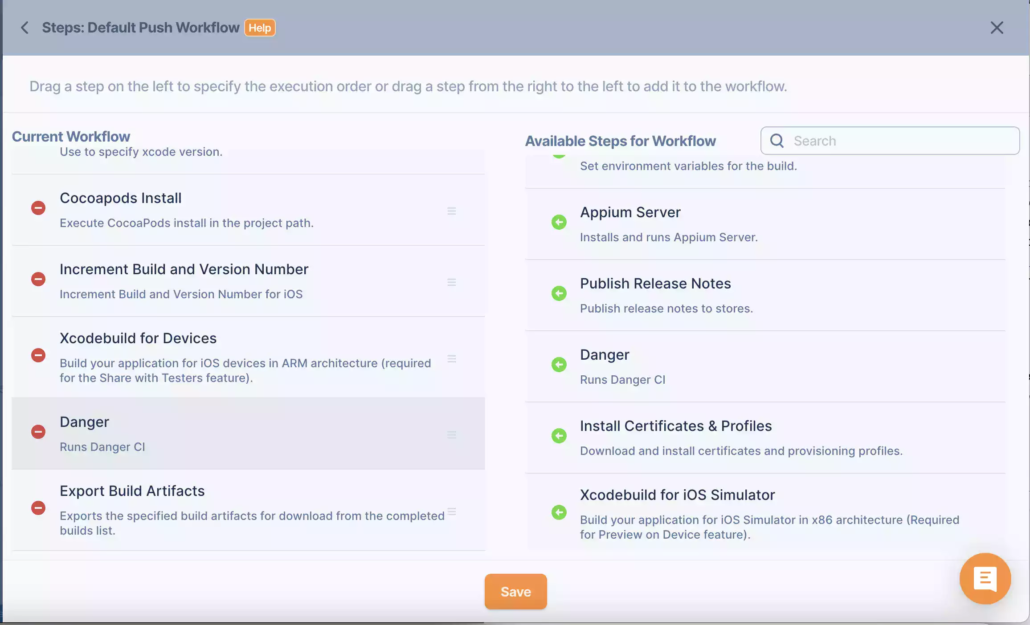
Automate Your Mobile Code Reviews with Danger CI

For more details, you can visit the documentation page for Danger Integration.

Why Combine Danger CI with Appcircle?

Danger CI automates code reviews, but pairing it with Appcircle enhances its utility:
  • Streamlined Workflow Management: Appcircle’s graphical workflow editor eliminates the need for complex YAML configurations.
  • Pre-configured CI/CD Runners: Reduce setup time with Appcircle’s pre-configured environments for mobile development.
  • Enhanced Collaboration: Appcircle’s integration capabilities ensure that Danger CI seamlessly fits into your existing CI/CD pipeline.

Real-World Benefits of Automating Mobile Code Reviews

  • Reduced Review Time: Focus your team’s efforts on critical code logic rather than repetitive checks.
  • Improved Code Quality: Ensure all pull requests meet your project’s coding standards.
  • Faster Releases: Accelerate deployment cycles by catching errors early in the development process.

Conclusion

Incorporating Danger CI into your CI/CD pipeline is a game-changer for mobile app development teams. By automating code reviews, Danger CI ensures consistency, saves time, and maintains high-quality codebases. When paired with Appcircle, you unlock a streamlined workflow tailored for mobile CI/CD, enabling faster, error-free deployments.
How to do code reviews?

Code review is one of the most important steps in developing software. It’s the process which written code is being reviewed and corrected by other developers.

The main goal of code reviews is to catch problems that will lower the quality of the code. Other goals that make code reviews important are:

  1. Better quality code
  2. Checking code for better performance and security
  3. Educating developers and exchange of knowledge
  4. Increase responsibility of both parties, reviewer and developer
  5. Finding new and better solutions
  6. Make code comply with QA guidelines and ISO/IEC standards

You can detect errors in code earlier with a proper code review process. They also streamline the code styling and makes sure that every piece of written code is within the defined code style.

On the contrary, a bad executed code review process leads to time and effort loss, resulting on a bad impact on developer and the product.

To avoid the bad execution and focus on value, here are a few principles you can apply with your team:

Principles on how to do code reviews

1. Be kind and respectful

Don’t forget that a human and a member of your team wrote the code you’re reviewing. To keep the communication health within your team, you have to be respectful and kind to others. One way to do this is to make sure you criticise only the code, and not the person who wrote it. The same applies to your code as well. If somebody else is criticising your code, don’t take it personally.

Bad example: “It’s clear that concurrency won’t do any good here. Why did you use multi-thread here?”

Good example: “Concurrency choice here, as far as I can see, doesn’t provide a real benefit on performance and it complicates the system. Since there isn’t a performance benefit, I think using a single-thread solution would be better option.”

2. Clearly indicate why

When advising what to do, always state the reason. This way the author of the code would understand the subject and why you want the change. This also helps the authors to improve themselves. If you don’t state reasons, the team will halt developing their own thinking and start apply everything you tell them, no questions asked.

3. Find the balance

It’s the author’s job to improve the code after it’s reviewed. But code reviews are not just comments on code, they also direct and support the author. Sometimes a simple comment would suffice, but there are cases where you need to clearly explain the things that need to be done, or maybe write the code yourself.

Finding the balance here is important. If you intervene and write the code yourself on all reviews, the author might get offended. If it’s a complicated subject in contrast to the author’s skills and you refrain from writing the code, you might delay the product development.

In short, get involved when you must, and keep the balance.

4. Be democratic

In a democratic code review process, everybody’s code gets reviewed. It’s not just the team leads reviewing other’s code, but others reviewing the team lead’s code as well.

In other words, experience, title and position shouldn’t alter the process. Everybody can make mistakes. The more eyes on code, the higher chance to spot mistakes early on. Detecting errors as a team is all that matters.

5. Be brave

Within a democratic code review process, a junior developer (1-3 years of experience) may find herself reviewing a senior developer’s (10+ years of experience) code. In this case the experienced should not lose themselves to their ego and encourage the less experienced. Less experienced should feel encouraged about making comments on mistakes of more experienced. If they refrain from calling out mistakes, fixing them later would cause bigger problems.

6. Ask questions and explain

Don’t hesitate to ask questions. Asking questions may mean that the code written isn’t very clear to another person. This is fine, and may require explanation. When making changes after the first review, you might want to explain the solution inside the code as a comment so that other reviewers might see why and what you changed on their reviews. Comments on code review tools will be forgotten, so keep a balance on what needs to be explained for future reference.

7. Emphasize the positive

You shouldn’t focus only on mistakes. Always look for good and comment on them as well. A simple praise or a thank you impacts the author more than you think.

“Nice catch!”

“I didn’t know this method existed. Very useful. Thank you!”

“I’ll implement like this from now on. This is more clear and concise.”

8. As long as it takes

You must not rush code reviews. It should last until the very last comments are handled and closed. Not fixing things because a deadline is approaching, or not having discussions on a piece of code that might benefit the attention leads to more serious problems in the future. Fixing mistakes in production or after a release is more expensive.

Last thoughts

Code review processes are shaped based on the team and the company’s dynamics. These principles I listed above are subject to change, and they should be tweaked. Creating a culture together with your team and not sacrificing code quality is what’s important.

May your code be the highest of quality, and your life full of joy…

Sources