
Automate Your Mobile Code Reviews with Danger CI
In the fast-paced world of mobile app development, ensuring code quality is a critical yet time-consuming task. Code reviews play a pivotal role in identifying issues, maintaining code standards, and avoiding costly mistakes. However, manual reviews often fall short in covering all aspects consistently. Enter Danger CI: a tool designed to streamline and automate mobile code reviews within your CI/CD pipeline.
Why Automate Mobile Code Reviews?
Manual code reviews, while essential, have their limitations:
- Inconsistency in Standards: Different team members may focus on varying aspects of the code.
- Time-Consuming: Reviewing code line-by-line for every pull request slows down development cycles.
- Missed Opportunities: Minor but important checks, such as code formatting or dependency updates, are often overlooked.
For mobile development, where frameworks like Swift, Kotlin, and React Native are frequently updated, keeping up with best practices becomes an added challenge.
Automation tools like Danger CI address these pain points by performing routine checks, ensuring compliance with coding standards, and freeing up developers to focus on more complex issues.
How Danger CI Works in Mobile CI/CD Pipelines
Danger CI integrates seamlessly into your CI/CD workflows to automate routine checks during the pull request process. Here’s what it brings to the table:
- Automated Static Checks: Ensures proper code formatting, naming conventions, and file structure alignment.
- Pull Request Validation: Verifies critical details such as whether tests were updated or if documentation changes align with the code.
- Custom Rules Implementation: Allows teams to define specific rules, such as preventing the addition of certain deprecated APIs or libraries.
- Pre-Merge Confidence: Developers can catch errors before merging, reducing post-deployment issues.
For example, Danger CI can be configured to flag large pull requests, untested code changes, or missing comments.
Implementing Danger CI with Appcircle
Appcircle makes integrating Danger CI into your workflows a breeze. Here’s how you can get started:
1. Set Up Danger in Your CI/CD Pipeline
- Install Danger in your mobile project by adding it as a dependency in your
Gemfile(for Ruby-based setups) or using the appropriate package manager for your stack. - Configure a
Dangerfileto define rules tailored to your team’s coding standards and practices.
2. Leverage Appcircle’s Workflow Automation
- Use Appcircle’s workflow editor to add a custom script step that triggers Danger CI during the build or testing phases.
- With Appcircle’s pre-configured environments, setting up and running Danger CI checks requires no additional infrastructure.
3. Monitor and Act on Results
- Danger CI results are accessible directly from your Appcircle build logs, providing actionable insights for your pull requests.
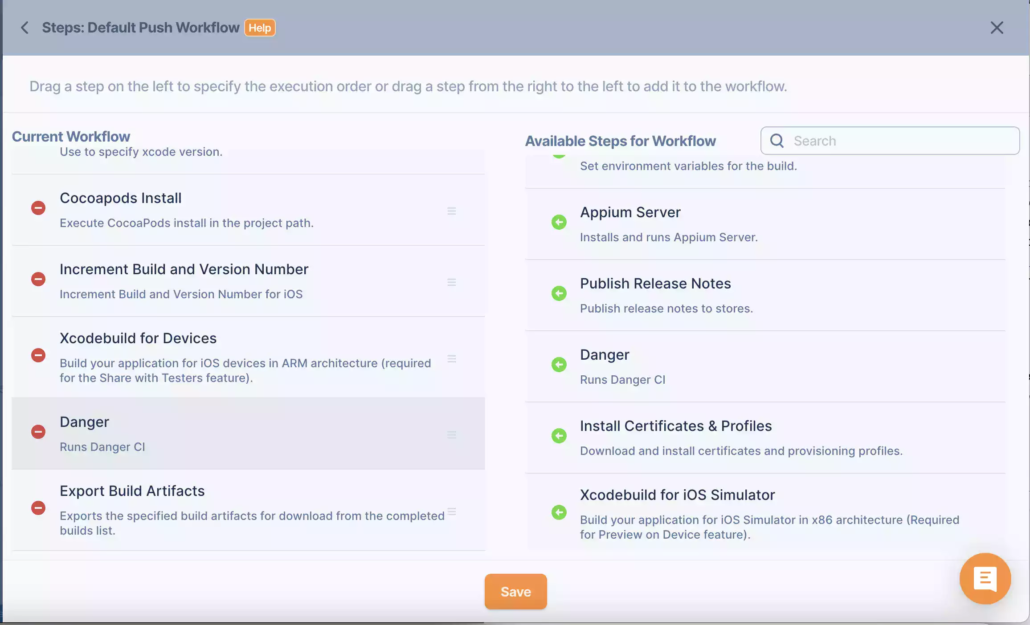
For more details, you can visit the documentation page for Danger Integration.
Why Combine Danger CI with Appcircle?
Danger CI automates code reviews, but pairing it with Appcircle enhances its utility:
- Streamlined Workflow Management: Appcircle’s graphical workflow editor eliminates the need for complex YAML configurations.
- Pre-configured CI/CD Runners: Reduce setup time with Appcircle’s pre-configured environments for mobile development.
- Enhanced Collaboration: Appcircle’s integration capabilities ensure that Danger CI seamlessly fits into your existing CI/CD pipeline.
Real-World Benefits of Automating Mobile Code Reviews
- Reduced Review Time: Focus your team’s efforts on critical code logic rather than repetitive checks.
- Improved Code Quality: Ensure all pull requests meet your project’s coding standards.
- Faster Releases: Accelerate deployment cycles by catching errors early in the development process.
Conclusion
Incorporating Danger CI into your CI/CD pipeline is a game-changer for mobile app development teams. By automating code reviews, Danger CI ensures consistency, saves time, and maintains high-quality codebases. When paired with Appcircle, you unlock a streamlined workflow tailored for mobile CI/CD, enabling faster, error-free deployments.