Posts

A Complete Guide to Flutter CI/CD for iOS, Android and Web

A Complete Guide to Flutter CI/CD for iOS, Android and Web

We all know it—setting up CI/CD for Flutter (or any mobile app) is probably one of the last things you want to think about, right up there with writing tests. But here’s the truth: embracing Flutter Continuous Integration and Delivery isn’t just a good idea—it’s essential. It streamlines your workflow, improves your apps, and, believe it or not, saves you more hassle than ignoring it ever could.
Skipping CI/CD may seem tempting, but it’ll cost you hundreds of hours chasing bugs, rolling back botched releases, and sitting through awkward meetings explaining to stakeholders why things went off the rails. And let’s face it, Flutter developers—you’re not exempt. In Flutter, CI/CD is just as critical as in any other framework. So, instead of dreading it, think of CI/CD as the safety net that keeps your workflow smooth and your apps reliable.

What Are the Benefits of Mobile CI/CD? What’s in It for a Developer?

Higher Productivity and Lower Costs

First and foremost, CI/CD solutions supercharge productivity through automation. Think of it like a manufacturing line: repetitive tasks like application builds are handled by “automated workers” (your CI/CD solution), freeing developers to focus on things that can’t be automated… like attending endless meetings.

Faster Release Cycles

Building an app takes time—so much time, in fact, that developers who rely on manual local builds often fall victim to “just one more change” syndrome. It goes like this: knowing how long a build takes, a developer decides to add “just one more line” before starting the build. Then they notice something else, or get another idea… and suddenly, that single change has turned into hours of untested code.
When it all goes sideways, you’ll be stuck sifting through hours of changes to figure out what went wrong. And let’s be honest, you don’t want to be doing that on a Friday. At 16:30. While your teammates are already halfway to happy hour.
With a mobile CI/CD solution like Appcircle, builds happen automatically in the cloud. You can confidently push even the smallest code changes, knowing the system will handle everything for you. This keeps your workflow fast and uninterrupted, letting you dive right into your next big idea—no waiting, no hassle.

Faster Feedback and Response

Shorter release cycles and smaller code changes mean faster feedback. When something goes wrong, it’s much easier to identify the specific change that caused the issue. This is especially critical for larger teams, where code conflicts are a common pain point.
With CI/CD, your code is continuously integrated without manual handoffs. This ensures all the pieces fit together seamlessly—or identifies any misfits before they become big problems.

Increased Coding Discipline

Every pull request triggers a build before merging, followed by automated unit testing and code reviews after every push. This process ensures that your code is thoroughly inspected long before release, leading to higher-quality apps and cleaner commits. In other words, CI/CD is the gentle nudge toward better habits that every developer secretly appreciates.

Early Warnings

In a CI/CD pipeline, every change is tested immediately as part of the workflow. This allows issues to be identified earlier—when they’re still small and manageable. Instead of digging through hundreds of lines of code, you’re pinpointing the problem in a fraction of the time.
And yes, this is especially useful on Friday afternoons.

Better Visibility

Mobile CI/CD brings transparency to your development process in two major ways. First, you’ll receive notifications whenever something goes wrong (or even right, though that can lead to notification fatigue). Second, the build logs provide detailed data you might not have had access to before. This makes it easier to troubleshoot, spot trends, and solve problems proactively—before they escalate.

Complexities of Delivery Are Handled for You

Mobile app delivery comes with a unique set of challenges, especially for multi-platform apps. From building and signing to distributing and installing, each platform (iOS, Android) has its own rules and requirements. With a robust CI/CD solution, all these complexities are automated, letting you spend more time coding and less time wrestling with configurations.

Left Icon

Ready to simplify your Flutter CI/CD pipeline?

Right Icon Meet Our Experts

Setting Up a Flutter CI/CD Pipeline with GitHub

GitHub provides an excellent foundation for hosting source code and automating workflows. With GitHub Actions, you can define custom workflows to automate various tasks like building, testing, and deploying Flutter apps.
Key Steps for CI/CD Setup:

1. Organize Your Repository:

  • Use a structured branching strategy, such as Git Flow, for better collaboration.
  • Store all necessary dependencies in the repository for reproducible builds.

2. Configure a Workflow File:

  • Define automation steps in a YAML file (flutter.yaml), specifying tasks like installing dependencies, running tests, and building artifacts.

3. Automate Testing and Builds:

  • Integrate testing frameworks for unit, widget, and integration tests.
  • Configure builds for iOS, Android, and web to generate IPA, APK, and web artifacts.

4. Streamline Deployments:

  • Use GitHub Actions to trigger automated deployments to app stores or internal testing platforms.
For more details, refer to Flutter documentation.

Simplifying Flutter CI/CD with Appcircle
Flutter ci cd

While GitHub Actions provides flexibility, setting up and maintaining workflows for mobile projects can become complex. This is where Appcircle excels, offering a mobile-first CI/CD platform designed specifically for streamlined workflows.
How Appcircle Enhances Your Workflow:

Step-by-Step Guide: Flutter CI/CD Workflow with Appcircle

1. Connect Your GitHub Repository
  • Link your repository to Appcircle securely using token-based authentication.
  • Select the branch (e.g., main or develop) to automate CI/CD tasks.
2. Set Up Your Workflow

Use Appcircle’s graphical interface to configure workflows tailored for Flutter:

  • Clone Repository: Fetch the latest code from GitHub.
  • Install Flutter SDK: Ensure compatibility with your project requirements.
  • Run Tests: Automate unit, widget, and integration testing.
  • Build Artifacts: Generate APK, IPA, and web builds with pre-configured steps.
3. Automate Signing and Security
  • Manage certificates and provisioning profiles using Appcircle Signing Identities.
  • Enable automatic code signing for both iOS and Android builds.
4. Streamline Testing
5. Automate App Distribution
6. Monitor and Manage Artifacts
  • Define retention policies to manage build artifacts effectively.
  • Automatically clean up outdated builds to optimize storage usage.

Conclusion

Flutter’s ability to deliver apps for iOS, Android, and web from a single codebase makes it a powerful framework. However, automating CI/CD pipelines is essential for maximizing efficiency and minimizing errors.
Appcircle provides a tailored solution for Flutter CI/CD, integrating seamlessly with GitHub to offer faster builds, better testing, and effortless app distribution. Whether you’re targeting app stores or internal platforms, Appcircle ensures a smooth CI/CD experience.

FAQs

1. What is the benefit of using CI/CD for Flutter projects?

The benefit of using CI/CD for Flutter projects is that it automates testing, building, and deployment across multiple platforms, streamlining workflows while improving code quality, accelerating release cycles, and reducing manual errors. This results in consistent and reliable app delivery for iOS, Android, and web, enabling faster feature releases and early bug detection. Additionally, CI/CD enhances team collaboration and minimizes production risks by ensuring reproducible builds and efficient deployment processes.


2. Why should I choose a mobile-first CI/CD platform over generic ones for Flutter projects?

Choosing a mobile-first CI/CD platform for Flutter projects ensures faster, more reliable builds, testing, and deployments, especially for iOS and Android. These platforms are built specifically for mobile, handling complexities like macOS build environments, code signing, app store submissions, and platform-specific dependencies. Unlike generic CI/CD tools, mobile-focused solutions offer prebuilt mobile-native integrations and up-to-date stack support. Platforms like Appcircle include built-in signing identity management, visual workflows, app distribution, and publishing modules, reducing DevOps overhead and accelerating release cycles.


3. How does Appcircle help with Flutter testing and deployment?

Appcircle lets you run unit, widget, and integration tests directly within your workflow. It supports Testing Distribution to share builds with QA teams, an Enterprise App Store for in-house app distribution, and Publish Automation for releasing apps to the App Store, Google Play, Huawei AppGallery, Microsoft Intune, and TestFlight. This all-in-one approach simplifies testing, distribution, and deployment, accelerating your Flutter app delivery.

Human Readable Xcode Test Results with Slather

Unit testing is invaluable in helping us to identify problems early in the development cycle, both in terms of the implementation and the specification. It also facilitates change, providing confidence that any future changes to the tested code won’t break its expected behavior.

Unit tests are crucial for our project. They help us identify problems early in development. After we have our tests, we need to make sure our test scenarios cover much of our code. Apple defines code coverage as follows:

https://developer.apple.com/library/archive/documentation/DeveloperTools/Conceptual/testing_with_xcode/chapters/07-code_coverage.html

Code coverage is a feature in Xcode that enables you to visualize and measure how much of your code is being exercised by tests. With it, you can determine whether your tests are doing the job you intended.

Although Xcode shows the test coverage nicely, it is hard to visualize and export those results to a human-readable format. Meet Slather. It helps you to convert your test results to different formats such as JSON, HTML, corbura, etc.

Installing Slather

[sudo] gem install slather

Example

Let’s learn the usage of Slather by using an example project. We will create a basic SwiftUI application with a single SwiftPM package called FizzBuzzKit. This framework solves the famous FizzBuzz problem.

The algorithm is defined as below:

Print integers 1 to N, but print ‘Fizz’ if an integer is divisible by 3, ‘Buzz’ if an integer is divisible by 5, and ‘FizzBuzz’ if an integer is divisible by both 3 and 5.

We will create somehow over-engineered FizzBuzzKit. It will print a string according to the given rules. You can see the source code of the class from here

https://github.com/appcircleio/appcircle-sample-slather/blob/main/FizzBuzzKit/Sources/FizzBuzzKit/FizzBuzzKit.swift

We will write unit tests for FizzBuzzKit. Our tests will cover below scenarios

  • Default initializer should have default values for Fizz and Buzz
  • It should return correct values for given numbers
  • Class could be initialized with different numbers and strings
  • Class could be initialized with filter functions besides numbers

It is better to write tests for all those scenarios and check if our code is working for every path.

If you switch your scheme to ‘FizzBuzzKit’ and hit ⌘U you can see the test results. It all passes.

Our test covers all the mentioned scenarios. To be sure that our test covers all the code we’ve written we will check our test coverage.

Here are the steps to use Slather with Xcode and enabling it on our Appcircle workflow:

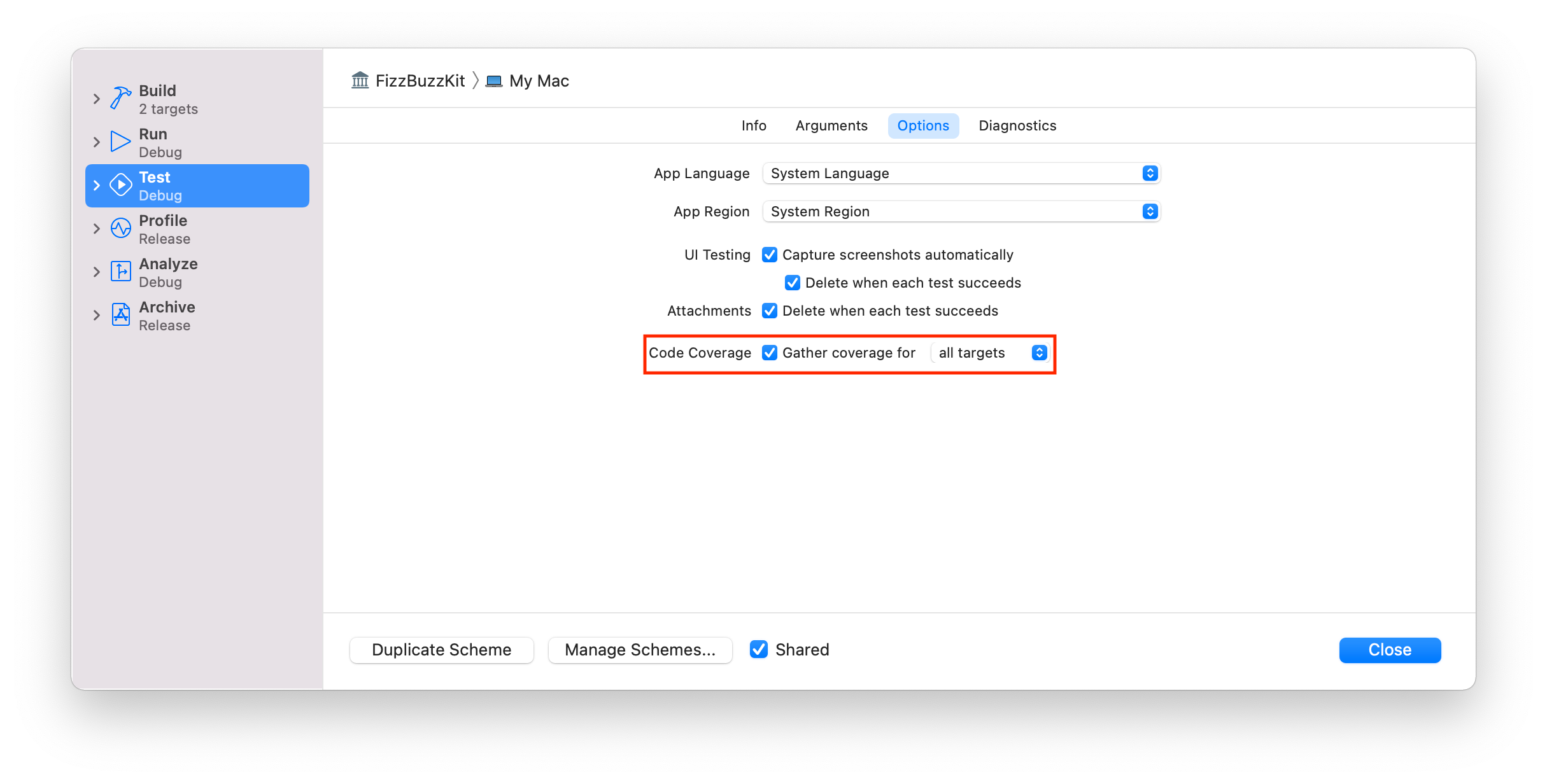
1. Enable Test Coverage

We need to enable test coverage in our project to get test coverage results. First, make sure your project has the following settings enabled.:

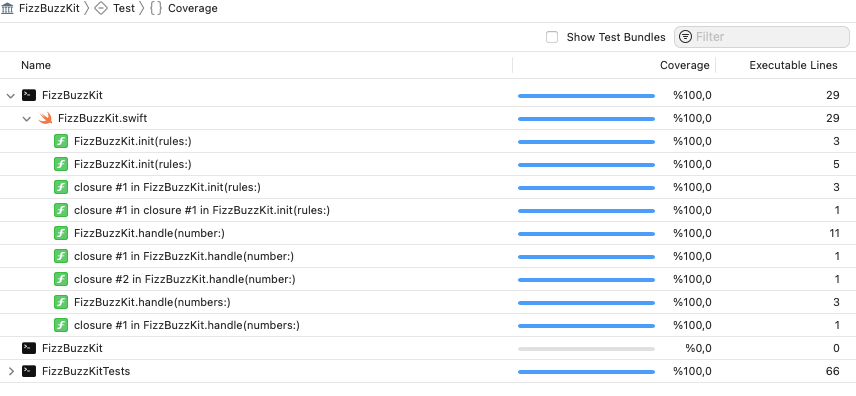
If we run our tests again, and click Coverage button we can see the coverage of our tests.

Coverage results can only be seen on Xcode. To get a human-readable format, we need to use an external tool.

Slather can convert Xcode test results to different formats.

2. Run Slather for Xcode

Go to the project directory open your terminal and run the below command

slather coverage --html --scheme FizzBuzzKit Appcircle.xcodeproj

If you are using workspaces or configs, you can change the command line parameters according to the Slather’s documentation.

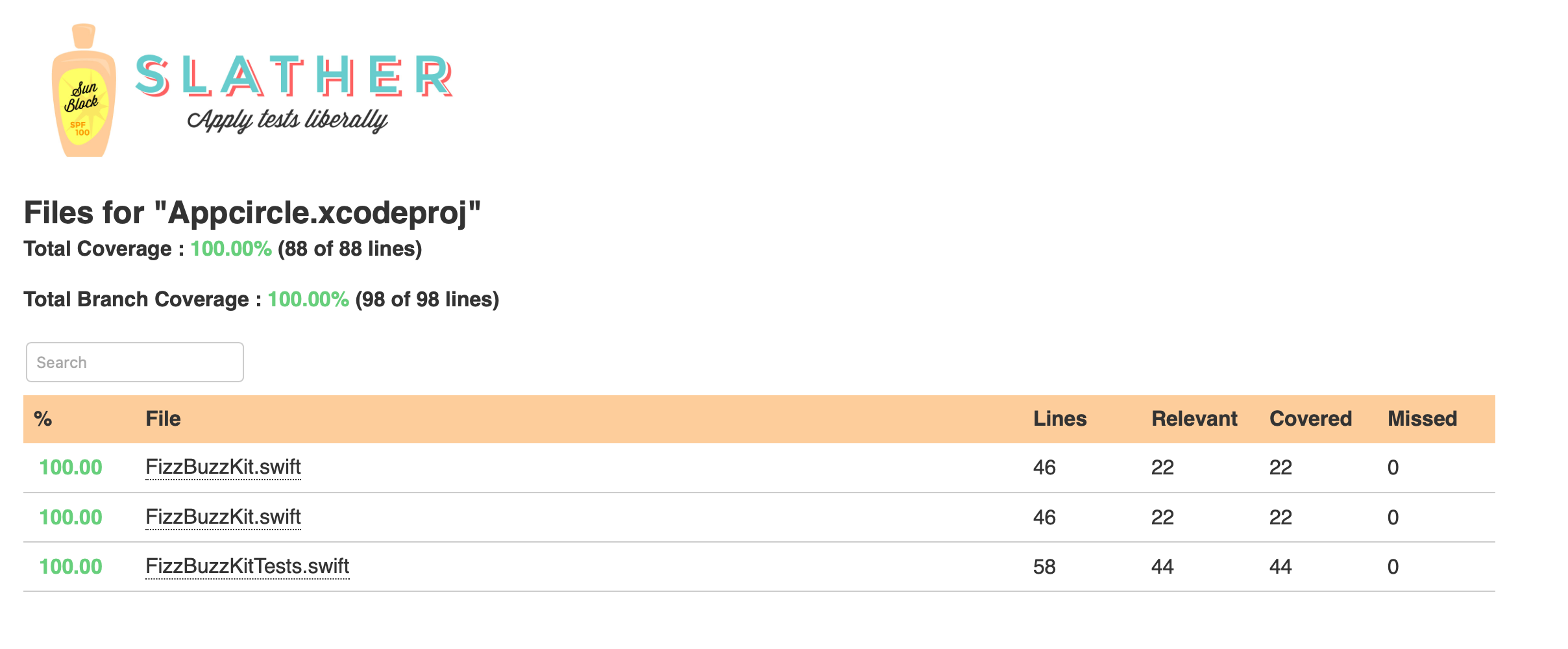
You’ll get a report something like below. If you get an error, try cleaning your DerivedData folder.

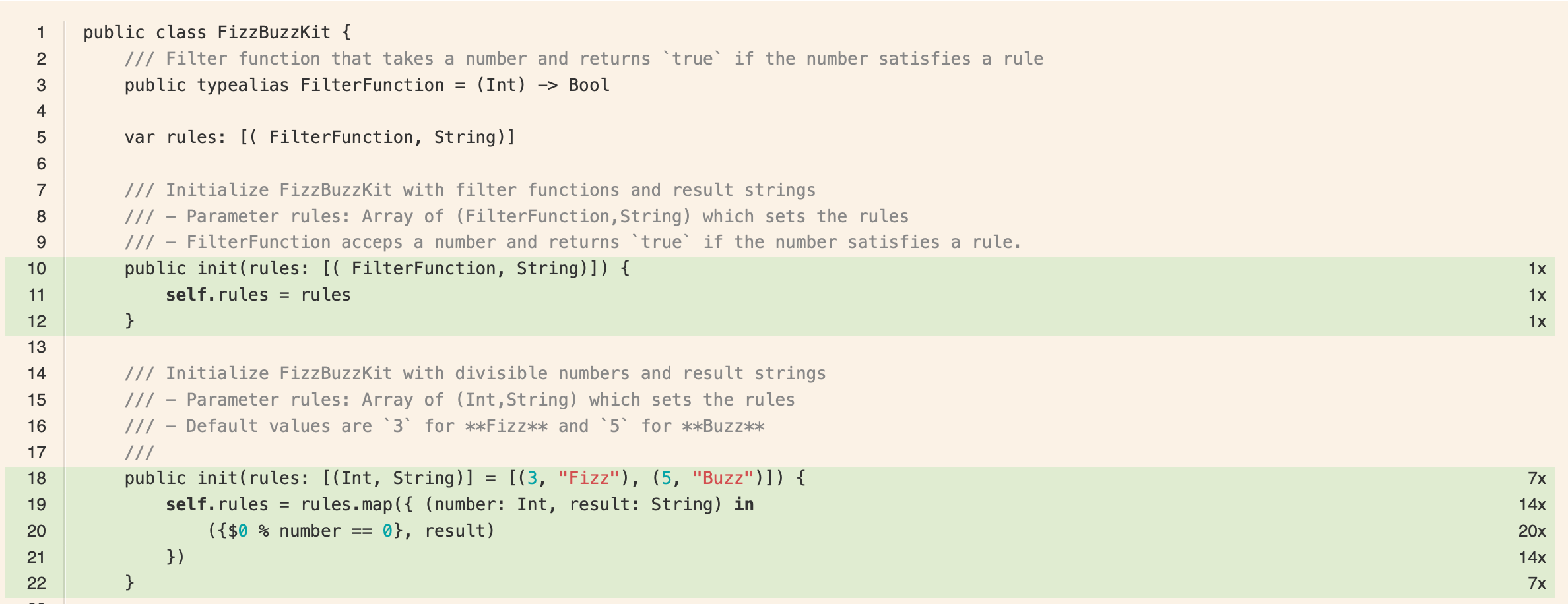
We can click on each file, and see how our test codes were run and how many times they were invoked.

Let’s add this project to Appcircle and see how easy to get test coverage results for our project.

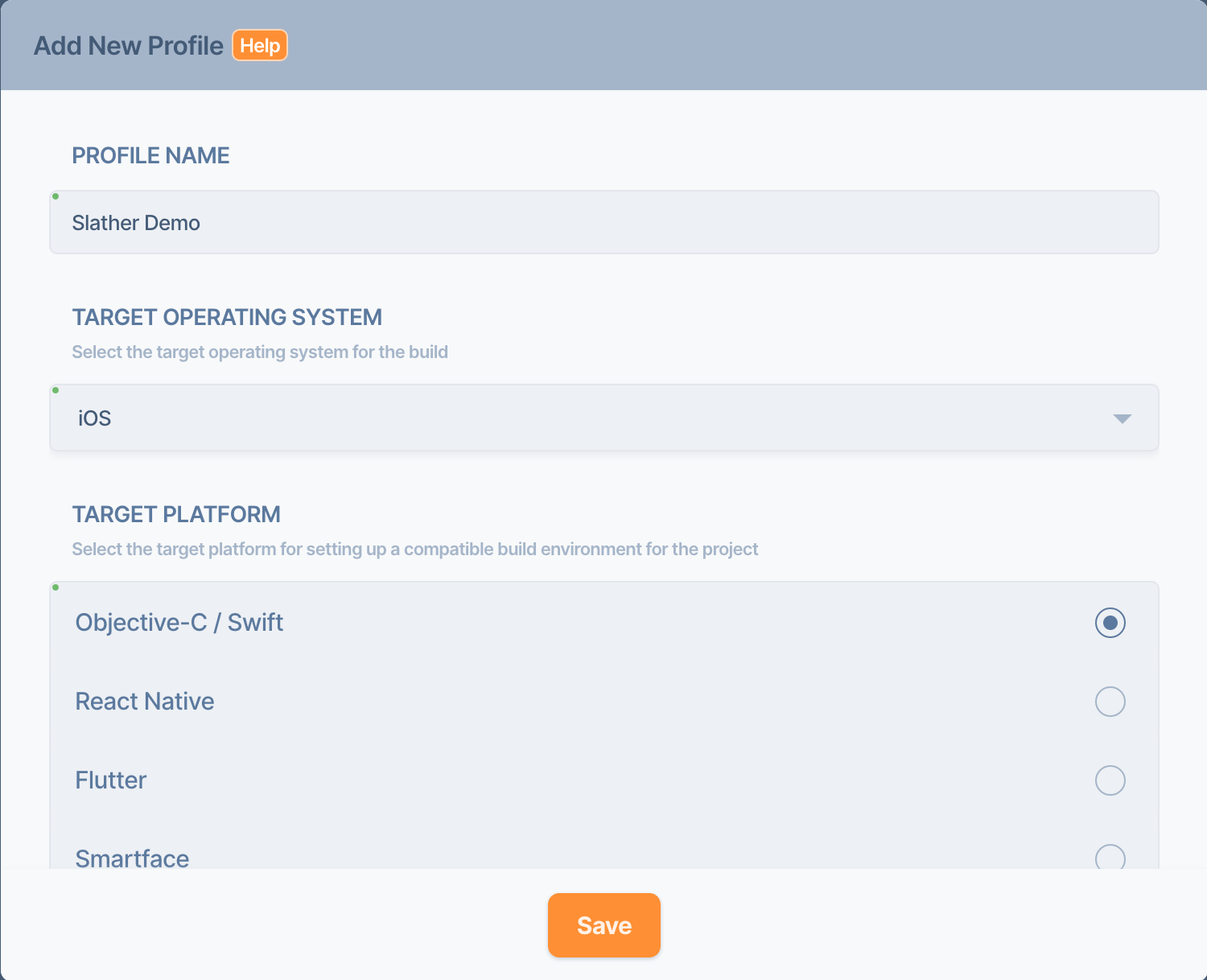
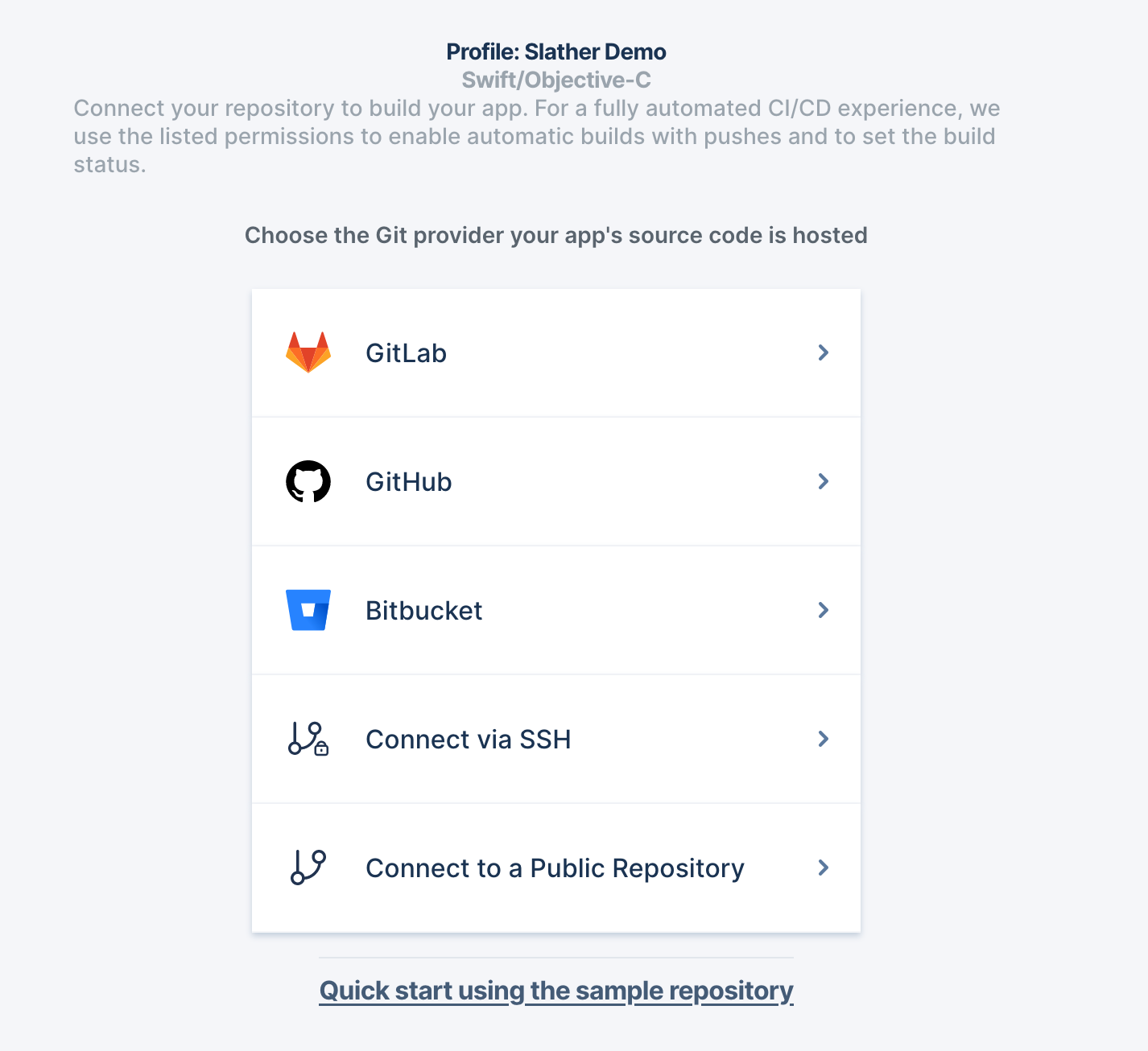
3. Create a new build profile

Create a new build profile and add our repo. You can either use its public link, or you can fork to your account and add it from there.


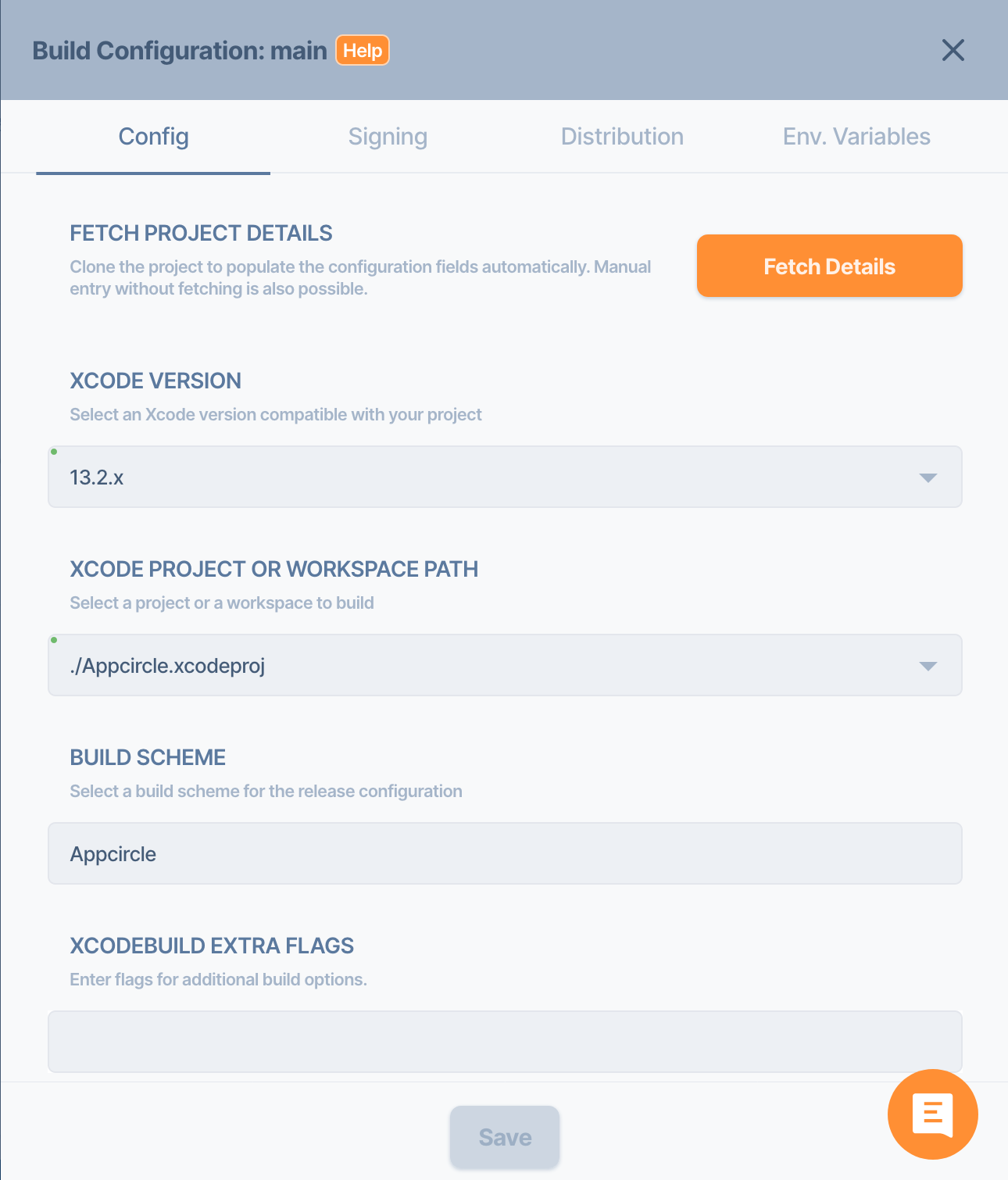
4. Configure your build profile

Go to the config section and fill in the details like below and hit Save.

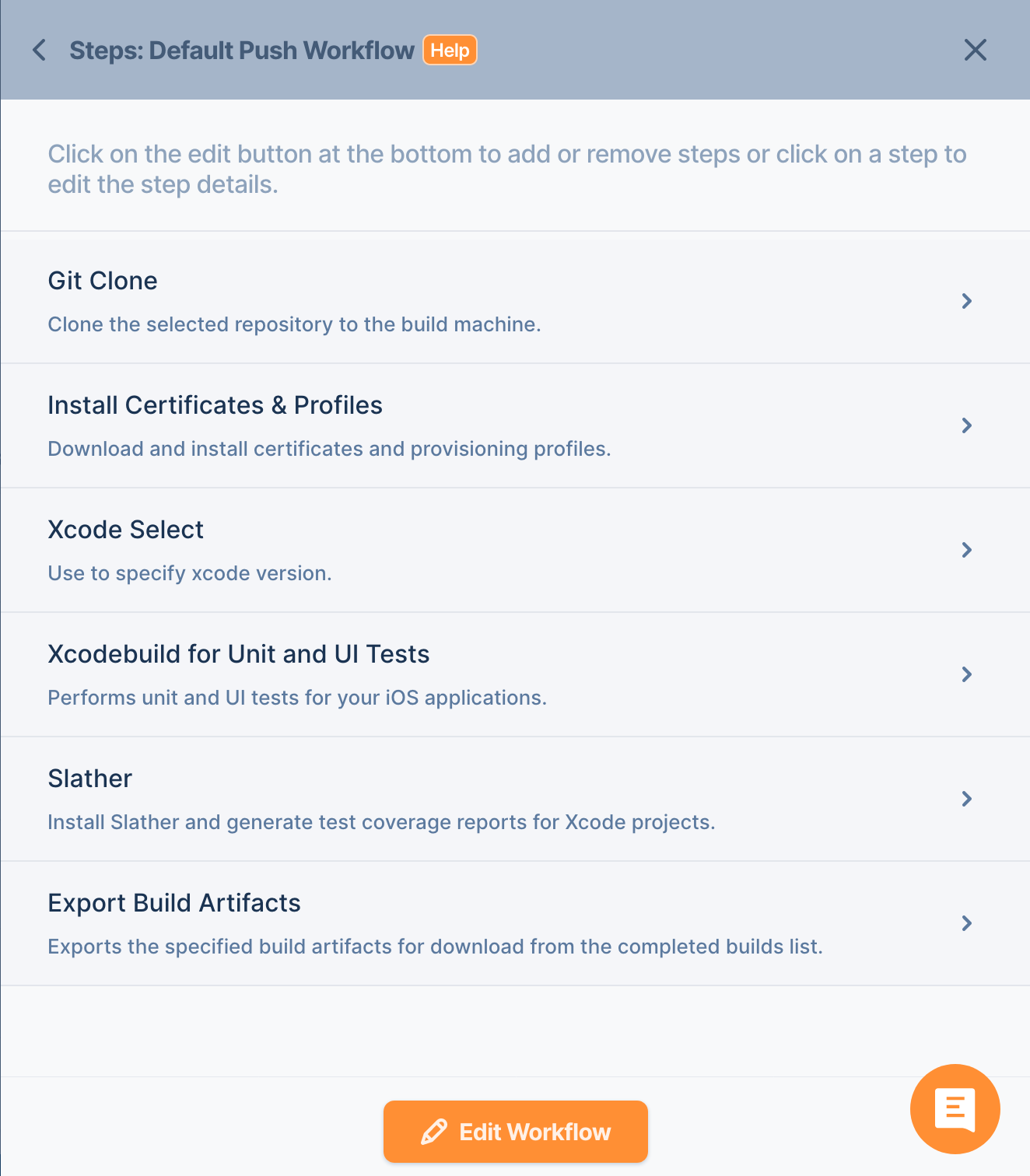
5. Edit your workflow

Edit your workflow and add Slather after the Xcode Unit Test.

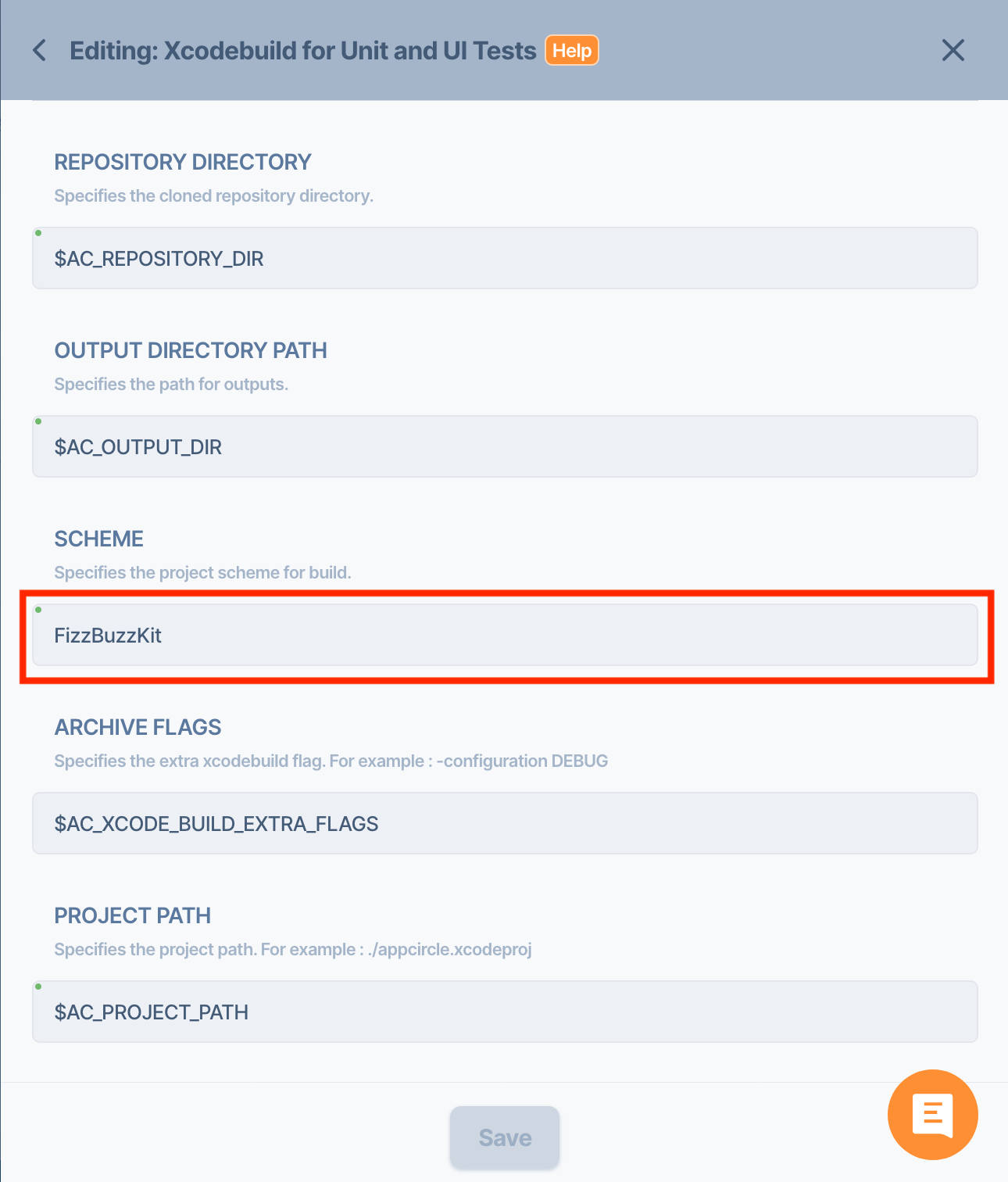
6. Modify your test step

Go to your Xcodebuild for Unit and UI Tests step detail and change it like below:

7. Edit your Slather Step

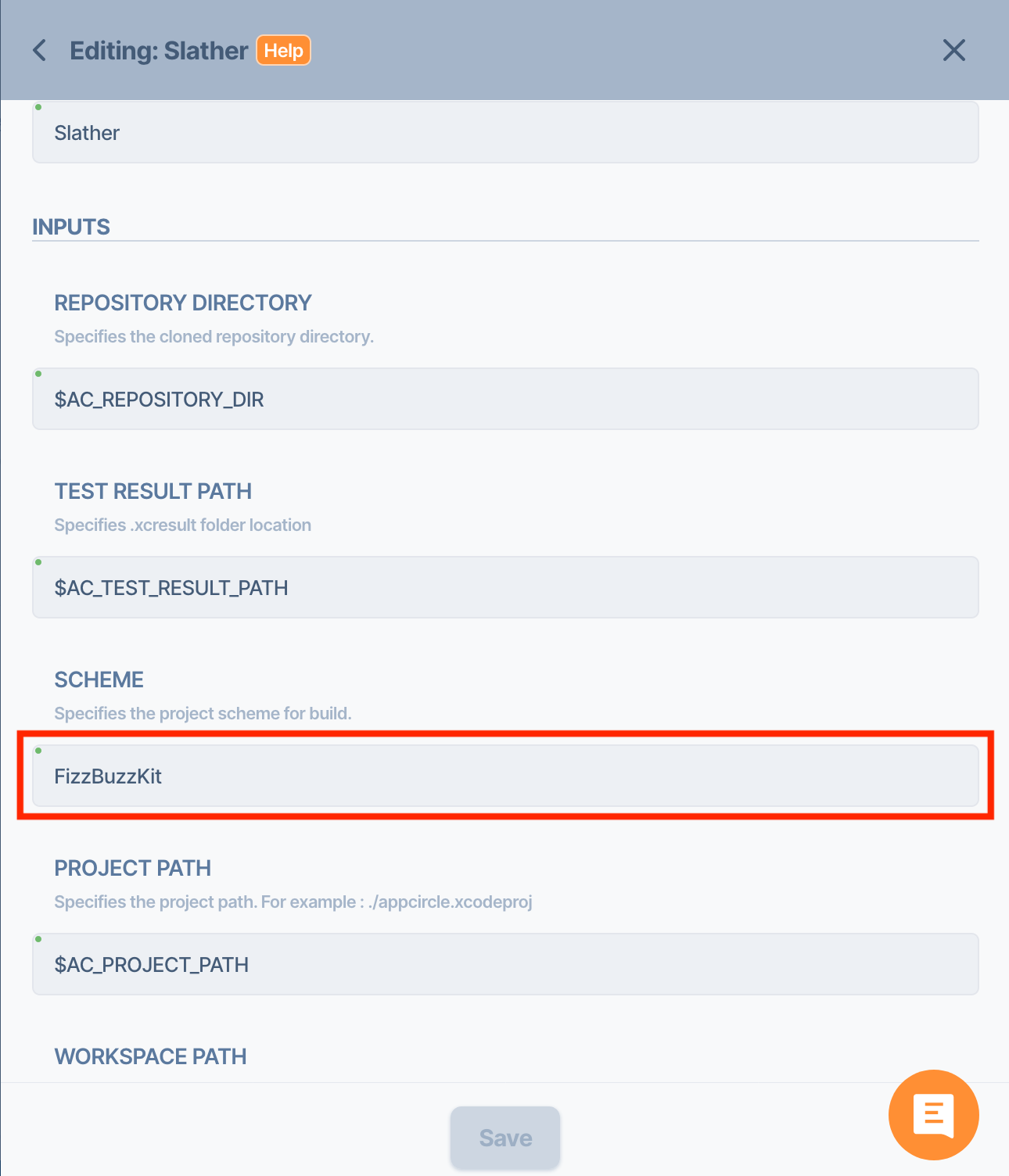
Finally, edit your Slather Step and change the configuration accordingly:

Hit the Build button. After the build is finished, tap the “Download Artifacts” button and easily download Slather coverage results.