

WWDC 25: What’s New in SwiftUI
WWDC25 made one thing clear: SwiftUI is no longer just an experiment — it’s the standard.
This year marked SwiftUI’s biggest leap yet, introducing a refreshed Liquid Glass design system, major performance gains, and deep integration with UIKit, AppKit, and RealityKit. From native rich text editing to fully immersive 3D layout support, SwiftUI now spans every Apple platform with precision and elegance.
A New Design Language
One of the most visible improvements is Liquid Glass Design and its aesthetics. Embracing this adaptive and fluid design brings the depth and responsive reflectivity to the views such as toolbars, sidebars and tab bars.
- Toolbars gain dynamic blur and morphing effects during transitions.
- Tab Bars now appear more compact on iPhone and support the new tabItemRole(.search) to isolate the Search tab visually for user to show off the real content instead of tab bars and search buttons.
- Bottom-Aligned Search on iPhone happens automatically — just use .searchable . In other devices, search buttons are still aligned to top trailing corner.

All of this is adopted automatically if you’re using system containers like NavigationSplitView or TabView. And yes, your custom views can join in with the new design APIs. Concentric rectangle shape is another feature that gives user opportunities to apply the .containerConcentric to achieve easy UI design.

For a deeper dive into how Liquid Glass Design reshapes modern UI development in SwiftUI, be sure to check out our full breakdown: WWDC25: Build a SwiftUI App with the New Liquid Glass Design. This article explores the principles, behavior, and implementation of Apple’s latest design paradigm in detail, with hands-on examples and best practices for adopting it in your app today.
UIKit and AppKit Meets SwiftUI
This year’s scene bridging feature is a game changer. You can now bring SwiftUI scenes into existing UIKit and AppKit lifecycle apps. This allows users and firms to adapt SwiftUI faster and better.
Using new scene types like MenuBarExtra, ImmersiveSpace and AssistiveAccessScene in existing projects.
- MenuBarExtra allows you to add a menu bar item (macOS) for quick access to core app functionality—like status indicators, mini dashboards, or quick actions.
- ImmersiveSpace enables spatial computing experiences in visionOS, such as fully immersive environments or interactive 3D scenes.
- AssistiveAccessScene offers a simplified, customisable UI mode for users with cognitive disabilities, adhering to Assistive Access mode in iOS 26.
Accessing new scene modifiers such as windowStyle and immersiveEnvironmentBehavior . While windowStyle lets you switch default, plain, hidden and borderless styles, immersiveEnvironmentBehavior sets and configure how content behaves in spatial environments.
For further information about assistive access visit the WWDC 25 Customise your app for Assistive Access.
Spatial Layout in 3D (visionOS)
Developers targeting visionOS get major upgrades in 3D layout capabilities.
- SpatialOverlay allows you to layer content in 3D space.
- Alignment3D lets you align elements volumetrically.
- manipulable modifier enables object interaction like picking up or moving items in 3D.
- sceneSnapping APIs let you query environment info for precise placement.
SwiftUI now supports fluid, immersive interfaces natively, with less need to drop into RealityKit for basic 3D UI.
Performance: It’s Not Just Faster. It’s Smarter.
Performance improvements this year are significant and measurable:
- List Rendering (macOS): 100,000+ row lists now load 6× faster and update 16× faster.
- Scroll Responsiveness: SwiftUI now schedules frame updates more intelligently to prevent dropped frames, especially during high-speed scrolls.
- Nested Lazy Stacks in scroll views defer rendering properly, reducing memory and CPU use.
And with the new SwiftUI performance instrument in Xcode, you can debug body updates, identify slow view diffs, and pinpoint layout problems in one glance.

| Feature | Improvement | Platform |
|---|---|---|
| List Rendering | 6× faster loading, 16× faster updates | macOS |
| Scroll Responsiveness | Smarter frame scheduling, fewer dropped frames | iOS & macOS |
| Lazy Stacks in ScrollViews | Proper deferred rendering, better memory & CPU use | All platforms |
| SwiftUI Performance Instrument | Inspect view diffs, long body updates, and rendering bottlenecks | Xcode |
Swift Concurrency + SwiftUI
SwiftUI continues its deep integration with structured concurrency, enabling safer and more efficient async code:
- View updates now run on @MainActor by default, ensuring UI changes remain safe and free of race conditions.
- Async tasks are automatically offloaded to background threads where appropriate, helping maintain smooth animations and responsive interactions.
- Modifiers like
task {}and.refreshable {}now integrate seamlessly with SwiftUI’s lifecycle and threading model, making async flows simpler and more predictable. - New @Animatable and @AnimatableIgnored macros to simplify animation logic.
Concurrency is no longer just a power feature — it’s a core part of SwiftUI’s architecture.
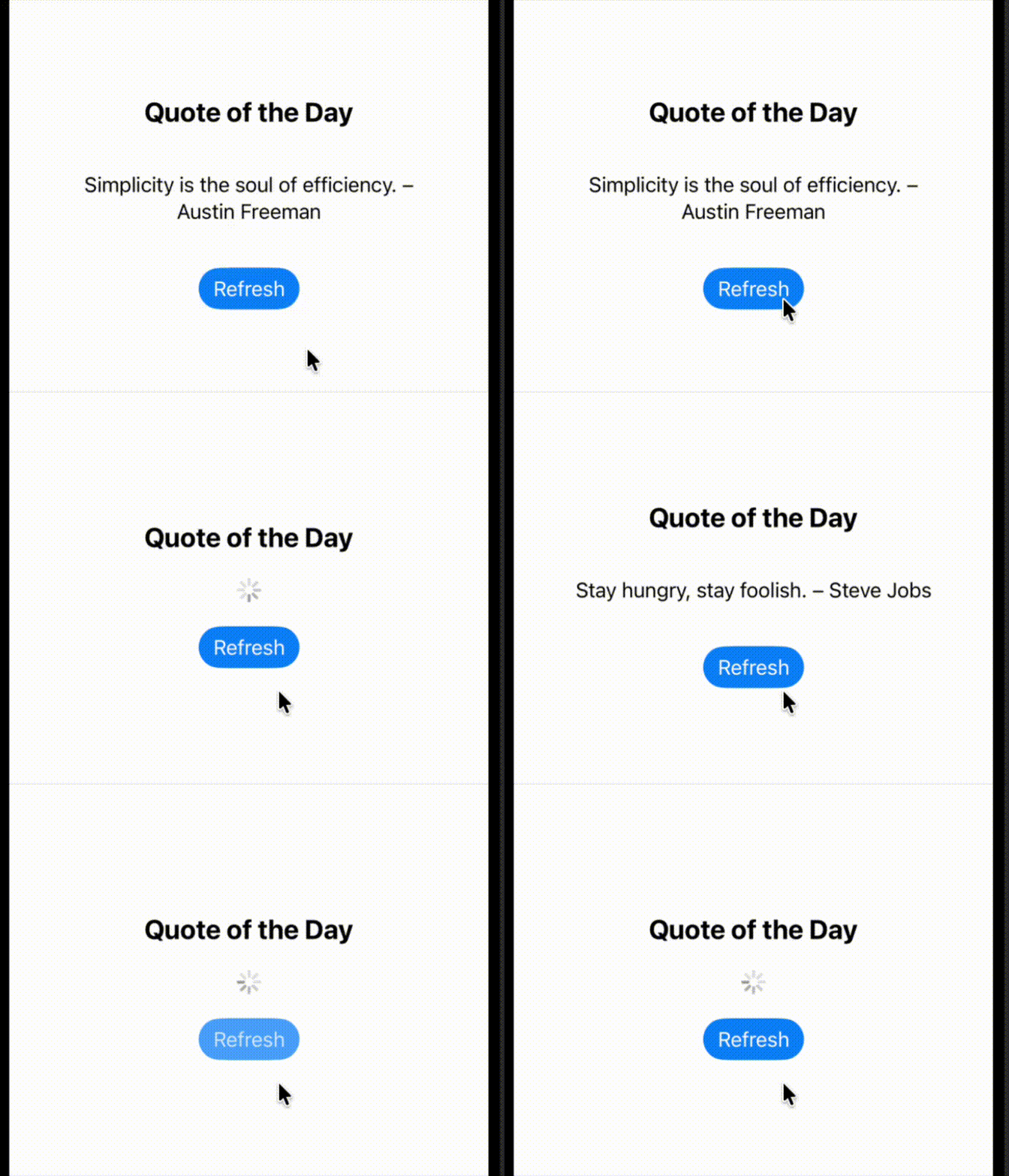
import SwiftUI

@MainActor
class QuoteViewModel: ObservableObject {
    @Published var quote: String?
    @Published var isLoading = false
    @Published var errorMessage: String?

    func fetchQuote() async {
        isLoading = true
        errorMessage = nil

        do {
            // Simulate async work on background thread
            try await Task.sleep(nanoseconds: 1_200_000_000)

            // Simulated quote (could be replaced with real API)
            let quotes = [
                "Stay hungry, stay foolish. – Steve Jobs",
                "Simplicity is the soul of efficiency. – Austin Freeman",
                "SwiftUI makes hard things simple, and simple things automatic.",
                "Concurrency isn’t scary — when it’s structured. ????"
            ]

            quote = quotes.randomElement()
        } catch {
            errorMessage = "Failed to fetch quote."
        }

        isLoading = false
    }
}

struct SwiftConcurrencyDemoView: View {
    @StateObject private var viewModel = QuoteViewModel()

    var body: some View {
        NavigationStack {
            VStack(spacing: 20) {
                Text("Quote of the Day")
                    .font(.title2)
                    .bold()

                if viewModel.isLoading {
                    ProgressView()
                } else if let quote = viewModel.quote {
                    Text(quote)
                        .multilineTextAlignment(.center)
                        .padding()
                } else if let error = viewModel.errorMessage {
                    Text(error)
                        .foregroundColor(.red)
                        .padding()
                }

                Button("Refresh") {
                    Task {
                        await viewModel.fetchQuote()
                    }
                }
                .buttonStyle(.borderedProminent)
            }
            .padding()
            .navigationTitle("Swift Concurrency")
            .task {
                await viewModel.fetchQuote()
            }
            .refreshable {
                await viewModel.fetchQuote()
            }
        }
    }
}
Rich Text Editing Comes to SwiftUI
SwiftUI now brings first-class rich text editing to your apps, unlocking a whole new range of expressive user experiences. With support for AttributedString in TextEditor, you can offer inline formatting controls.
- Bold, italic, underline, strikethrough, and more — without any custom implementation.
- Pass a binding to an AttributedString directly to TextEditor for real-time editing.
- You can constrain which formatting options are available to the user, or define your own.
- Control paragraph styling with line spacing, indentation, and alignment.
- Dynamically add, remove, or modify attributes as the user types.
And it’s not just about editing — SwiftUI gives you tools to transform and display rich content consistently across all platforms, with localization support baked in.

WebKit Comes to SwiftUI
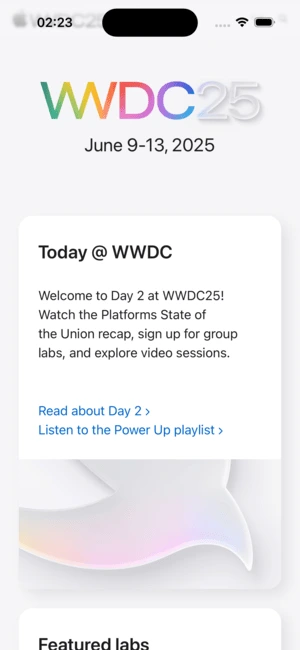
SwiftUI now includes a native WebView component, powered by WebKit—the same rendering engine behind Safari. This marks a major milestone for hybrid app development, eliminating the need for UIKit bridges.
With WebView, you gain full control over:
- Navigation state and history
- JavaScript execution and message handling
- Custom user agents and advanced URL interception
- Scroll position tracking and find-in-page support
- An observable model called WebPage for real-time interaction with web content
SwiftUI’s WebView brings powerful, flexible web integration directly into your declarative UI, making hybrid experiences cleaner, faster, and more maintainable — while still leaving room to grow into a full-featured web content platform.
struct InAppBrowser: View {
    @State private var page = WebPage()

    var body: some View {
        WebView(page)
            .ignoresSafeArea()
            .onAppear {
                page.load(URLRequest(url: wwdcURL))
            }
    }

    var wwdcURL: URL {
        URL(string: "https://developer.apple.com/wwdc25/")!
    }
}
Drag & Drop, Reimagined in SwiftUI
SwiftUI’s drag and drop system received a major overhaul this year — introducing a new, more capable set of APIs that bring precision and power to interactive item transfers across platforms.
- dragContainer Modifier
Easily turn any view into a multi-item drag source. It works seamlessly with your app’s selection logic to return multiple items in a drag operation. - Lazily-Requested Drag Items
SwiftUI now requests drag items only when a drop actually occurs, improving performance and memory usage. - dragConfiguration API
Customise drag operations by declaring supported behaviours (like .copy, .move, or .delete). Gain full control over what the drag represents and how it’s handled.
RealityKit + SwiftUI
SwiftUI and RealityKit are now more tightly integrated than ever, opening up seamless pathways between declarative UI and immersive 3D content.
- Entity is now Observable
SwiftUI can directly observe changes to RealityKit entities, allowing real-time UI updates based on entity state. - New Presentation APIs
You can now present SwiftUI views like popovers directly from within a RealityKit scene. For example, tapping on a virtual object can reveal contextual information or controls via a native overlay. - Improved Coordinate Conversion
Converting between coordinate spaces in your scene is now easier and more accurate, giving you better control over alignment and interaction zones. - Animation Synchronisation
SwiftUI animations and RealityKit animations can now be coordinated to move in sync.
F.A.Q.
How does Swift Concurrency improve SwiftUI app development?
Swift Concurrency enables safer and more responsive code by allowing you to manage asynchronous operations with structured syntax and built-in compile-time checks for data races. SwiftUI now deeply integrates with concurrency, making features like async data loading, task cancellation, and predictable view updates much easier to implement.
What does the new design language in SwiftUI actually change in my app?
The new system design brings in a brighter, more fluid UI across all platforms. This includes features like Liquid Glass materials, compact and adaptive toolbars, blurred scroll edges, and dynamic search placement. By simply recompiling your app with the latest SDK and using native SwiftUI containers, your UI automatically adopts this refreshed look.
Is rich text editing in SwiftUI production-ready?
Yes. With native AttributedString support in TextEditor, SwiftUI now offers first-class rich text editing across Apple platforms. You can customize available formatting options, apply paragraph styles, and even constrain which attributes users can apply—all without third-party dependencies.

Final Thoughts
WWDC25 makes one thing clear: SwiftUI is no longer the future — it’s the present.
With WWDC25, Apple has redefined what’s possible with declarative UI: fluid design transitions, seamless platform bridging, async-friendly rendering, and spatial computing — all from the same intuitive SwiftUI codebase. Whether you’re updating an existing app or starting from scratch, there’s never been a better time to go all-in on SwiftUI. It’s no longer about catching up — SwiftUI is setting the pace.

