
WWDC26: What’s New in SwiftUI
SwiftUI received one of its most significant updates yet at WWDC26. From visual refinements that automatically modernize existing apps to an entirely new document architecture, enhanced interaction APIs, and major performance improvements, Apple continues to push SwiftUI forward as the primary framework for building apps across its platforms. In this article, we’ll explore the most important SwiftUI announcements from WWDC26 and what they mean for developers building modern Apple experiences.
A Refreshed Look and Feel for SwiftUI Apps
Liquid Glass Comes to SwiftUI
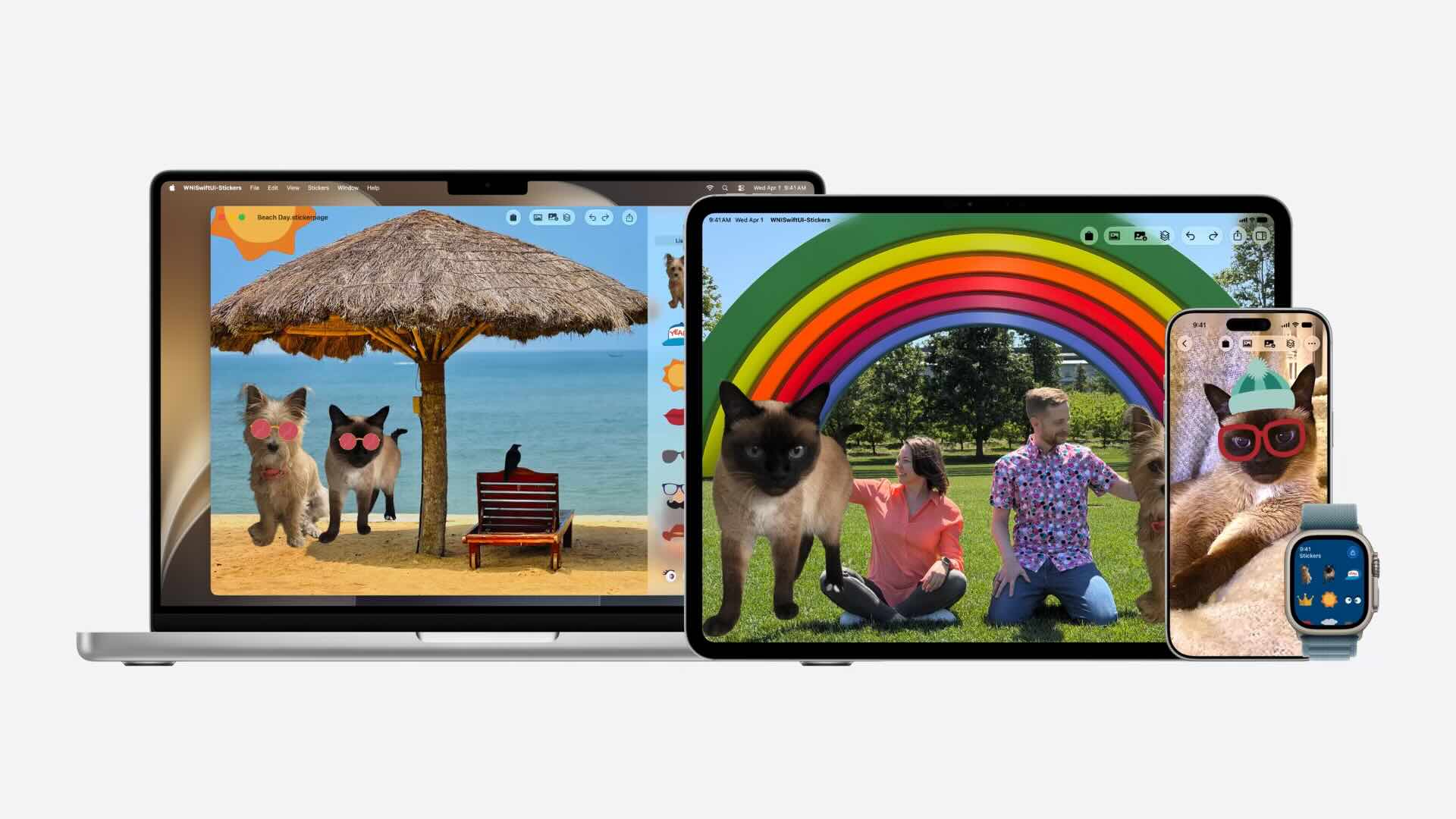
One of the most visible SwiftUI updates in WWDC26 is the evolution of Apple’s Liquid Glass design language. Apps automatically adopt the refreshed visual appearance across Apple platforms without requiring code changes, helping developers deliver a more modern and consistent user experience.
Interactive Liquid Glass Elements
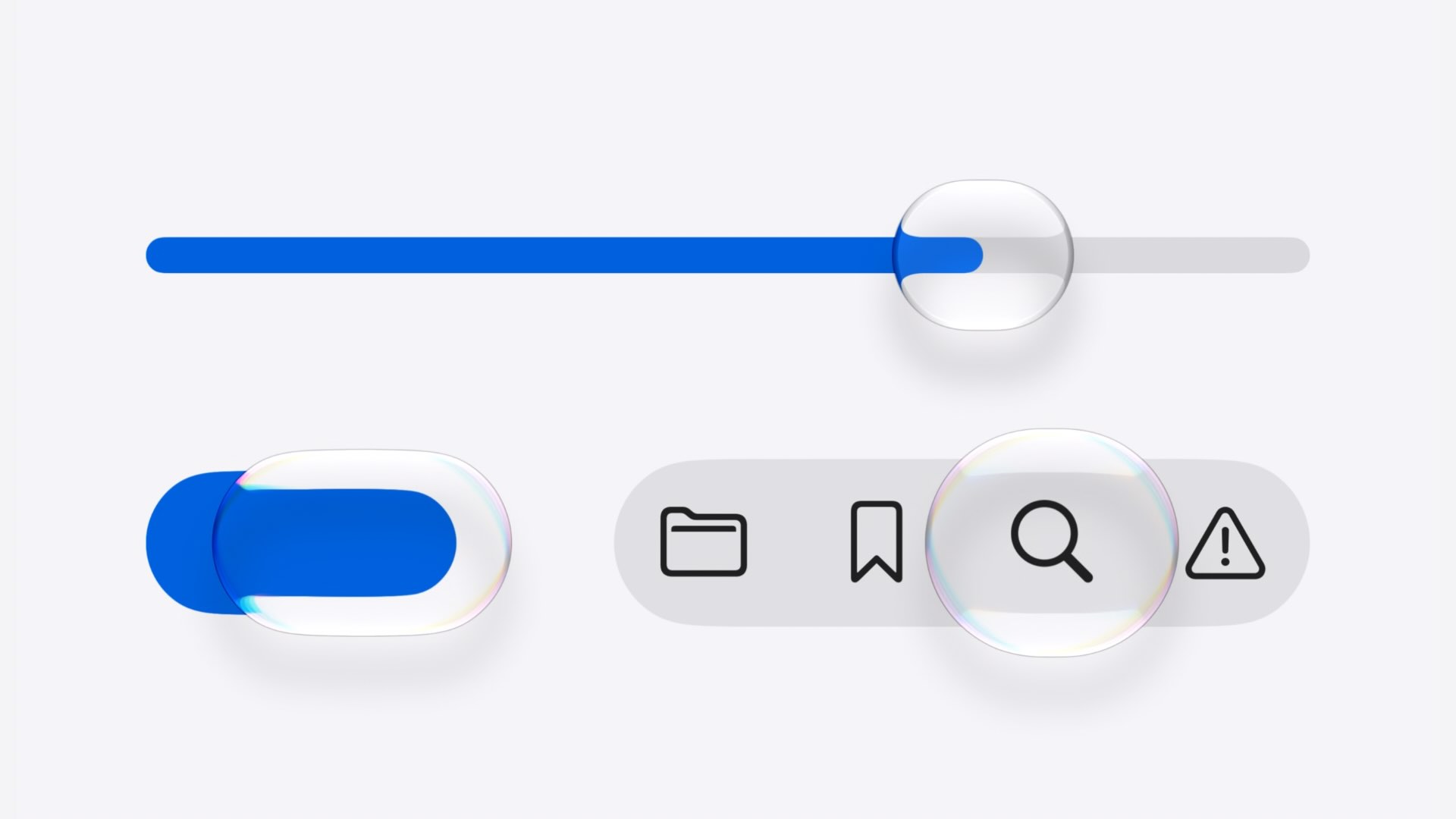
SwiftUI now allows custom Liquid Glass elements to be marked as interactive. These elements respond more naturally to user input, creating a more dynamic and responsive interface that feels at home across iPhone, iPad, and Mac.
Active and Inactive Window States
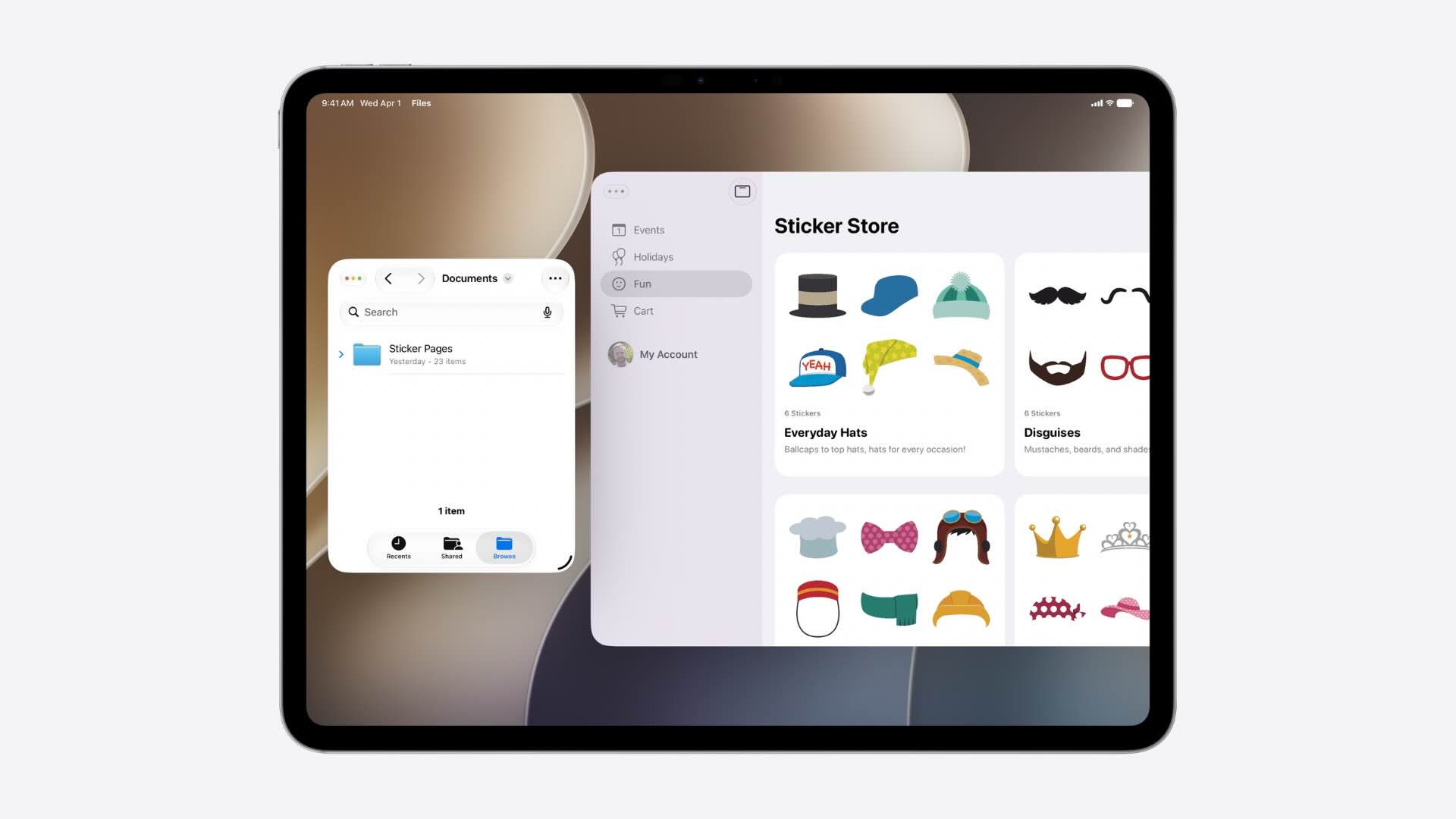
Apps can now better communicate window focus and activity states. On iPad and macOS, SwiftUI automatically adjusts visual elements when a window becomes inactive, while developers can further customize the experience using new environment values.
Fine-Tuning the New Appearance
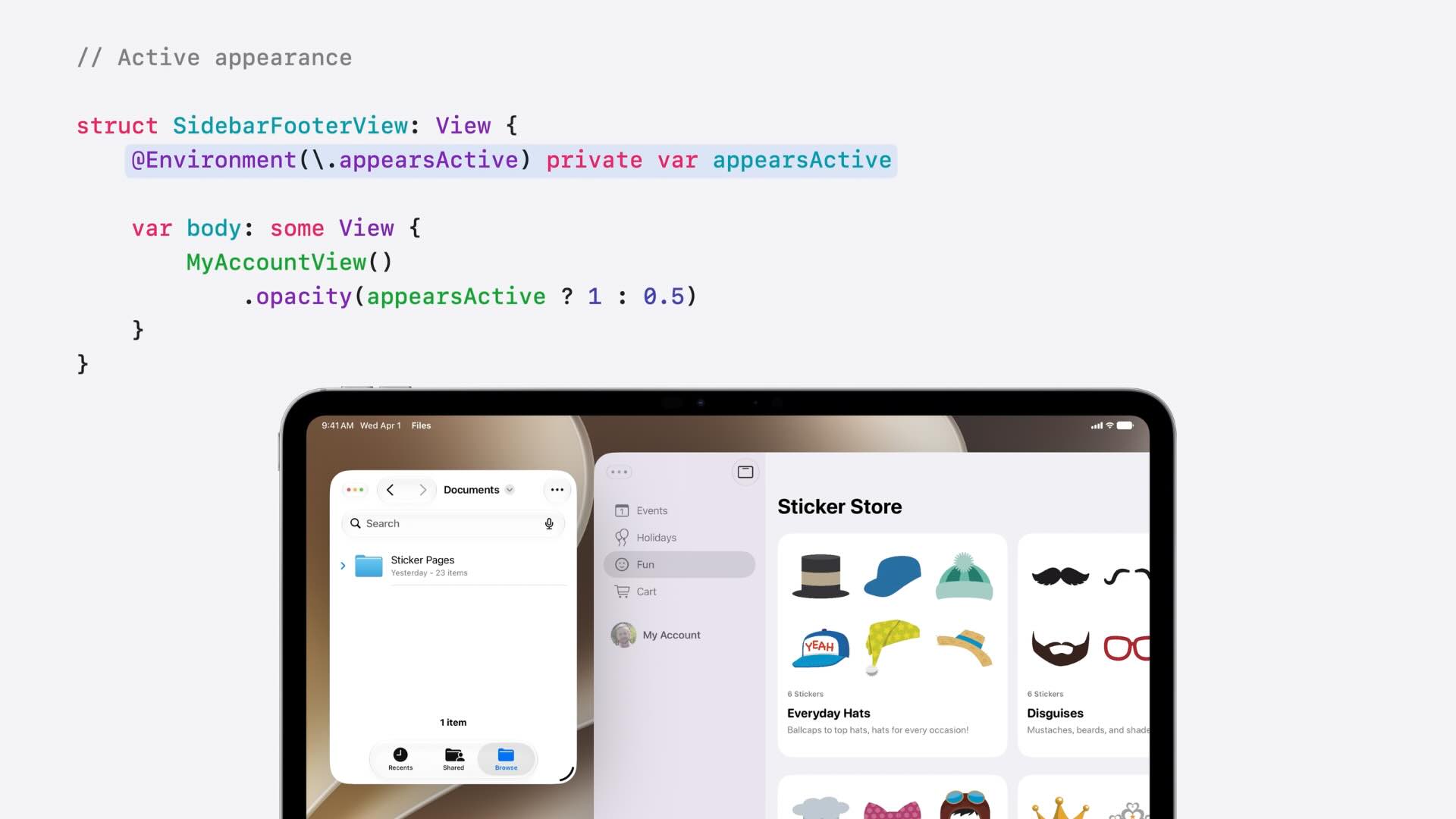
While many visual improvements are automatic, SwiftUI also introduces new customization options for developers who want more control. From toolbar styling to menu presentation and custom component behavior, apps can better align with their intended design while embracing the latest platform conventions.
Building Apps for a Resizable Future
Resizable iPhone Apps
One of the most significant platform changes announced at WWDC26 is support for resizable iPhone apps. As iPhone apps increasingly run in different environments, including iPad and iPhone Mirroring, developers can no longer assume a fixed screen size. SwiftUI applications that already follow adaptive layout principles will automatically benefit from this change, making it easier to deliver consistent experiences across a wider range of window sizes and device configurations.
Testing Resizability with Xcode 27 Live Previews
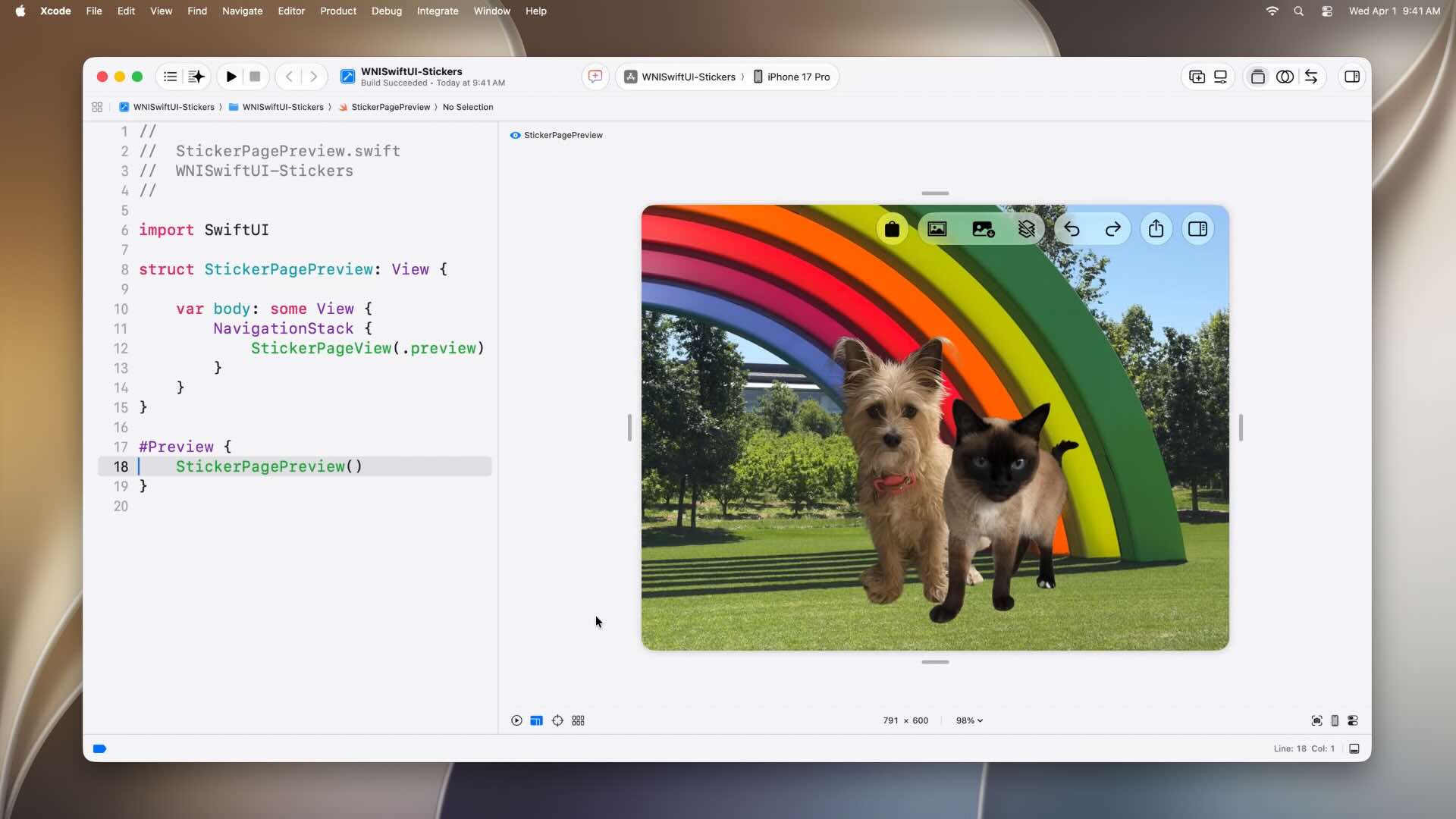
To help developers prepare for this new era of adaptable interfaces, Xcode 27 introduces resize handles directly within Live Previews. Developers can now interactively resize their app during development and instantly observe how layouts respond to changing dimensions. This provides a faster and more efficient way to identify layout issues without repeatedly launching the app on different devices or simulators.
Smarter and More Flexible Toolbars
Highlighting Important Actions with Prominent Tabs
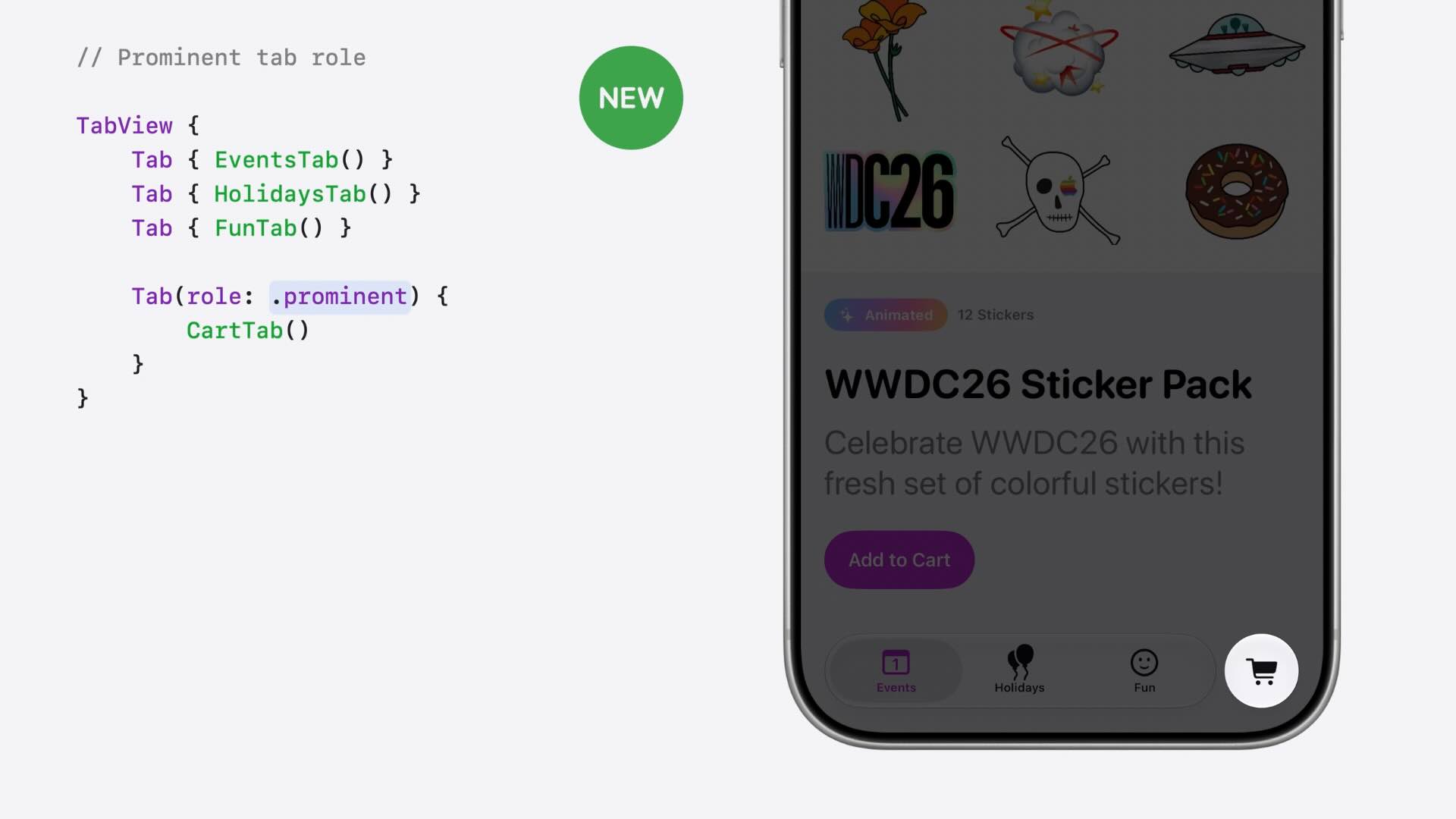
SwiftUI introduces a new way to emphasize important destinations within a tab-based interface. Using the new prominent tab role, developers can visually separate key actions from standard navigation items, helping users quickly identify frequently used features such as shopping carts, creation flows, or primary app actions.
Controlling Toolbar Visibility Priority
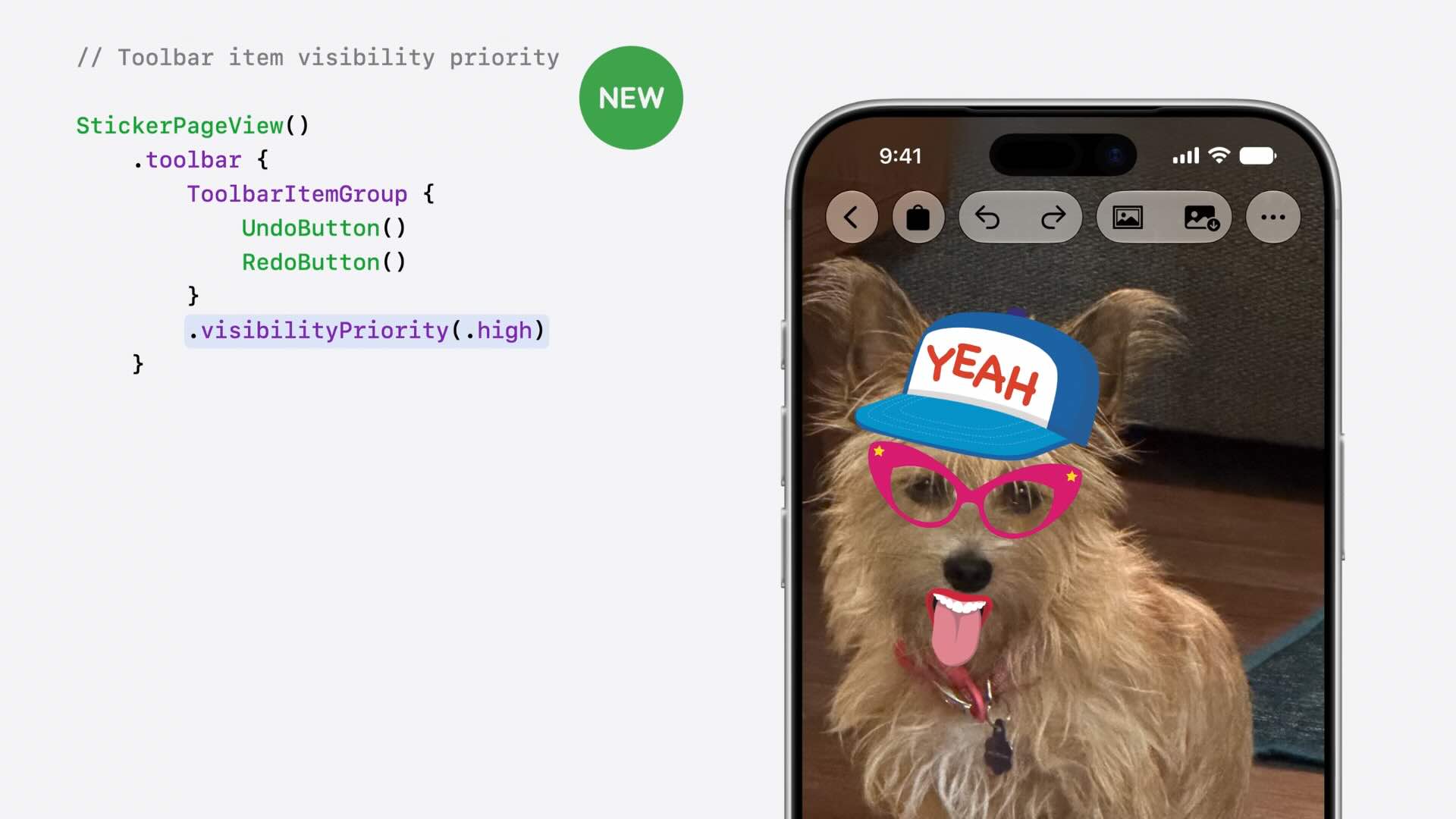
As apps become more flexible and resizable, toolbar space can quickly become limited. The new visibilityPriority modifier allows developers to specify which toolbar items should remain visible when space is constrained. This ensures that critical actions stay accessible regardless of window or screen size.
Managing Overflow Actions
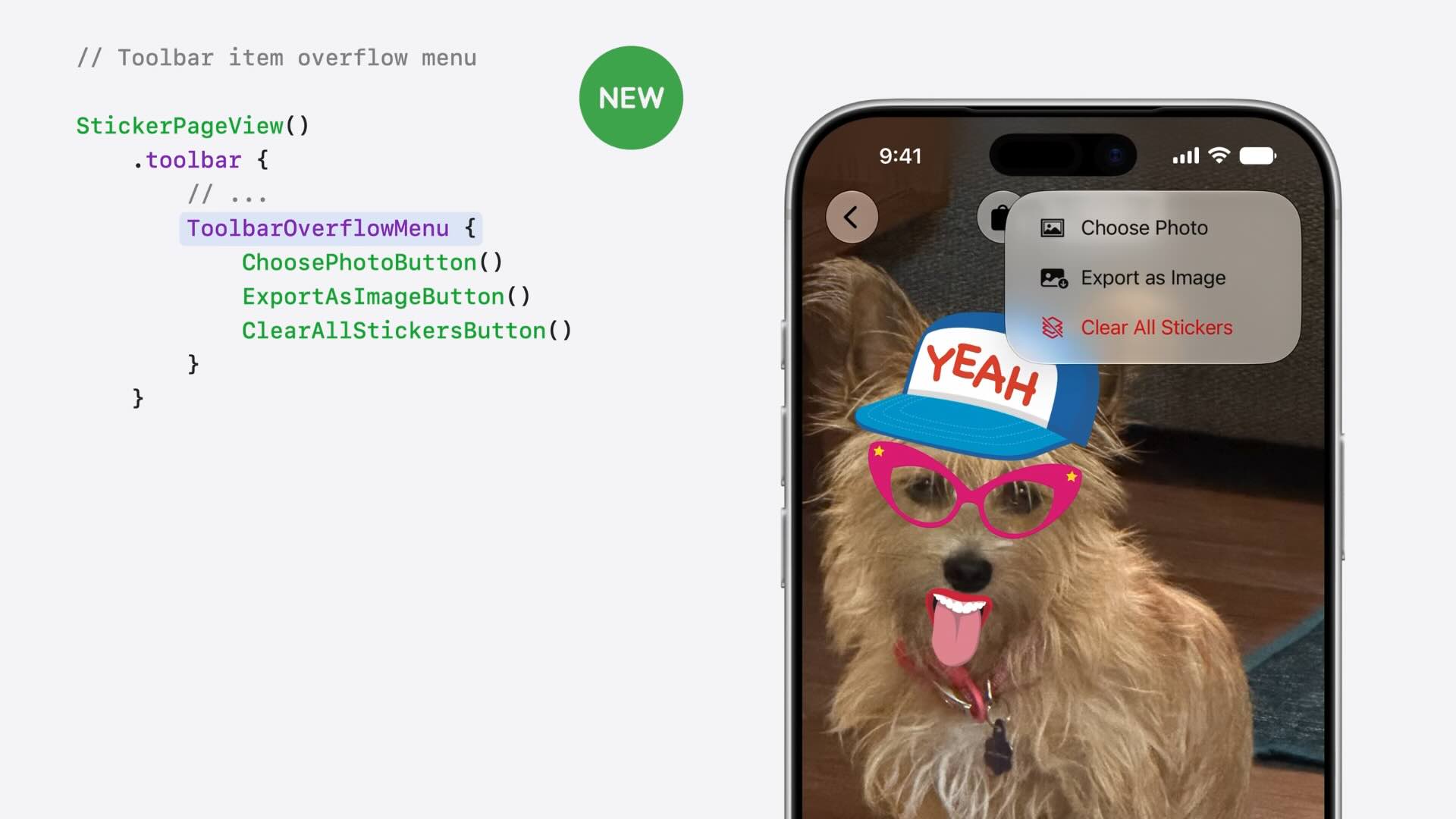
SwiftUI now provides a dedicated ToolbarOverflowMenu container for actions that don’t need to be visible at all times. Instead of relying on the system’s default behavior, developers can explicitly group secondary actions into an overflow menu, creating cleaner and more predictable toolbars.
Pinning Critical Actions
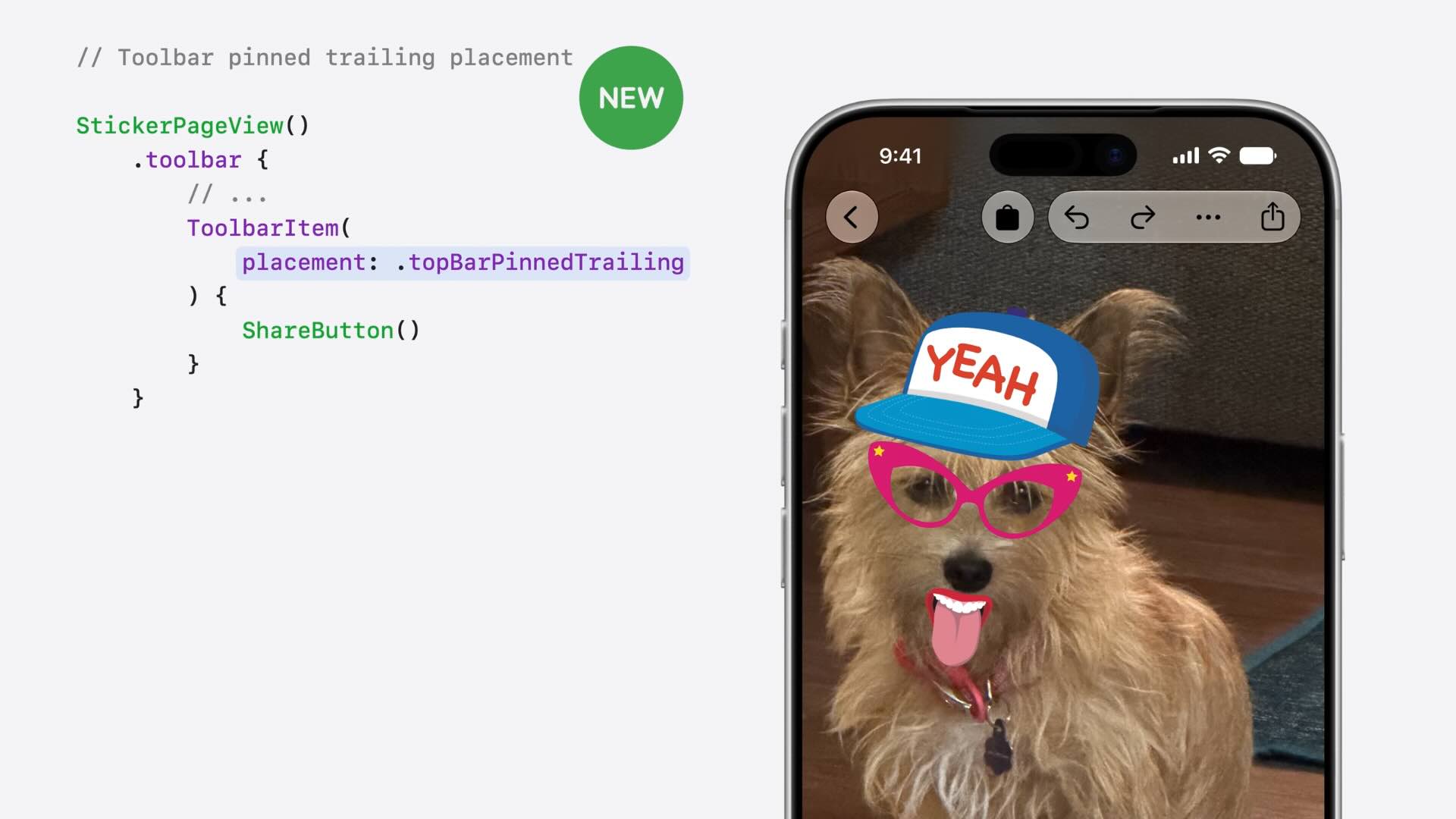
For actions that should never disappear, SwiftUI introduces the new topBarPinnedTrailing placement. This allows important controls, such as sharing or collaboration actions, to remain permanently visible in the toolbar, even when other items are moved into overflow menus.
Automatically Minimizing Toolbars While Scrolling
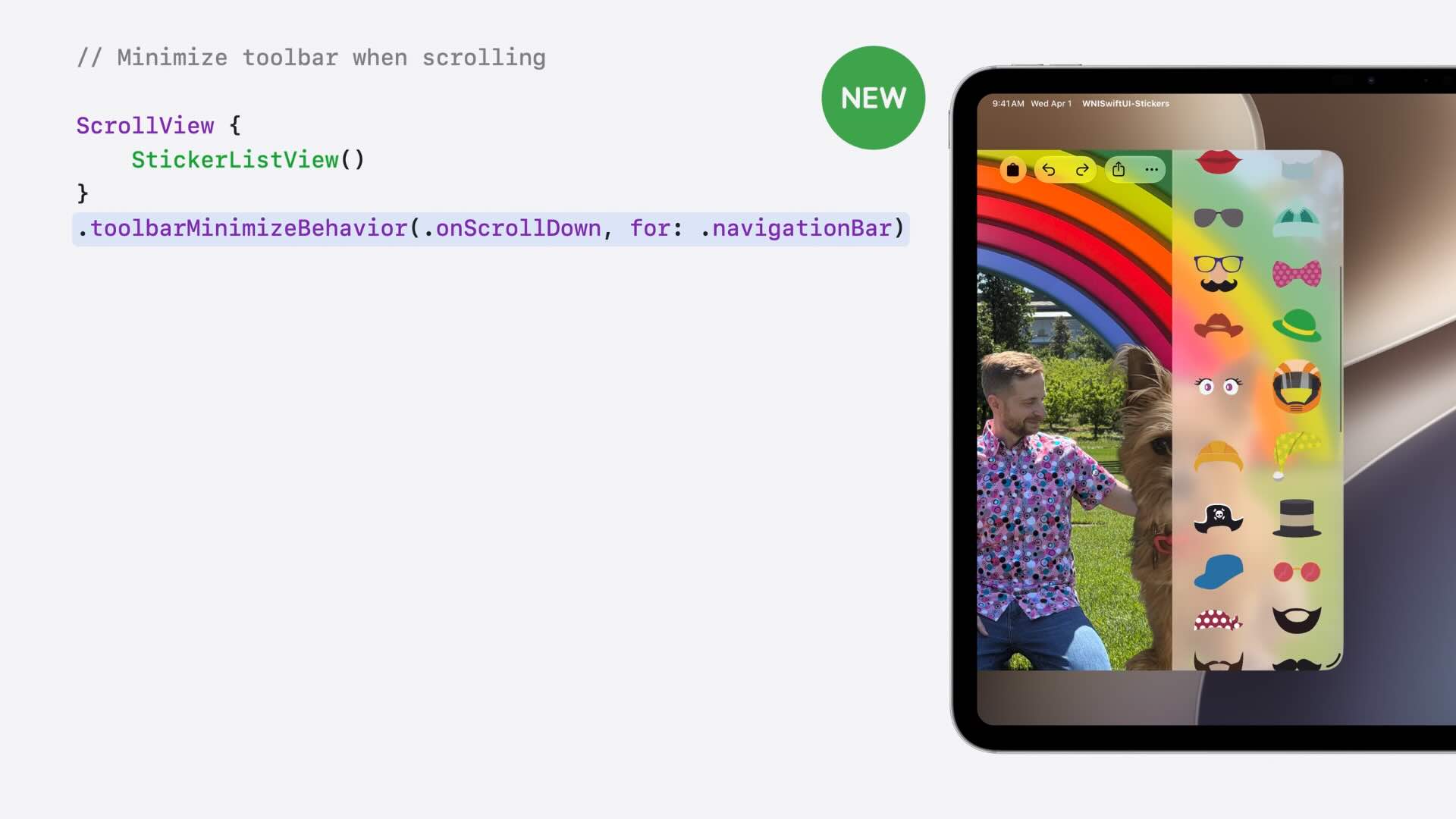
To maximize available screen space, SwiftUI now supports automatic toolbar minimization while users scroll through content. With the new toolbarMinimizeBehavior modifier, navigation bars can intelligently hide and reappear based on scrolling activity, allowing content to take center stage without sacrificing accessibility.
Reorderable Containers Across SwiftUI
Making Lists Reorderable
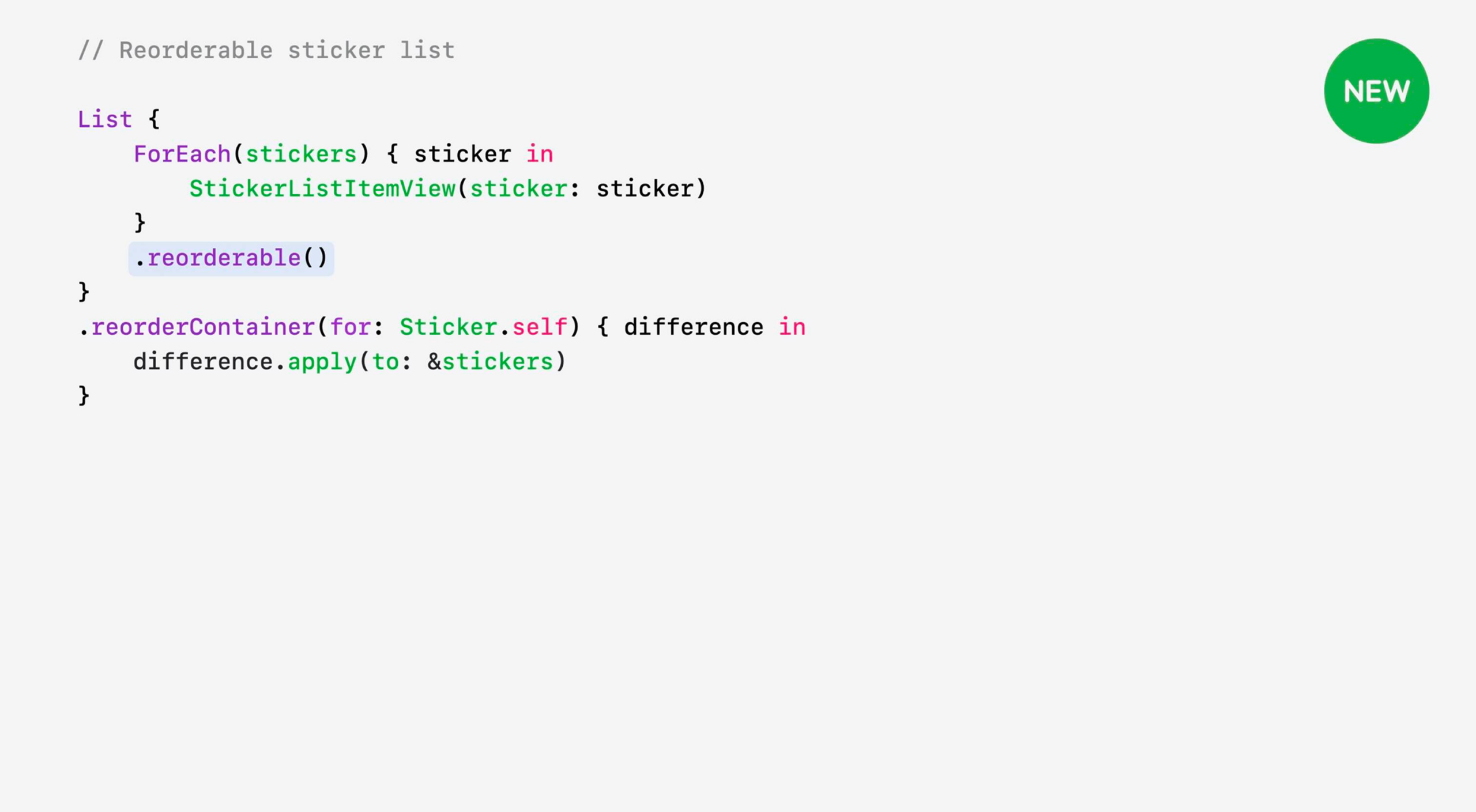
SwiftUI introduces a new Reorderable API that makes it easier to let users rearrange items within a list using drag-and-drop interactions. Developers simply enable reordering on a container and update their underlying data model, while SwiftUI handles the drag gestures, animations, and user experience automatically.
Bringing Reordering to Grid Layouts
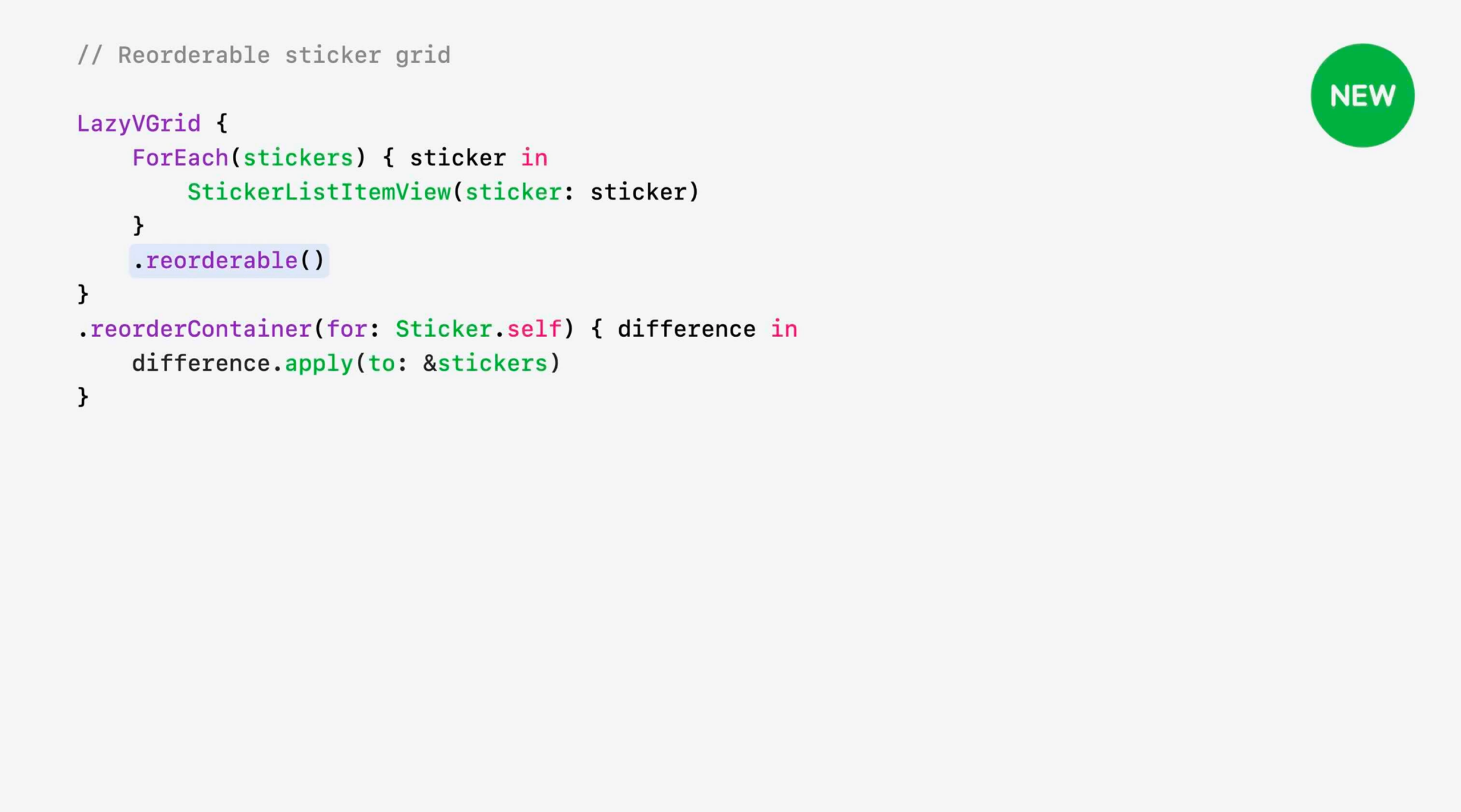
The new reordering capabilities are not limited to lists. SwiftUI now allows the same drag-and-drop reordering experience to be used in grid-based layouts, making it easy to organize visual collections such as photos, stickers, products, or media libraries without implementing custom gesture logic.
Reusing the Same Reordering Logic Everywhere
One of the biggest advantages of the new API is its consistency. The same reordering code can be reused across different container types, including lists and grids. This reduces duplication, simplifies maintenance, and allows developers to provide a consistent interaction model throughout their applications.
Reordering Support on watchOS
For the first time, SwiftUI brings built-in reordering support to watchOS. Users can now rearrange content directly on Apple Watch, while developers can use the same APIs they already use on iPhone, iPad, and Mac, making cross-platform experiences easier to build and maintain.
New Presentation and Interaction Enhancements
Swipe Actions Beyond List
One of the most useful interaction improvements in SwiftUI is the expansion of swipe actions beyond List. Previously, swipe gestures were primarily limited to list-based interfaces. With WWDC26, developers can now add swipe actions to virtually any view, making it easier to build custom layouts without sacrificing familiar system interactions.
Coordinating Actions with SwipeActionsContainer
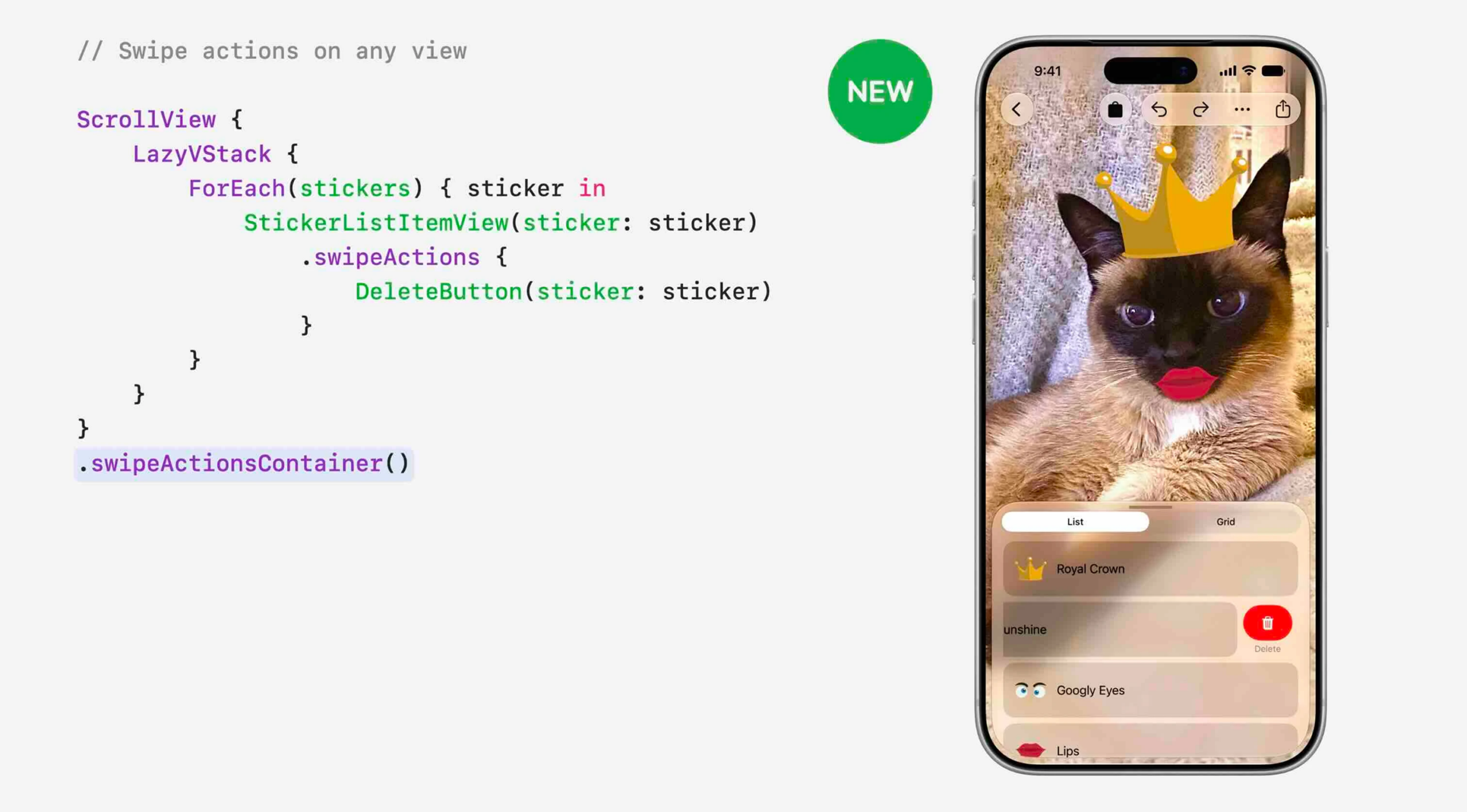
To support swipe actions in custom layouts, SwiftUI introduces the new swipeActionsContainer API. This container coordinates swipe gestures across multiple items within a scrollable view, ensuring a consistent and predictable interaction experience even when using custom stacks or layouts instead of a traditional List.
Improved Confirmation Dialog APIs
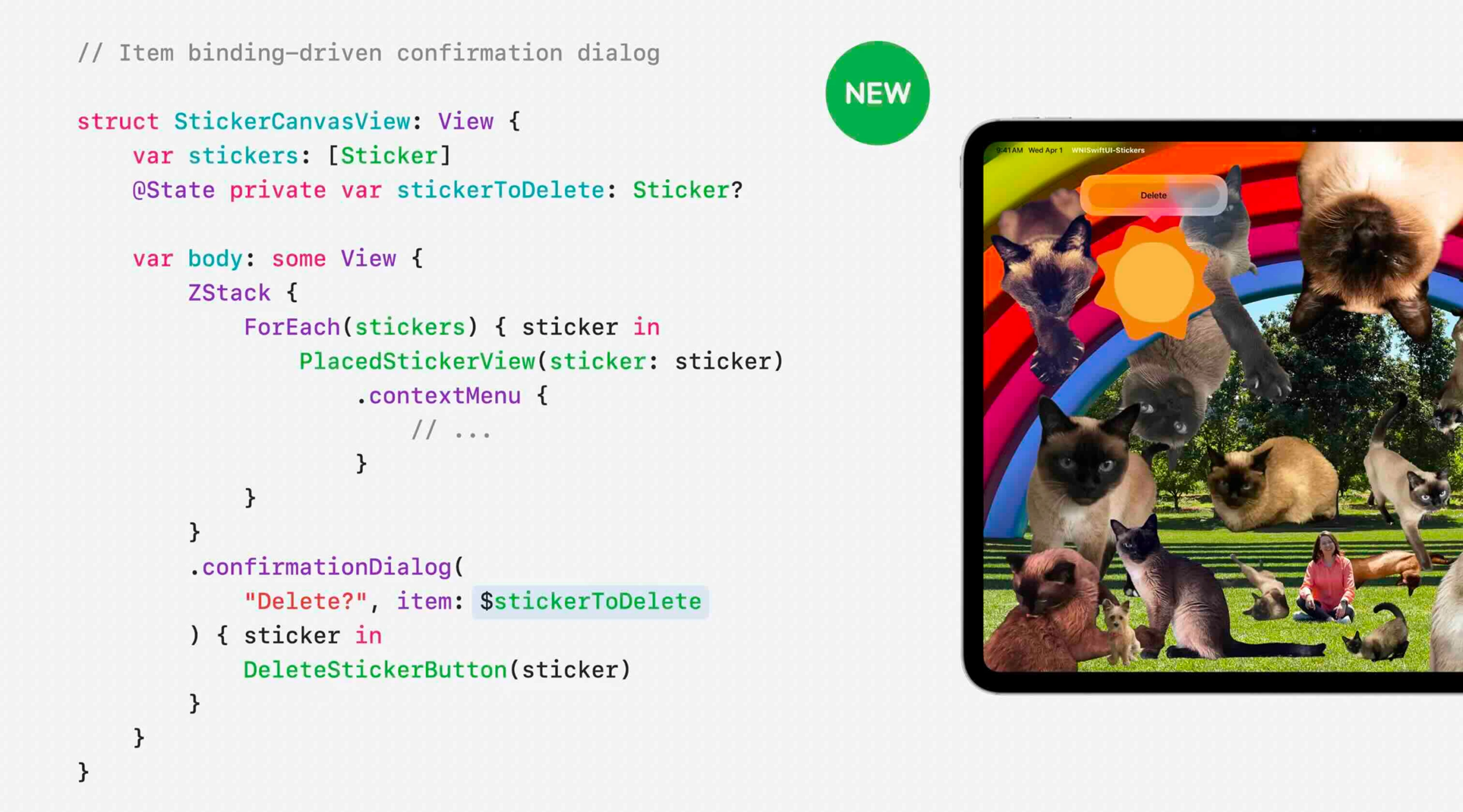
SwiftUI enhances confirmation dialogs by making them easier to integrate with application state. Developers can now present dialogs using more flexible data-driven patterns, reducing boilerplate code and creating cleaner implementations for confirmation workflows such as deleting content or performing destructive actions.
Item-Based Alerts and Dialogs
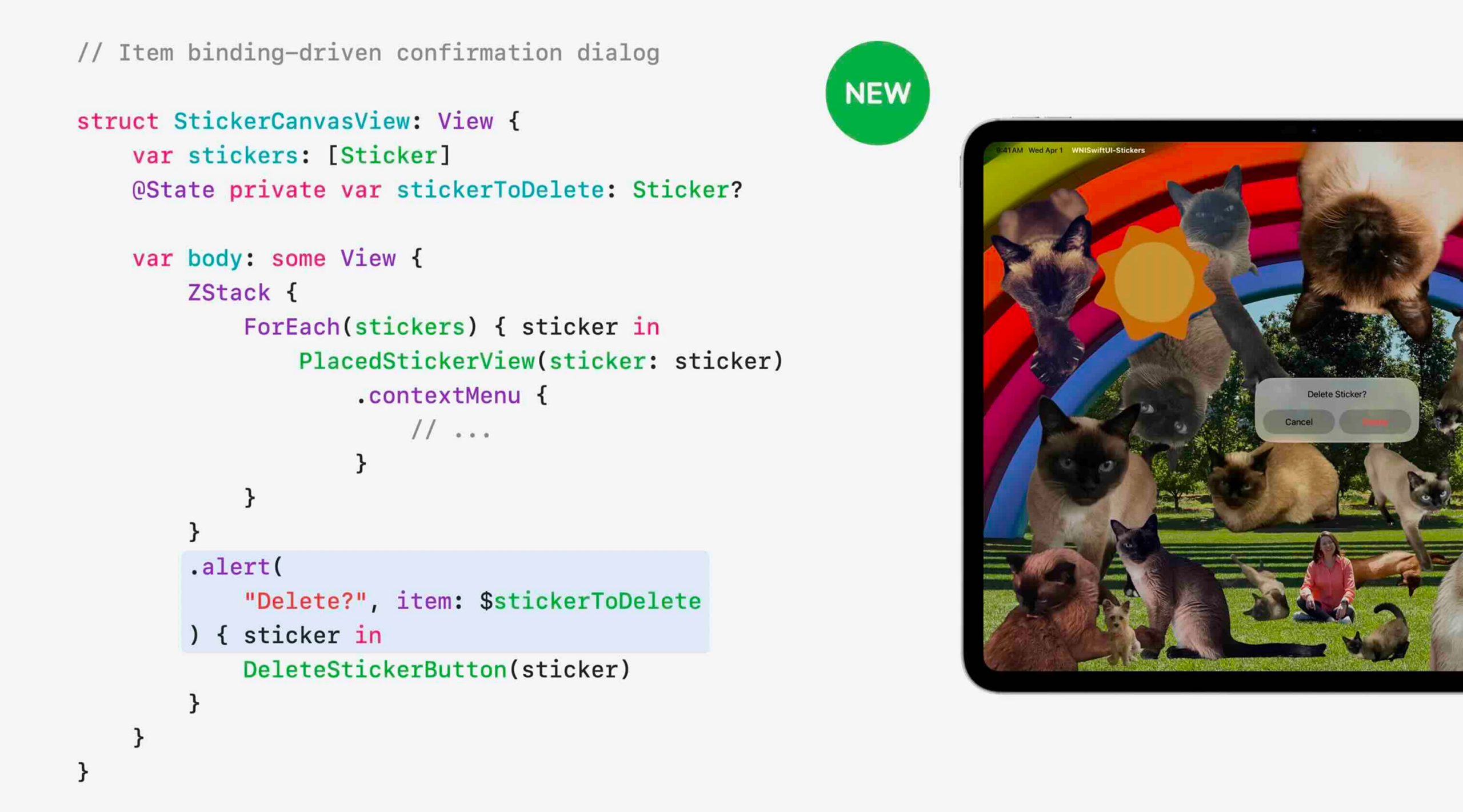
Alerts and confirmation dialogs now support the same item-binding approach already familiar from sheets. Instead of managing multiple Boolean state variables, developers can bind dialogs directly to optional data objects, making presentation logic simpler, more readable, and less error-prone.
Building More Flexible Interactions
Together, these enhancements make SwiftUI’s interaction model more flexible and expressive. Developers can build richer interfaces using custom layouts while still benefiting from native gestures, contextual actions, alerts, and dialogs that integrate seamlessly with SwiftUI’s state-driven architecture.
AsyncImage Gets Smarter
Built-In HTTP Caching
AsyncImage now supports standard HTTP caching out of the box. Previously, images could be re-downloaded when they reappeared on screen, even if they had been loaded moments before. With WWDC26, AsyncImage automatically respects the server’s cache headers and stores images in cache, resulting in faster loading times, reduced network usage, and a smoother user experience — all without requiring code changes.
Customizing Image Requests

Developers now have more control over how images are fetched by supplying a custom URLRequest to AsyncImage. This makes it possible to configure request-specific behaviors such as cache policies, headers, authentication requirements, or other networking preferences on a per-request basis.
Using Custom URL Sessions
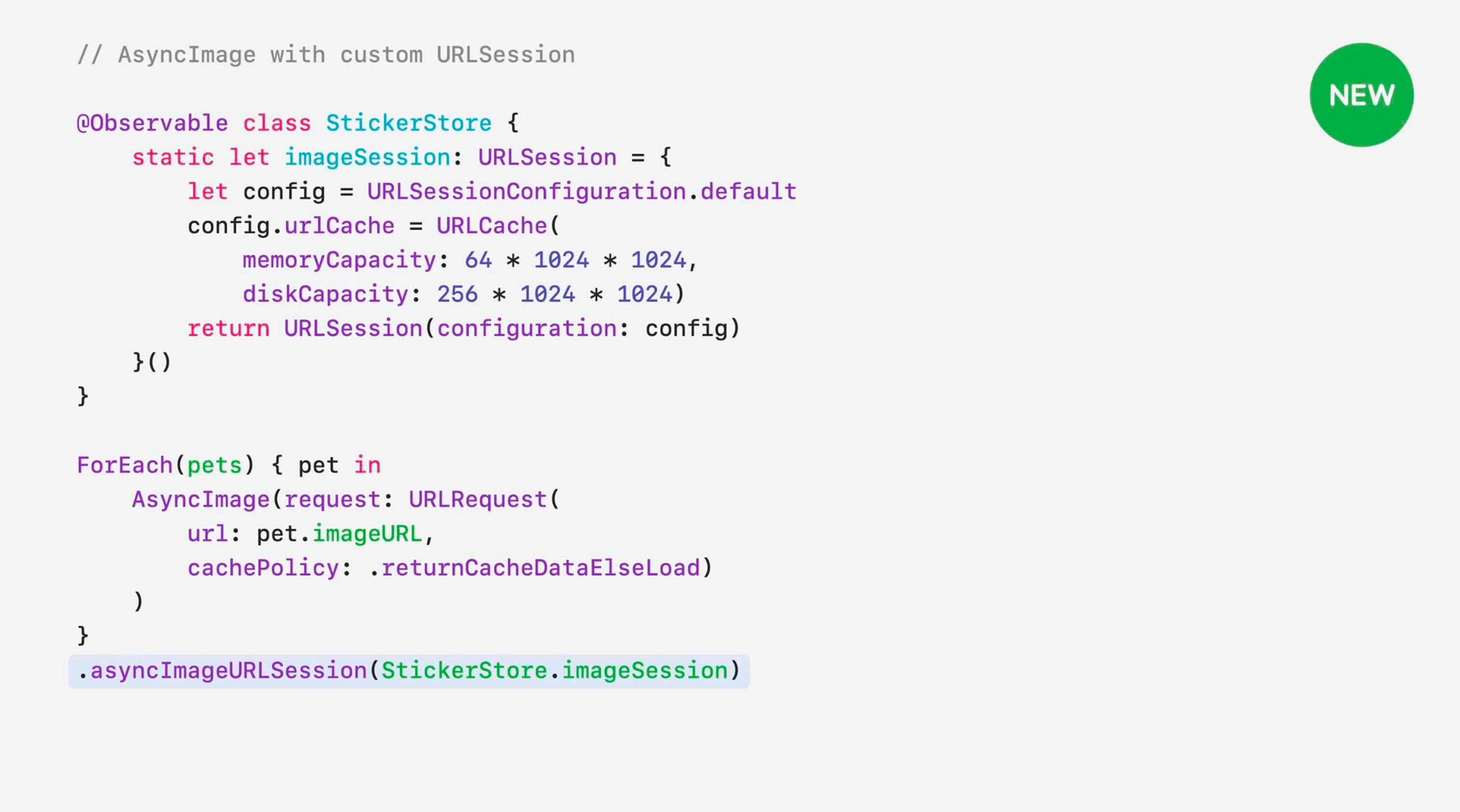
For applications that require more advanced networking configurations, AsyncImage can now work with custom URLSession instances. Developers can define their own session settings, including custom URLCache configurations, allowing greater control over caching behavior, memory usage, and download performance.
Improving Scrolling Performance
These caching improvements have a direct impact on UI responsiveness. Images that have already been downloaded can now be displayed instantly when users scroll back through content, eliminating unnecessary network requests and reducing visual loading delays. The result is a noticeably smoother scrolling experience, especially in image-heavy applications.
Improvements to State and Observation
Lazy Initialization for State Objects
One of the most significant changes to SwiftUI’s data flow system is the introduction of lazy initialization for classes stored in @State. In previous releases, a new class instance could be created every time a view was initialized, even though only the original instance was actually used. With WWDC26, SwiftUI now creates the object only when it’s needed for the first time, eliminating unnecessary object creation and improving runtime efficiency.
The New State Macro Behavior
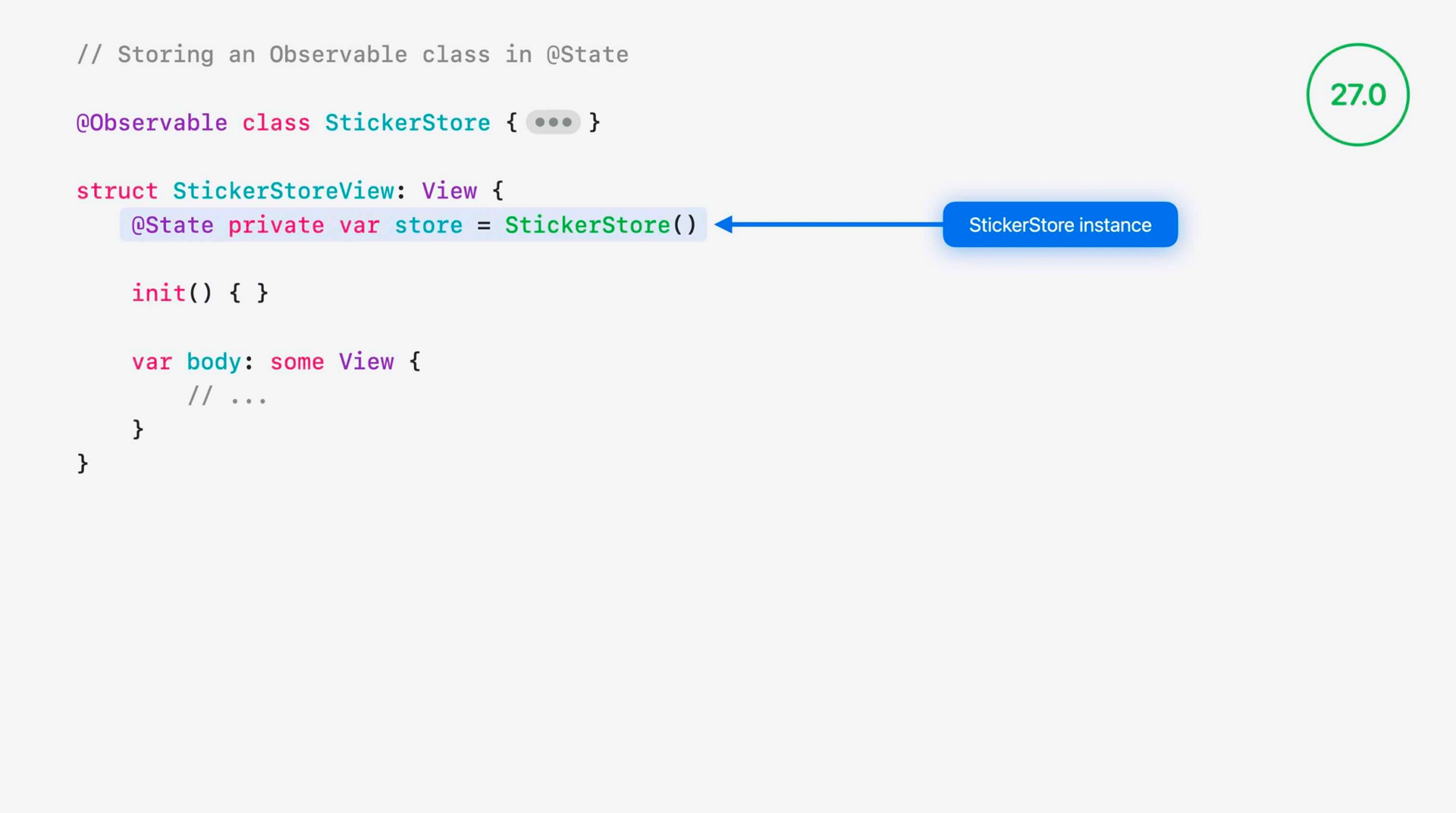
This improvement is made possible by transforming @State from a dynamic property into a macro-based implementation. The new architecture allows SwiftUI to better understand how state is created and managed, resulting in more predictable initialization behavior and improved performance throughout the view lifecycle.
Backward Compatibility with Earlier Releases
Apple has backported this behavior to the platform versions where the Observation framework was originally introduced, including iOS 17, iPadOS 17, and macOS 14. This means developers can benefit from these improvements even when supporting older operating system versions, as long as they build with the latest tools.
Migrating Existing Code
While most applications will benefit automatically, some projects may encounter source-breaking changes. In particular, code that combines default @State values with manual assignments inside initializers may now produce compiler errors. Developers should review these patterns and update them to align with the new State macro behavior when migrating to Xcode 27.
Faster SwiftUI Compilation with ContentBuilder
Why SwiftUI Type Checking Becomes Expensive
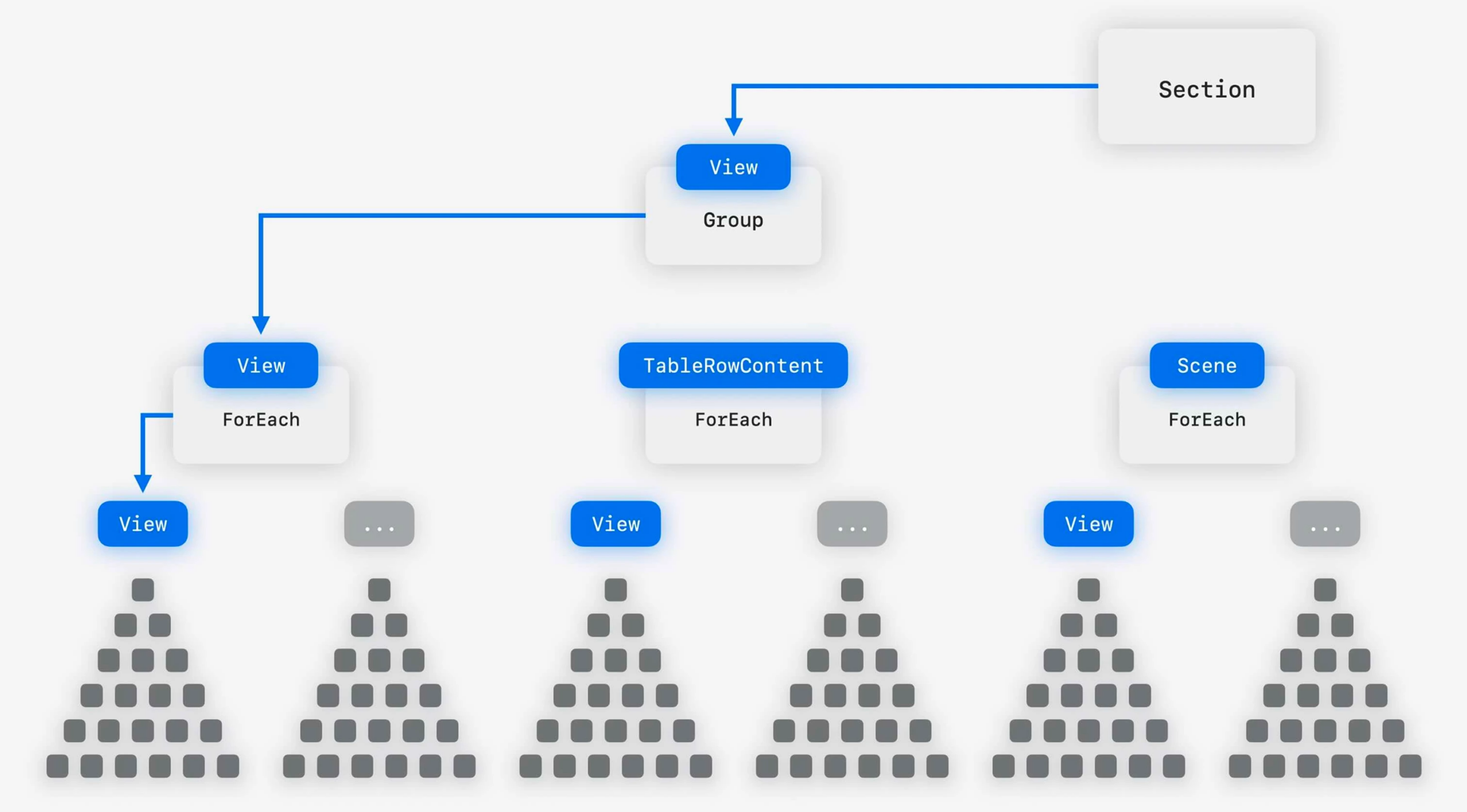
As SwiftUI views grow in complexity, the compiler must evaluate increasingly large numbers of possible type combinations when processing nested view hierarchies. Containers such as Section, Group, and ForEach often introduce multiple overloads and builder variations, making type checking more computationally expensive. This is one of the primary reasons developers sometimes encounter lengthy build times or the familiar “unable to type-check this expression in reasonable time” compiler error.
Introducing ContentBuilder

To address these challenges, SwiftUI introduces ContentBuilder, a new unified builder system that simplifies how view content is constructed. Rather than forcing the compiler to evaluate numerous possible builder paths, ContentBuilder provides a more streamlined and predictable structure, reducing the complexity of the type-checking process.
Unified Builders Across SwiftUI
A major goal of ContentBuilder is to unify multiple builder implementations under a single model. By standardizing how content is assembled throughout SwiftUI, Apple reduces ambiguity for the compiler while laying the foundation for a more consistent developer experience across the framework’s APIs.
Improving Build Times in Large Projects
The practical benefit of ContentBuilder is faster compilation, particularly in applications with large and deeply nested SwiftUI view hierarchies. By reducing the amount of work required during type checking, developers can expect quicker builds, fewer compiler timeouts, and a more responsive development experience when working with complex interfaces.
AI-Powered SwiftUI Development in Xcode 27

Xcode 27 introduces new AI-powered SwiftUI development tools designed to help developers adopt best practices and modern APIs more efficiently. The new SwiftUI Specialist Skill provides guidance on architecture, patterns, and framework-specific recommendations, while the What’s New in SwiftUI Skill helps developers discover and implement the latest SwiftUI features introduced in WWDC26. Apple also allows these agent skills to be exported and integrated into external workflows, making it easier to bring SwiftUI-focused AI assistance beyond Xcode and accelerate the adoption of new APIs across development teams.
Conclusion
Whether you’re maintaining an existing app or starting a new project, now is the perfect time to explore these new APIs and bring the latest SwiftUI capabilities to your applications. For a complete walkthrough of all the announcements, be sure to watch Apple’s official WWDC26 session, “What’s New in SwiftUI”: Watch the video
FAQs
What are the biggest SwiftUI updates announced at WWDC26?
The biggest SwiftUI announcements at WWDC26 include the new SwiftUI Document API, resizable iPhone apps, improved toolbar customization, reorderable containers, AsyncImage caching enhancements, State and Observation improvements, and the introduction of ContentBuilder for faster compilation.
Does SwiftUI automatically adopt the new Liquid Glass design?
Yes. Apps built with SwiftUI automatically gain the updated Liquid Glass appearance on the latest Apple platform releases without requiring code changes. Developers can further customize the experience using new APIs for interactivity, window activity states, and toolbar presentation.
What is the new SwiftUI Document API?
The new Document API provides a modern architecture for building document-based applications. It introduces new protocols and types such as ReadableDocument, WritableDocument, DocumentReader, and DocumentWriter, making it easier to create, read, write, autosave, and export documents while improving performance and scalability.
How has AsyncImage improved in SwiftUI?
AsyncImage now supports standard HTTP caching by default, respecting server cache headers without requiring additional code. Developers can also customize image requests, cache policies, and URL sessions to gain more control over image loading and networking performance.
What is ContentBuilder and why does it matter?
ContentBuilder is a new unified builder system in SwiftUI that simplifies how views are constructed under the hood. By reducing compiler complexity and eliminating many overload-resolution paths, it significantly improves SwiftUI type-checking performance and can help reduce build times in large projects.

