
Speed Up your Release Process with Appcircle’s Azure Bot for SwiftLint and Detekt
What Is Appcircle’s Azure Bot for SwiftLint and Detekt?
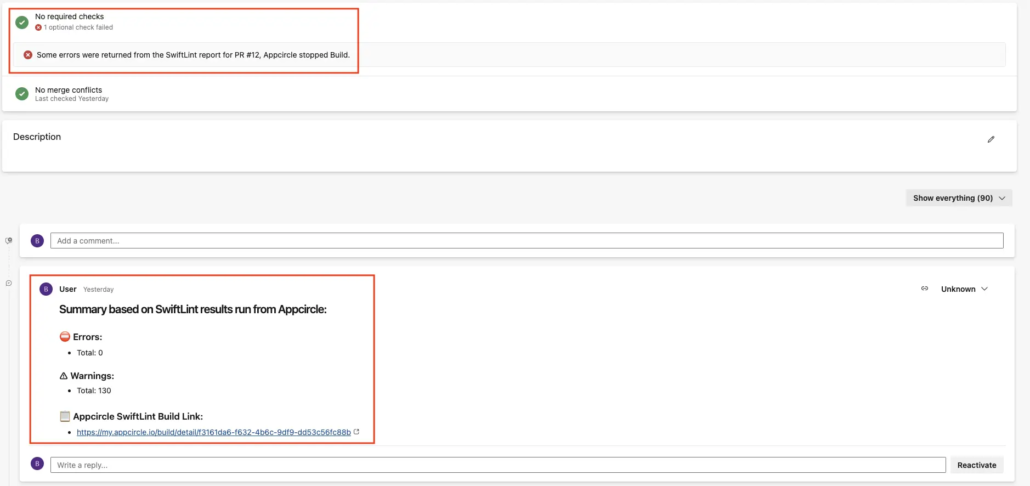
- Adds comments under PRs based on linting reports.
- Updates PR statuses, giving developers clear visibility into what needs fixing.
- Ensures coding standards are met before code is merged into the main branch.
Why Appcircle’s Azure Bot Is a Game-Changer
1. Quick Feedback Loop
The bot provides instant feedback to developers, reducing the time spent waiting for code reviews. This accelerates the development process and ensures issues are resolved in real-time.
2. Improved Code Quality
By leveraging the robust capabilities of SwiftLint and Detekt, the bot identifies potential bugs, enforces coding standards, and minimizes technical debt early in the development cycle.
3. Reduced Manual Work
Manual code reviews often involve repetitive checks for style and structural consistency. The bot automates this, freeing developers and team leads to focus on more critical tasks like logic and feature implementation.
4. Time and Resource Savings
Imagine managing a team of 10 developers, each submitting a feature daily. Without automation, code reviews could consume 10+ hours daily for a team lead. With Appcircle’s Azure Bot, that time is reduced to 2-3 hours, saving up to 160 hours per month!
5. Standardization Across the Codebase
Consistency is key to maintainable code. The bot enforces coding rules, ensuring all developers adhere to the same standards, which leads to a more cohesive and easier-to-manage codebase.
How Appcircle’s Azure Bot Works
1. Set Up the Bot
- Configure your Azure DevOps project to use the bot.
- Upload your SwiftLint and Detekt configuration files to define your team’s coding standards.
2. Automate Linting
- The bot runs SwiftLint and Detekt checks on every pull request automatically.
3. Receive Feedback Instantly
- Inline comments are added to the PR for any rule violations, saving time during code reviews.
- The bot updates the PR status, stopping builds for critical errors and allowing only clean PRs to proceed.
4. Track and Improve
- Generate reports to monitor code quality trends across your project.
How to Use Appcircle’s Azure Bot
- Integrate your project with Appcircle.
- Add the Azure Bot for SwiftLint or Detekt to your repository.
- Customize your bot by setting up rules and configuration files.
- Sit back and relax—the bot automatically analyzes PRs, adds comments, and updates statuses.
Why Your Team Needs Appcircle’s Azure Bot
Key Benefits at a Glance:
- Automates repetitive tasks.
- Speeds up pull request reviews.
- Reduces technical debt.
- Enhances code quality and consistency.
- Saves valuable developer time.

