

Enhance Mobile App Security and Distribution with Appcircle and Intune
Hey there, tech enthusiasts! As mobile technology continues to evolve, businesses are increasingly leaning on employee-owned devices to get work done. This trend supercharges productivity but also stirs up some serious security concerns. That’s where Mobile Device Management (MDM) and Mobile Application Management (MAM) come to the rescue. And when you add Appcircle to the mix, you’ve got a powerhouse combo for managing your team’s devices. Let’s dive into what MDM and MAM are all about and see how Appcircle can make your app publishing process to Microsoft Intune a breeze, keeping your workforce secure and connected.
MDM vs. MAM
What is Mobile Device Management (MDM)?
Think of MDM as your mission control for managing all your mobile devices—smartphones, tablets, laptops, you name it. It’s like having a remote control for your entire fleet of devices, letting IT admins:
- Enforce security policies: Set strong passwords, restrict data access, and remotely wipe lost devices to keep sensitive info safe.
- Distribute apps and content: Push essential corporate apps and documents straight to employee devices, no cables are needed.
- Monitor device health: Keep tabs on device performance, battery levels, and software updates.
What is Mobile Application Management (MAM)?
Now, MAM is like a sidekick that focuses specifically on managing mobile apps. Here’s what MAM does for you:
- Securely distribute and manage business-critical apps on employee devices, even personal ones.
- Separate corporate data from personal data within an app using containerization, keeping work and personal life balanced and secure.
- Selectively wipe corporate data from a lost or stolen device, ensuring user privacy is protected.
What is Intune?
Intune is Microsoft’s all-in-one cloud-based MDM and MAM solution. It works hand-in-hand with other Microsoft products like Office 365, giving you a one-stop shop for managing devices, apps, and user access.
What is Intune used for?
Organizations use Intune to:
- Simplify mobile device enrollment: Employees can easily add their devices to the company network, making onboarding a snap.
- Deploy and manage corporate apps: Securely distribute internal apps, public apps from app stores, and even web apps.
- Enforce security policies: Set up strong password requirements, data encryption, and selective wipe functionalities to protect sensitive data.
- Gain device insights: Monitor device health, track app usage, and generate reports for smart decision-making.
Intune vs. Azure Active Directory
Both Intune and Microsoft Entra ID (formerly Azure Active Directory, Azure AD) are Microsoft products that boost mobile security, but they play different roles:
- Intune is all about managing devices and applications, ensuring compliance and data security.
- Microsoft Entra ID handles user authentication and access to cloud resources like Office 365.
Together, they form a solid team to keep your mobile environment secure.
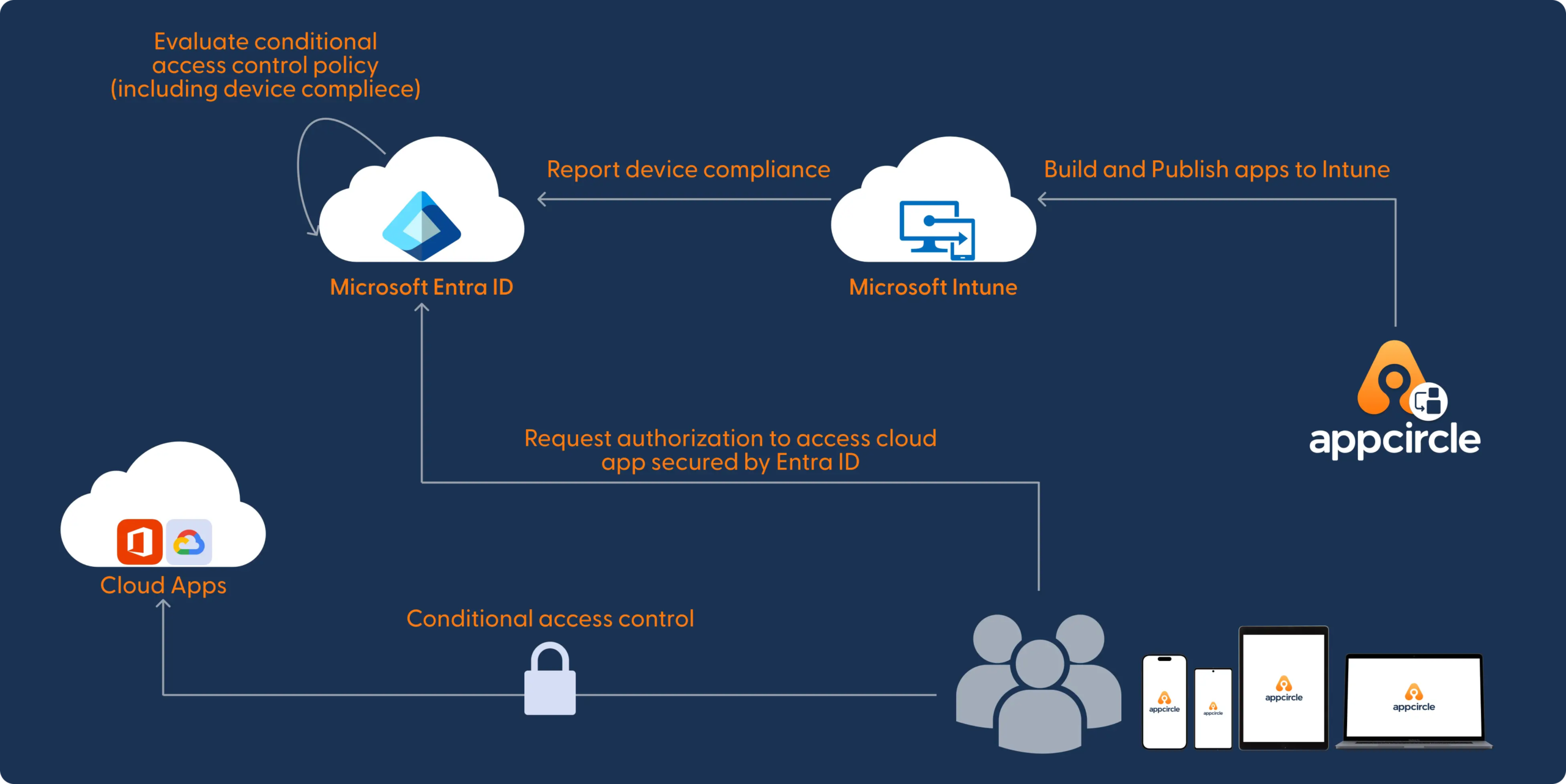
What is Appcircle?
Appcircle is your go-to DevOps platform for simplifying and automating mobile app development and deployment. It integrates seamlessly with various tools and platforms, including Microsoft Intune.
Why Use Appcircle for App Publishing to Intune?
Appcircle makes publishing your internal apps to Intune easy and efficient. Here’s why you’ll love it:
- Streamlined Workflows: Integrate Appcircle with your Intune environment for smooth app distribution.
- Automated Uploads: Automate app signing and upload directly to Intune, saving time and resources. Create publish workflows to manage each release in detail.
- Secure App Distribution: Ensure only authorized personnel access your apps, preventing security leaks with embedded security features.
- Simplified Updates: Push updates to your Intune-managed apps easily, making sure everyone has the latest secure version.
With Appcircle, you can streamline your app publishing process to Intune, ensuring your business apps are always up-to-date and secure for your team.
How to Publish Your Apps to Microsoft Intune with Appcircle
Appcircle offers a user-friendly interface and clear documentation to guide you through the Intune app publishing process. Here’s a quick rundown:
- Create an Appcircle Account: Sign up for a free Appcircle account to get started.
- Integrate with Intune: Follow the Appcircle documentation to securely connect Appcircle to your Intune environment.
- Build and Upload Your App: Use your preferred development tools to build your app and upload it to Appcircle.
By following these steps, you’ll efficiently manage and distribute your mobile applications while ensuring top-notch security and accessibility for your team.
Conclusion
In today’s fast-paced digital world, managing mobile devices and applications effectively is crucial for any business. With the combined power of Mobile Device Management (MDM) and Mobile Application Management (MAM), you can ensure both productivity and security. Appcircle and Microsoft Intune take these capabilities to the next level, offering streamlined workflows, automated uploads, secure app distribution, simplified updates, and enhanced visibility.
By leveraging Appcircle’s seamless integration with Intune, you can simplify the process of publishing and managing your business apps, ensuring they are always up-to-date and secure. This not only enhances your operational efficiency but also safeguards sensitive corporate data, maintaining a balance between accessibility and security.
So, whether you’re a tech-savvy business owner or an IT admin looking for robust mobile management solutions, Appcircle and Intune provide the tools you need to stay ahead in the mobile-first world. Embrace these technologies to empower your workforce, protect your data, and drive your business forward with confidence.

