

Introducing the Testing Distribution Extension for Azure DevOps
Testing Distribution Extension for Azure DevOps is Here. Since Microsoft has announced the shutdown of App Center, we have been contacted by companies all over about our Testing Distribution module. Testing distribution is the process of distributing test builds to designated test groups or individuals. It involves IPA, AAB, and APK distribution to testers in a secure manner. This process allows developers to gather quick feedback, identify bugs, and ensure the quality of software applications before releasing them to customers.
One common question coming from existing MS App Center clients was if we had an Azure DevOps extension so that after they build their app on Azure DevOps, they could directly send the package to our Testing Distribution module. We are proud to announce that this module is available in the Visual Studio Marketplace.
Appcircle’s test distribution extension enables developers to create test groups and share builds with them, utilizing enterprise-grade authentication methods. With the Visual Studio Extension, this module will be accessible directly from the Azure DevOps pipeline.
Benefits of Using Testing Distribution
1 Simplified Binary Distribution.
– Skip Traditional Stores: Share .xcarchive .IPA, APK, AAB, Zip, files directly, avoiding the need to use App Store TestFlight or Google Play Internal Testing.
2. Streamlined Workflow:
– Automated Processes: Platforms like Appcircle automate the distribution process, saving time and reducing manual effort.
– Seamless Integration: Integrates smoothly with existing DevOps pipelines, enabling efficient build and distribution workflows.
3. Enhanced Security:
– Controlled Access: Set specific permissions for who can access the test builds using enterprise authentication methods such as LDAP & SSO.
– Confidentiality: Ensures that only authorized testers have access to the builds, protecting sensitive information.
4. Efficient Resource Management:
– Targeted Testing: Allows the creation of specific test groups, ensuring that the right people are testing the right features.
– Optimized Testing: Helps in allocating resources effectively, leading to better utilization of testing resources.
5. Reduced Time to Market:
– Eliminates Approval Delays: By bypassing store approval processes, developers can distribute builds directly to testers, speeding up the testing cycle.
– Continuous Delivery: Supports continuous delivery practices, enabling faster iterations and quicker releases.
6. Faster Feedback Loop:
– Quick Issue Identification: Distributing test builds quickly allows developers to gather immediate feedback, identify bugs, and address issues early in the development cycle.
– Improved Quality: Continuous testing helps ensure the software meets quality standards before release, reducing the likelihood of post-release issues.
7. Cost-Effective:
– Reduced Overheads: Automating the distribution reduces the need for manual intervention, cutting down operational costs.
– Efficient Bug Fixes: Early detection and fixing of bugs prevent costly fixes later in the development process.
8. Enhanced User Experience:
– Better Quality Control: Ensures that end users receive a more stable and polished product.
– Customer Satisfaction: By delivering higher quality software, customer satisfaction and trust in the product increase.
Overall, using testing distribution in mobile DevOps significantly enhances the efficiency, security, and effectiveness of the software development process, leading to better products and faster delivery times.
How To Use Appcircle Testing Distribution Extension
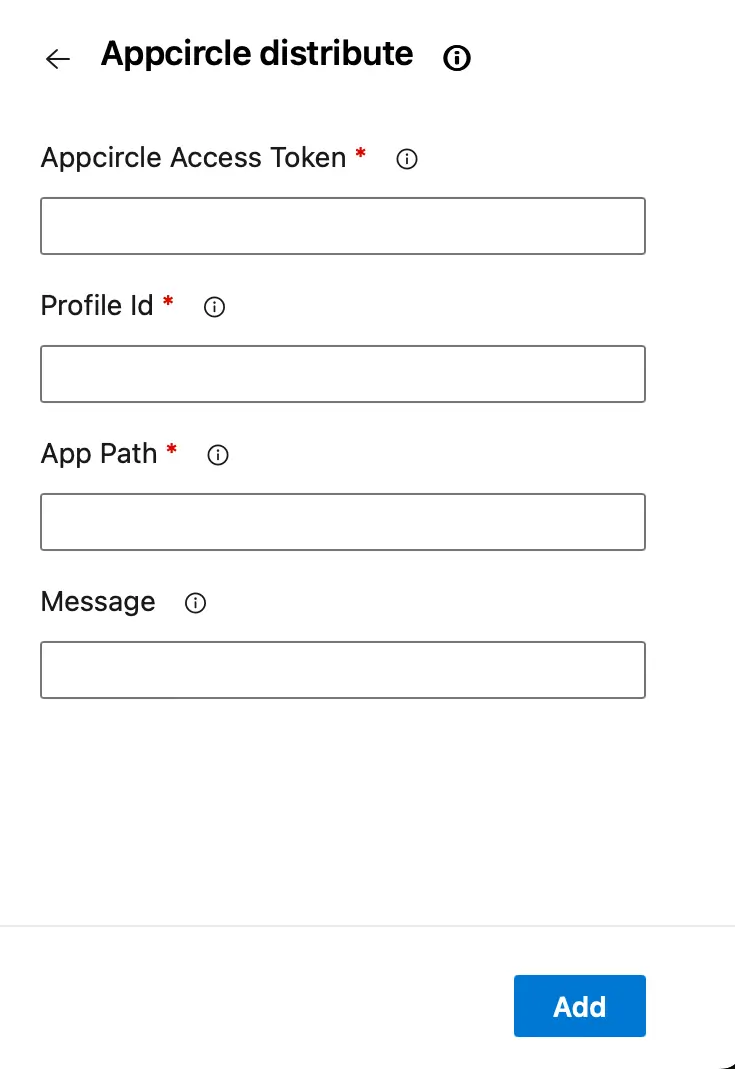
Go to Visual Studio Marketplace and install Appcircle extension. Inside your pipeline in the tasks section search for “Appcircle distribute” task and fullfil the required input fields. You should be seeing a form like below
Access Token
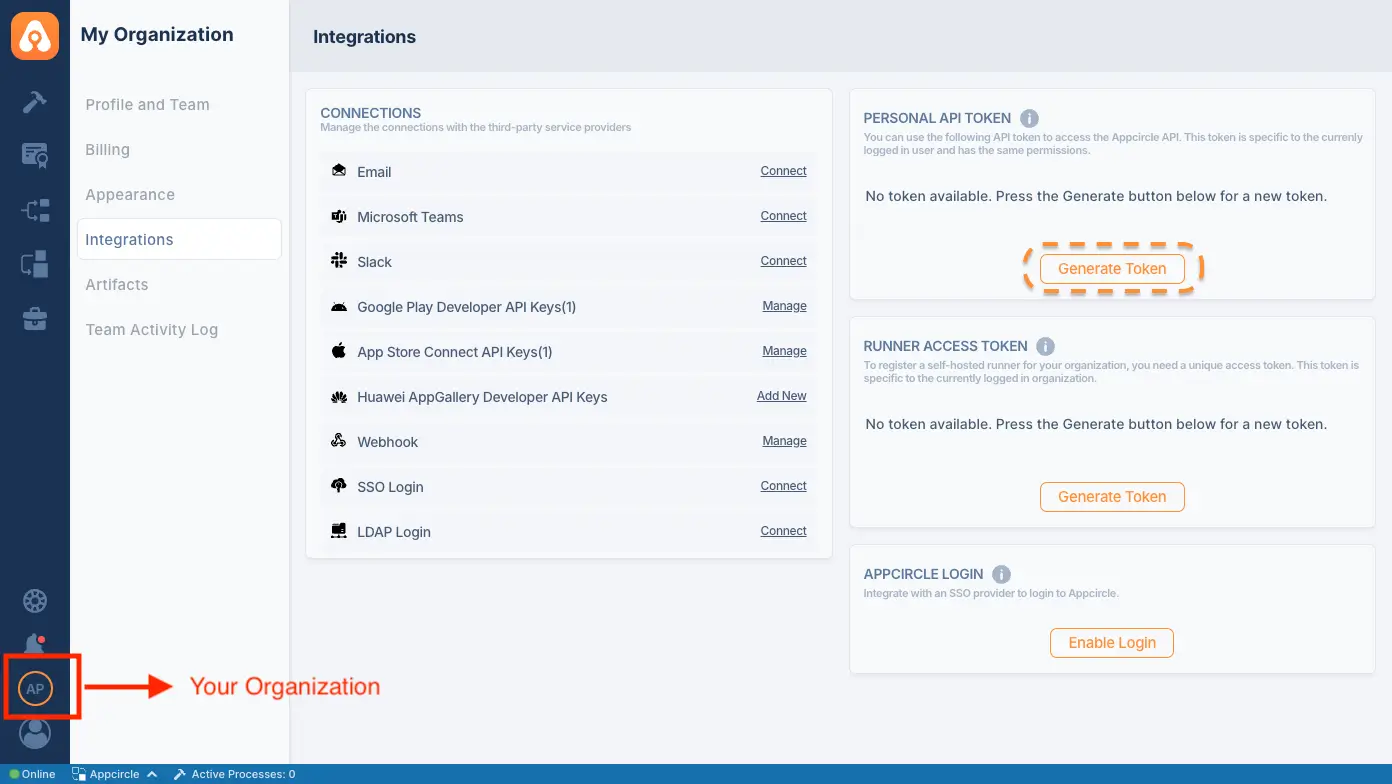
To generate a Personal API Token, go to the My Organization screen on the second option at the bottom left. You’ll find the Personal API Token section in the top right corner. Press the “Generate Token” button to generate your first token.
Profile ID
You can get your testing distribution profile ID from the URL. Go to Appcircle and navigate to the Testing Distribution module. Open up your project and you should see your profile like below
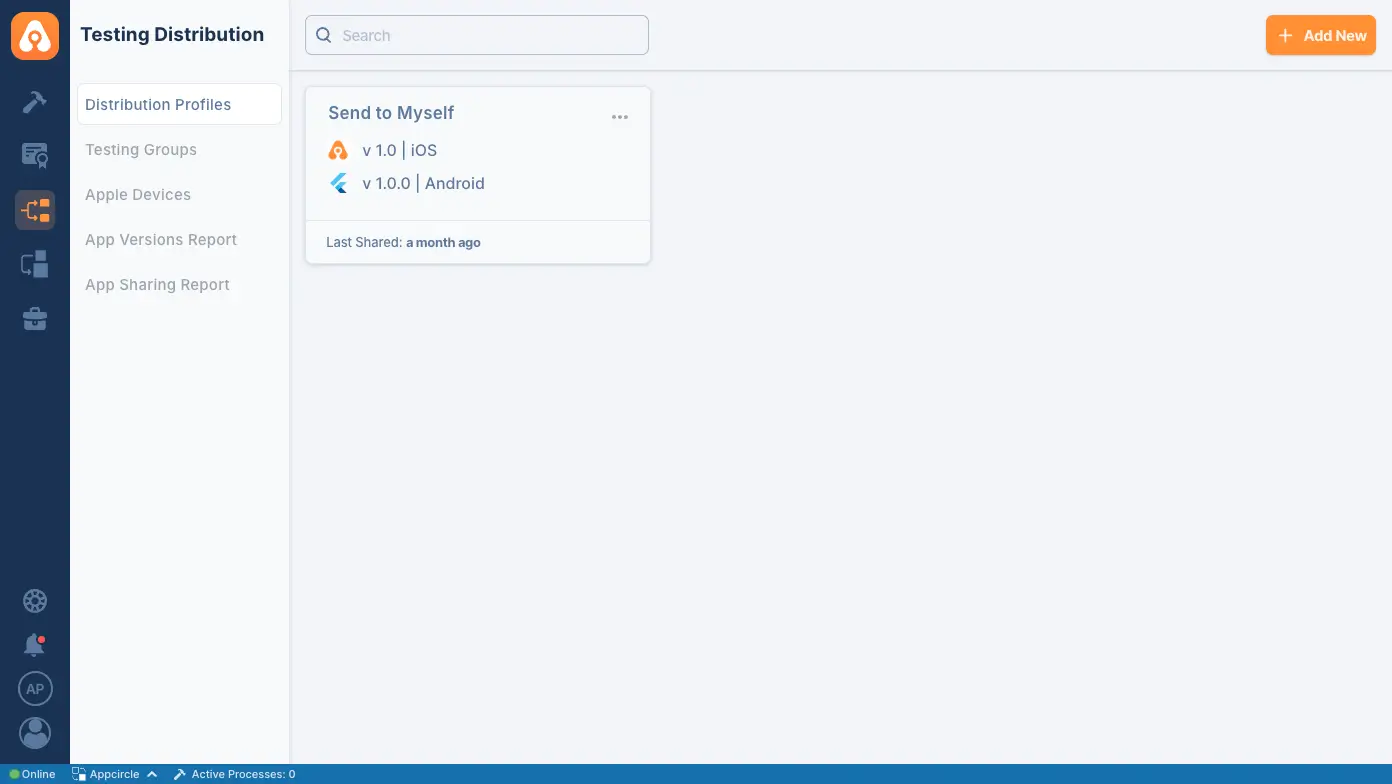
The latest part of the URL represents the id of the profile. Alternatively, you can get the information with appcricle/cli
App Path
For IPA distribution, APK distribution, and ABB distribution provide your build output path for uploading your app to Appcircle
Message
Your message to test groups or individuals for the current build.
After fulfilling the form, create an “add” button to your the task in your pipeline. But make sure you add the task after building and getting the output bundle.
Reference
- For details on generating an Appcircle Personal Access Token, visit Generating/Managing Personal API Tokens
- To create or learn more about Appcircle testing and distribution profiles, please refer to Creating or Selecting a Distribution Profile

