
WWDC25: Automate your development process with the App Store Connect API
At WWDC25, Apple announced major App Store Connect API updates that will revolutionize the way developers automate their app development workflows. Apple introduced us to these groundbreaking innovations that have been long awaited by the developer community.
The Need for Speed in Application Development
Application development is fundamentally an iterative process. You develop features, upload builds, deploy to testers, collect feedback and repeat. The faster you can run this cycle, the better your app will be. When users report crashes or issues, you want to fix them right away, instead of waiting to manually check the status.

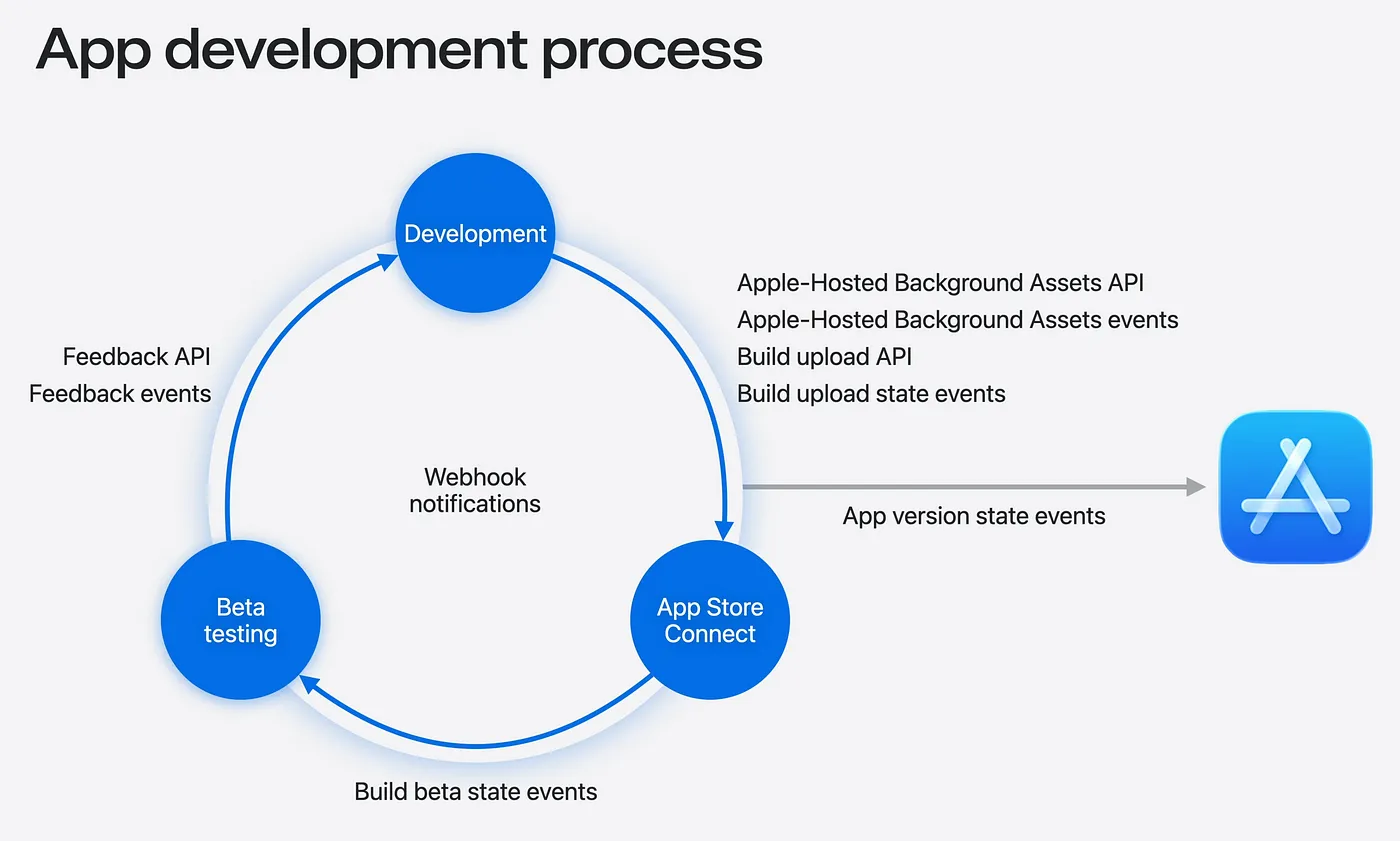
This is exactly what these new APIs address. Apple has introduced three main components to automate this whole cycle: Webhooks, Build Upload API and Feedback API.
Webhook Notifications
The biggest addition is webhook support. Instead of constantly asking App Store Connect “is there an update yet?”, webhooks completely turn this around. App Store Connect now sends notifications directly to your servers when something important happens.
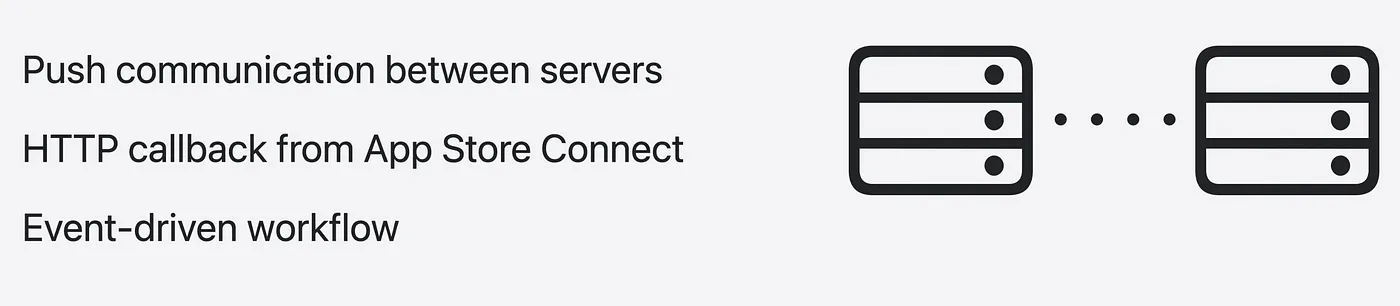
How it works:
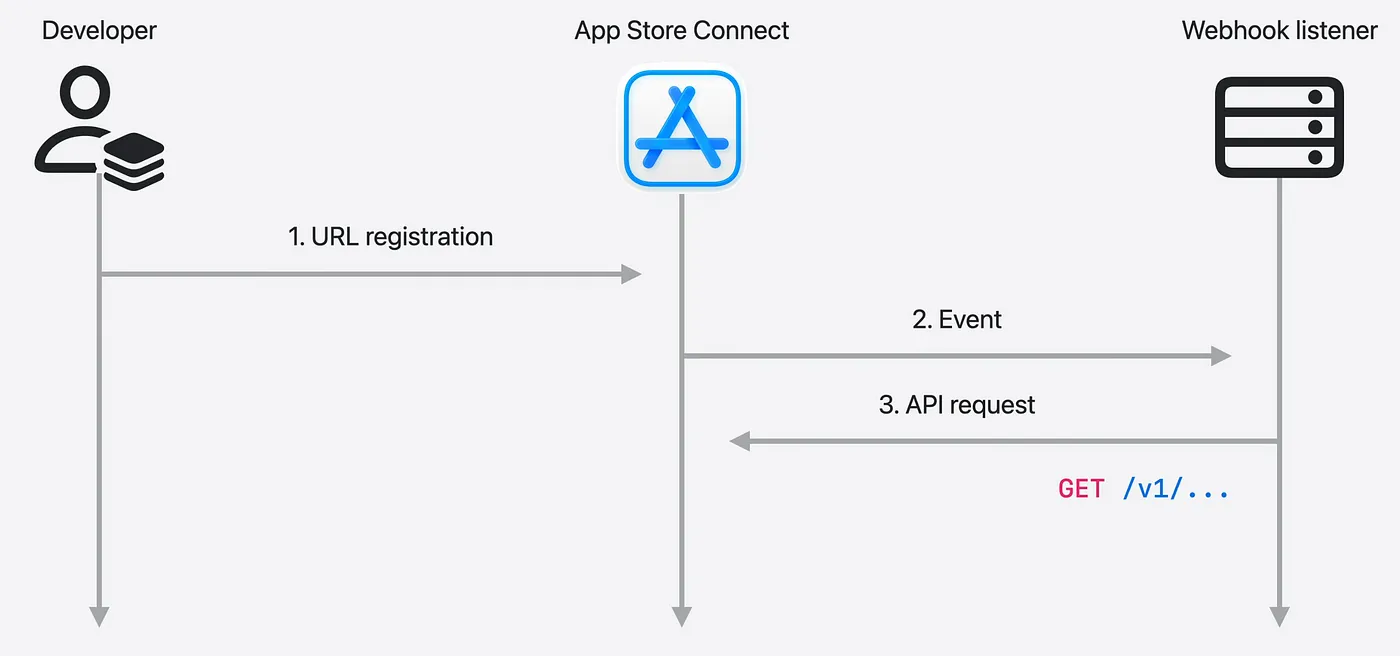
- Let’s say you have an HTTP server, this will be your webhook listener. First, you give App Store Connect the URL of your webhook listener, basically telling App Store Connect where to send updates.
- Then, whenever any relevant change occurs within App Store Connect, it sends a POST request to the URL you saved.
- The request payload contains information about the event. Based on this payload, your system can query the App Store Connect APIs for more information or take necessary actions.
Available Webhook Events
Apple now supports webhook notifications for:
- TestFlight feedback submission
- App version state
- Build upload state
- Build beta state (TestFlight review completion)
- Apple-Hosted Background Assets states
Setting Up Webhooks
Via the Website:
1. Go to Users and Access → Integrations → Webhooks
2. Click the Plus button
3. Add your Webhook name and listener URL
4. Set the secret key for signature verification
5. Select the events you want to subscribe to
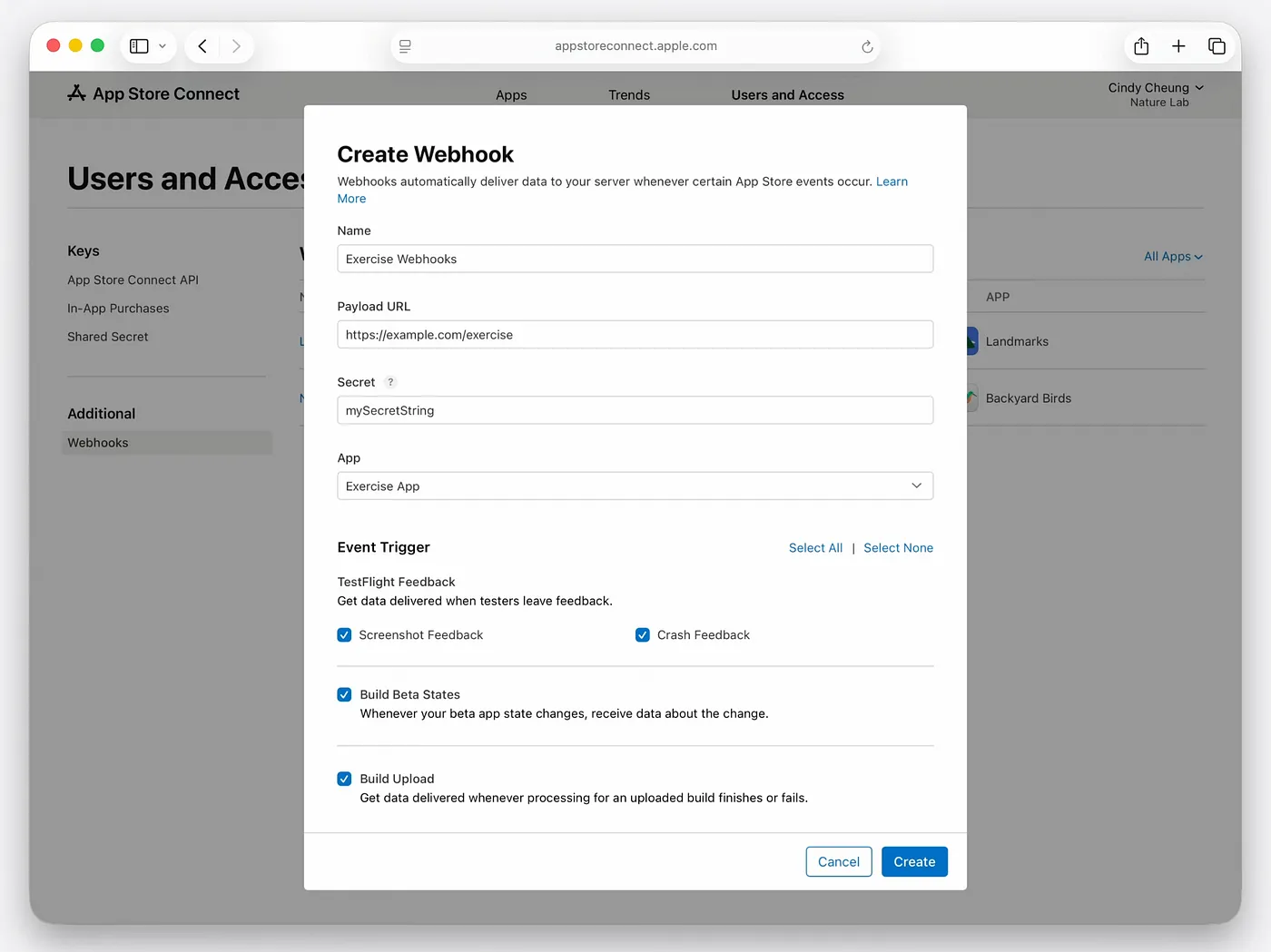
Now your servers will receive webhook notifications when these events occur in your applications.
Via API:
Send a POST request to the webhook endpoint with your event types, secret key, and listener URL.
{
  "data": {
    "type": "webhooks",
    "attributes": {
      "enabled": true,
      "eventTypes": [
        "BETA_FEEDBACK_CRASH_SUBMISSION_CREATED",
        "BETA_FEEDBACK_SCREENSHOT_SUBMISSION_CREATED",
        "BUILD_UPLOAD_STATE_UPDATED",
        "BUILD_BETA_DETAIL_EXTERNAL_BETA_STATE_UPDATED"
      ],
      "name": "Exercise Webhooks",
      "secret": "mySecretString",
      "url": "https://example.com/exercise"
    }
  }
}
After successful webhook creation, you will receive 201 CREATED response and webhook ID.
Build Upload API
Benefits of the new Build Upload API
Previously, installing a build required specific Apple tools. Now, you can install a build using any programming language or platform through the standardized App Store Connect API.
Build Upload Process

1 — Create BuildUpload: POST request with your build’s bundle version and target platform:
{
  "data": {
    "type": "buildUploads",
    "attributes": {
      "cfBundleShortVersionString": "1.4.3",
      "cfBundleVersion": "119",
      "platform": "IOS"
    },
    "relationships": {
      "app": {
        "data": {
          "type": "apps",
}
If your request is successful, App Store Connect will respond with a status of 201 CREATED with a unique ID for this new BuildUpload.
2 — BuildUploadFile Create: Provide file details (name, size, asset type).
POST /v1/buildUploadFiles

{
  "data": {
    "type": "buildUploadFiles",
    "attributes": {
      "fileName": "exercise.ipa",
      "fileSize": 349175808,
      "assetType": "ASSET",  // ASSET, ASSET_DESCRIPTION, ASSET_SPI
      "uti": "com.apple.ipa"
    },
    "relationships": {
      "buildUpload": {
        "data": {
          "type": "buildUploads",
          "id": "8301e41f-5e00-42f0-9586-61ea087bc8bc"  // from previous response
          // ...
}
In response, you will receive detailed instructions on uploading operations:
- Upload URL
- HTTP method (PUT)
- Required headers
3 — Upload Binary: Upload your build binary according to the instructions from the previous step. If your file is very large (e.g. 500MB+), App Store Connect will give you multiple upload operations. In this case, you will split the file into parts and upload each part separately.
4 — Mark as Complete: Send PATCH request to notify that the installation is complete.
PATCH /v1/buildUploadFiles/abee06d5-c93d-407d-9d2f-84729d36b931

{
  "data": {
    "id": "abee06d5-c93d-407d-9d2f-84729d36b931",  // from previous response
    "type": "buildUploadFiles",
    "attributes": {
      "uploaded": true
    }
  }
}
After successful completion, you will receive a `200 OK` response and a `COMPLETE` status.
Once you mark the upload as complete, App Store Connect will begin processing your build. You will be notified once the process is complete and will automatically be able to move on to the next step. This is where webhooks become invaluable.
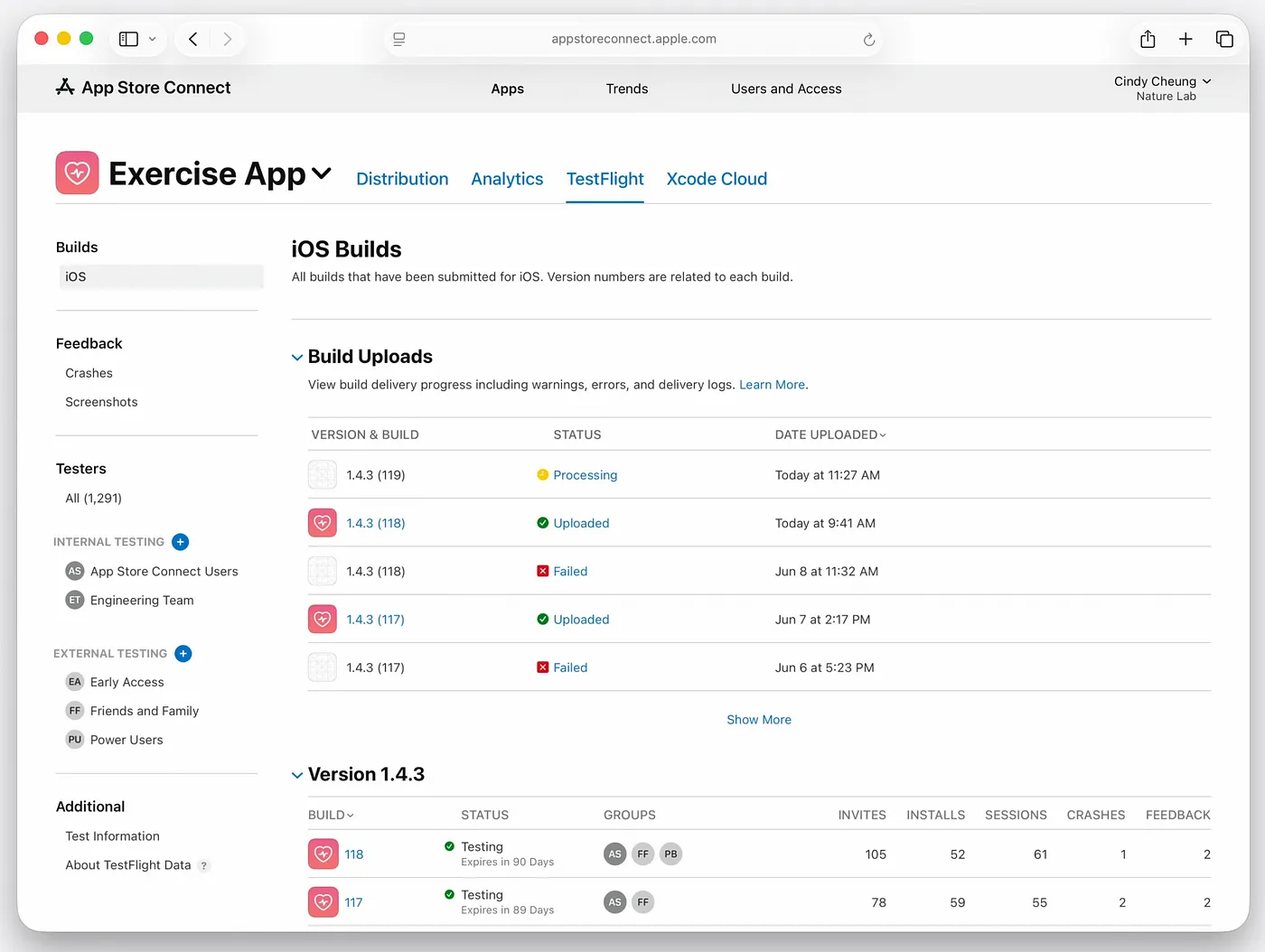
The App Store Connect website shows that the new version is being processed. So when will it be finished and how will we know? This is where the webhook notification we configured earlier comes into play.
Here is an example of what your server receives from App Store Connect when your build is successfully processed:
POST /your/webhook/endpoint
x-apple-signature: hmacsha256=7f062172b01cb00b53ca06861474a3d982a34062a0f...

{
  "data": {
    "type": "buildUploadStateUpdated",
    "id": "607fea97-a6ba-445d-a9ba-a9ba445daa6b",
    "attributes": {
      "oldState": "PROCESSING",
      "newState": "COMPLETE",
      // ...
    },
    "relationships": {
      "instance": {
        "data": {
          "type": "buildUploads",
          // ...
}
This webhook notification includes:
- type: buildUploadStateUpdated
- oldState: PROCESSING — previous state (processing)
- newState: COMPLETE — new state (completed)
- x-apple-signature: HMAC-SHA256 signature for security
This notification indicates that your build has been processed and is ready to be deployed to TestFlight.
TestFlight Integration
Once your build is committed, TestFlight APIs allow you to fully automate distribution to beta testers. You can assign builds to specific tester groups, submit them to Beta App Review, and notify testers programmatically.
Build Beta State Webhook
A new feature introduced at WWDC25, the Build Beta State Webhook sends a push notification when the TestFlight beta review is complete.
POST /your/webhook/endpoint

{
  "data": {
    "type": "buildBetaDetailExternalBuildStateUpdated",
    "id": "995f8aec-6249-4039-916a-ff8c62659eae",
    "attributes": {
      "newExternalBuildState": "BETA_APPROVED",
      // ...
    },
    "relationships": {
      "instance": {
        "data": {
          "type": "buildBetaDetails",
          // ...
}
This webhook notification indicates:
- type: BuildBetaDetailExternalBuildStateUpdated
- newExternalBuildState: BETA_APPROVED — build passed beta review
- relationships: buildBetaDetails reference
This notification indicates that your build has completed the TestFlight beta review process and is ready to be distributed to external testers. You can now assign the build to external beta tester groups.
Feedback API: Feedback Management
The new Feedback API addresses one of the most requested features from developers. You get instant webhook notifications when testers submit feedback, whether it’s screenshots or crash reports.
Screenshot Feedback Management:
Webhook notifications include the feedback type and instance ID. Using the ID, you can get full details including device information and screenshot URLs.
POST /your/webhook/endpoint

{
  "data": {
    "type": "betaFeedbackScreenshotSubmissionCreated",
    "id": "d91aca7e-1efb-493f-9c2c-3691015d6d32",
    "relationships": {
      "instance": {
        "data": {
          "type": "betaFeedbackScreenshotSubmissions",
          "id": "AH80TqAo0tvM85u0ix0csEM"
        }
      }
      // ...
}
This notification indicates that a beta tester has submitted screenshot feedback.
This webhook notification contains:
- type: betaFeedbackScreenshotSubmissionCreated — new screenshot feedback created
- id: unique ID of the webhook event
- type: betaFeedbackScreenshotSubmissions — feedback type
- id: AH80TqAo0tvM85u0ix0csEM — feedback ID
You can get feedback details using this ID:
GET /v1/betaFeedbackScreenshotSubmissions/AH80TqAo0tvM85u0ix0csEM

> HTTP/1.1 200 OK
{
  "data": {
    "type": "betaFeedbackScreenshotSubmissions",
    "id": "AH80TqAo0tvM85u0ix0csEM",
    "attributes": {
      "deviceModel": "iPhone15_2",
      "osVersion": "18.4.1",
      "screenshots": [{
        "url": "https://...",
        "height": 2556,
        "width": 1179
        // ...
      }]
    }
  }
}
This API call provides:
- Retrieves specific screenshot feedback with Feedback ID
- deviceModel: Device model (iPhone15_2)
- osVersion: Operating system version (18.4.1)
- screenshots: Screenshot URLs and size information
- url: URL to download the screenshot
You can download the screenshot images using these URLs with separate API calls.
Crash Feedback
Similar process, but you can also download crash logs programmatically via the crashLog endpoint.
GET /v1/betaFeedbackCrashSubmissions/AIH1Ps37mn8NnYNidtTELmI/crashLog

> HTTP/1.1 200 OK
{
  "data": {
    "type": "betaCrashLogs",
    "id": "MTA3NTkwODUzMDI6Y29tLnJJLnRlJjLnRlc3RtYXQuaHlicm1k...",
    "attributes": {
      "logText": "...",
      // ...
}
This API call provides:
- crashLog endpoint to fetch log of specific crash feedback
- type: betaCrashLogs — crash log type
- id: Unique ID of crash log
- logText: Actual crash log content (stack trace, error details)
Using this endpoint you can get detailed log information of crash feedback programmatically and perform automatic analysis.
Fully Automatic Workflow
How these pieces work together:
1. Upload your build using the Build Upload API
2. Receive a webhook notification when the build is complete
3. Deploy automatically via TestFlight APIs
4. Receive notifications when the Beta App Review is complete
5. Receive instant feedback notifications from testers
6. Download crash logs and screenshots programmatically
Looking to the Future
These API updates represent Apple’s commitment to developer productivity. By automating routine tasks, developers can focus on what matters most: creating great user experiences.
The combination of webhooks, automated uploads, and instant feedback creates a faster and more responsive development pipeline than ever before. For teams that manage multiple apps or have complex release cycles, these tools will be transformative.
For more details, check out Apple’s comprehensive App Store Connect API documentation and the related WWDC25 sessions on Apple-Hosted Background Assets and App Store Connect updates.
The era of manual, time-consuming app management tasks is officially over. Welcome to automated app development.
Conclusion
These App Store Connect API updates are a major milestone in iOS development automation. Apple has listened to developer demands and has implemented the tools we’ve been asking for for years.
With these new APIs, manual processes are giving way to fluid automation. Webhooks, automated build uploads, and an instant feedback system create faster iteration cycles.
App Store Connect is no longer just a management portal, it’s a comprehensive automation platform. By automating daily tasks, you can focus on the user experience.
FAQ
What events are webhooks available for?
App Store Connect supports webhooks for the following events:
1 — TestFlight feedback submissions
2 — App version state changes
3 — Build upload state changes
4 — Build beta state changes
5 — Apple-Hosted Background Assets state changes
How are webhooks secured?
Each webhook notification is signed with the HMAC-SHA256 algorithm. You can verify that the notification came from Apple by verifying the signature in the X-Apple-SIGNATURE header with your own private key.
In which programming languages can I use it?
Since it is a REST API, you can use it in all modern languages such as Python, Node.js, Swift, Java, C#.

