
WWDC25: Bring on-device AI to Your App Using the Foundation Models Framework
WWDC25 introduced a transformative leap for developers: access to Apple’s on-device large language model through the new Foundation Models framework. This means it can be built intelligent features that are fast, privacy-respecting, and fully offline.
In this post, you will observe through the capabilities of the Foundation Models framework, how to use it in your app, and what makes it a game-changer for iOS, macOS, iPadOS, and visionOS development. It’ll be inspected in four categories.
- Prompt Engineering
- Tool Calling
- Streaming Output
- Profiling
Why Foundation Models?
| Feature | Foundation Models Advantage |
|---|---|
| On-Device Execution | Runs entirely on-device without requiring internet connectivity |
| Privacy | User data stays private — never sent to external servers |
| Performance | Low latency, high responsiveness, and support for streaming results |
| App Size Impact | No additional app size — the model is already embedded into the operating system |
| Native Integration | Feels like a built-in part of the Apple ecosystem across iOS, macOS, iPadOS, and visionOS |
Prompt Engineering
Using Xcode Playgrounds, developers can now write and iterate on prompts with live feedback — just like SwiftUI Previews, but for AI code. Adding additional information to the prompt makes the result better.
import Playgrounds
import FoundationModels

#Playground{
    let prompt = "Create a basic plan for trip to Istanbul"
    let session = LanguageModelSession()
    let response = try await session.respond(to: prompt)
}
And this prompt returns — which can be changing when you try it yourself.

Structured Output with @Generable and @Guide macros
If you’d like the model to generate output that fits directly into your own data types — without manually parsing anything — Swift’s @Generable macro handles it for you automatically.
For more control over how that output is shaped, the @Guide macro allows you to define rules and expectations for each property, guiding the model’s responses with precision.
import Foundation
import FoundationModels

@Generable
struct WorkoutPlan: Equatable {
    @Guide(description: "A motivating title for this workout plan.")
    let title: String

    @Guide(.anyOf(["Beginner", "Intermediate", "Advanced"]))
    let difficultyLevel: String

    @Guide(description: "Brief description of the plan's focus and goals.")
    let overview: String

    @Guide(description: "Daily breakdown of workouts across the plan")
    @Guide(.count(3)) // 3-day plan
    let days: [WorkoutDay]
}

@Generable
struct WorkoutDay: Equatable {
    @Guide(description: "A name describing this day’s focus, like 'Upper Body Strength'")
    let name: String

    let focusArea: String
    let goal: String

    @Guide(.count(3)) // 3 exercises per day
    let exercises: [Exercise]
}

@Generable
struct Exercise: Equatable {
    let type: ExerciseType
    let name: String
    let instructions: String
}

enum ExerciseType: String, Equatable, CaseIterable, Generable {
    case strength
    case cardio
    case flexibility
    case mobility
}
Tool Calling
The Foundation Models framework gives your app the ability to register custom tools. Functions that the on-device language model can invoke on its own when needed. These tools act as extensions of the model’s capabilities, enabling it to fetch real-world data, or generate context results.
To define a tool, you provide:
- A name and description that tell the model when and why to use it.
- An
Argumentstype that conforms to@Generable, allowing the model to construct inputs. - A
callmethod that performs your custom logic and returns a result asToolOutput.
In the example below, the tool that helps the model find wellness-focused locations like gyms, spas, or yoga studios based on the user’s city and preferences. It uses MapKit to search for real nearby venues, blending AI reasoning with real-world results.
import Foundation
import FoundationModels
import MapKit

struct WellnessLocation {
    var city: String
    var coordinates: CLLocationCoordinate2D
}

struct FindWellnessSpotsTool: Tool {
    let name = "findWellnessSpots"
    let description = "Returns fitness or relaxation venues for a given city."

    let location: WellnessLocation

    @Generable
    enum WellnessCategory: String, CaseIterable {
        case yoga
        case gym
        case swimming
        case hikingTrail
        case spa
    }

    @Generable
    struct Arguments {
        @Guide(description: "The type of wellness venue the user is looking for.")
        let category: WellnessCategory

        @Guide(description: "A general search query to enhance relevance.")
        let query: String
    }

    func call(arguments: Arguments) async throws -> ToolOutput {
        let results = try await fetchPlaces(near: location.coordinates, using: arguments)
        let names = results.prefix(5).compactMap { $0.name }

        // Initialize ToolOutput directly with a string
        return ToolOutput("Here are some great \(arguments.category.rawValue) spots in \(location.city): \(names.joined(separator: ", "))")
    }


    private func fetchPlaces(near coordinate: CLLocationCoordinate2D, using arguments: Arguments) async throws -> [MKMapItem] {
        let request = MKLocalSearch.Request()
        request.naturalLanguageQuery = arguments.query
        request.region = MKCoordinateRegion(center: coordinate, latitudinalMeters: 15_000, longitudinalMeters: 15_000)
        let search = MKLocalSearch(request: request)
        return try await search.start().mapItems
    }
}
Note that developers should not forget that Apple Intelligence will not always be available. It may not be supported, enabled, or ready on a given device! So the model’s availability depends on this. It is really important to check the status of the model.
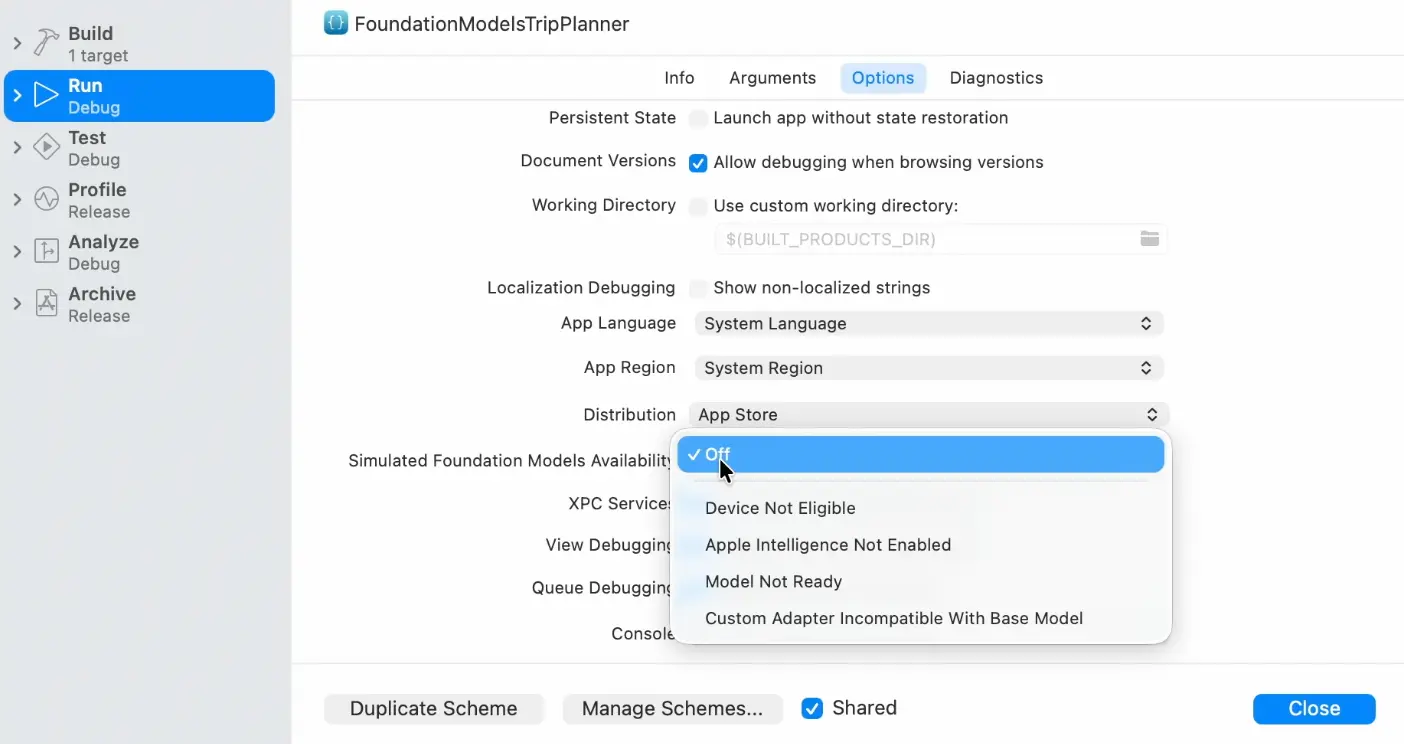
Users need to handle this accordingly in the UI as well. What user should want to achieve here is to tell the user why the model does not work. To do that user need to learn the state of the availability of the model. Let’s assume to have a “Generate” button to work with our model.
| Case | Condition | Recommended App Behavior |
|---|---|---|
| Case 1: Device Not Eligible | Device doesn’t support Apple Intelligence | Hide the “Generate” button or related functionality |
| Case 2: Not Enabled | Apple Intelligence is supported but not enabled | Show a label or pop-up informing the user and guide them to enable it |
| Case 3: Model Not Ready | Model is downloading or initializing | Inform the user to wait and try again later |
To handle this in our code, what better way is there than using enums?
import FoundationModels
import SwiftUI

struct WellnessPlanningView: View {
    let location: WellnessLocation
    private let model = SystemLanguageModel.default

    var body: some View {
        switch model.availability {
        case .available:
            WellnessPlanView(location: location)

        case .unavailable(.appleIntelligenceNotEnabled):
            MessageView(
                location: self.location,
                message: """
                Wellness Planner is unavailable because \
                Apple Intelligence has not been turned on.
                """
            )

        case .unavailable(.modelNotReady):
            MessageView(
                location: self.location,
                message: "Wellness Planner isn't ready yet. Please try again shortly."
            )

        default:
            ScrollView {
                WellnessOverviewView(location: location)
            }
            .headerStyle(location: location)
        }
    }
}
Streaming Output
One of the standout demos at WWDC25 showcased how developers can stream model output in real time using Foundation Models — enabling dynamic, responsive UIs that update as content is generated. By default, respond(to:) returns a complete result after the model finishes generating it. But with streaming, your UI can update as the model generates. This gives the user a more fluid and better experience because user may read the response parts that generated while other parts are being generated. Using PartiallyGenerated<T>, you can build real-time SwiftUI interfaces that reflect each step of generation.
@State private var partialPlan: PartiallyGenerated<WellnessPlan>?

var body: some View {
    VStack {
        if let plan = partialPlan {
            if let title = plan.title {
                Text(title)
                    .font(.title)
                    .transition(.opacity)
            }

            if let overview = plan.overview {
                Text(overview)
                    .padding()
                    .transition(.slide)
            }

            if let days = plan.days {
                ForEach(days) { day in
                    if let name = day.name {
                        Text("???? \(name)").bold()
                    }

                    if let activities = day.activities {
                        ForEach(activities) { activity in
                            Text("• \(activity.name ?? "Loading...")")
                        }
                    }
                }
            }
        } else {
            Text("Generating your wellness plan...")
        }

        Button("Start Plan Generation") {
            Task {
                let session = LanguageModelSession()
                for try await update in session.stream(
                    prompt: "Create a 3-day wellness plan with daily activities.",
                    as: WellnessPlan.self
                ) {
                    partialPlan = update
                }
            }
        }
    }
    .padding()
}
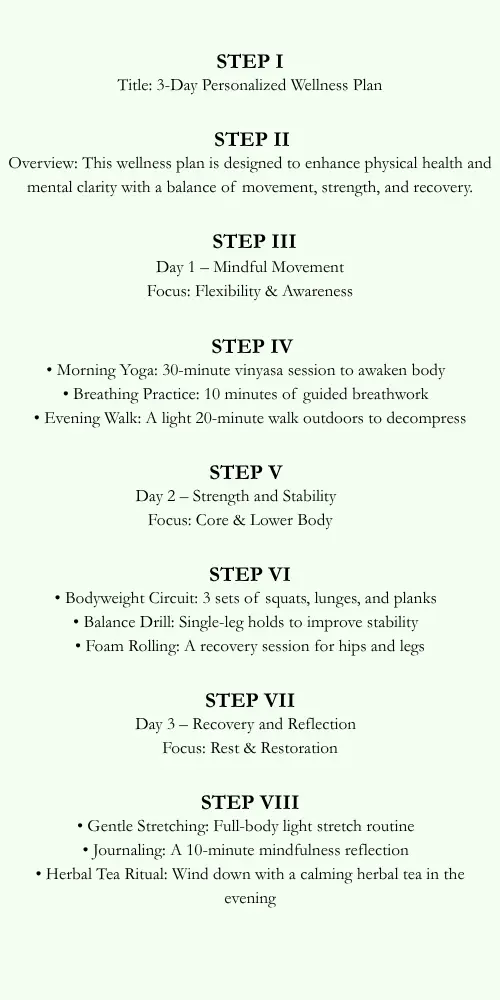
In above code note that partial plan is divided to title, overview, days and activities. Model will start generating from title and it will work step by step until it is done.
Profiling
Even with on-device AI, performance isn’t guaranteed to be instant. Depending on the device, model size, and memory availability, there can be visible delays. To optimise the user experience, Apple provides a dedicated Foundation Models Instrument in Instruments.app.
To reach open Instruments,
- Launch Instruments from Xcode.
- Connect your physical device.
- Select the Foundation Models instrument from the template list.
- Start recording while triggering a model request in your app.
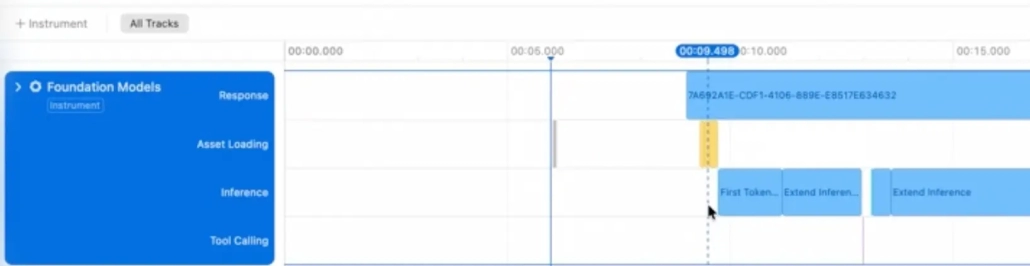
You’ll see tracks like:
- Asset Loading: Time spent loading the model into memory.
- Inference: Time spent generating tokens.
- Tool Calling: Time spent executing your custom tools.
To reduce the model render time, you can prewarm the session. This starts the model right before the user submits a request, especially if you anticipate intent (like tapping a text field or a “Generate” button).
let session = LanguageModelSession()
Task {
    await session.prewarm()
}
Final Thoughts
The biggest piece WWDC25 brought to table might be the Foundation Models is a big step jumping forward. It makes it easier to create intelligent features and connect with AI. With its capabilities like high privacy, fast usage and beautiful integration, it is coming in hot. This is not AI on a device; it is AI for devices. The tools Apple unveiled at WWDC25 aren’t just future-looking — they’re ready now.

